
BlueCat DNS Edge Just Got More Powerful
The latest release of DNS Edge is now live and includes a number of new features like multi-namespace support for better routing, enhanced volumetric tunneling detection, dashboard improvements, and other foundational enhancements.



 Key takeawaysKey takeaways are generated with AI assistance. Because automated summaries can occasionally contain errors or miss important context, always refer to the full blog post for complete information.
The latest release of DNS Edge introduces multi-namespace support, enhanced volumetric tunneling detection, and dashboard and admin improvements to optimize DNS resolution and threat detection. Multi-namespace lets administrators route queries for hundreds of domains to specific forwarder groups at default or site level, reducing duplicate records and offloading internal servers for trusted cloud applications. Threat detection refinements include a System Tunneling List and hourly volumetric polling to lower false positives, while dashboard updates add QPS graphing and an Analyst role for constrained access to activity tables.
How does multi-namespace support improve DNS resolution and reduce duplicate records?
Multi-namespace support lets administrators define up to three default Namespaces and set different Namespaces per Site, each able to handle hundreds of domains. By routing queries for select domains to specific forwarder groups using Match & Exception domain lists, administrators can avoid maintaining identical records across internal and external zones. For example, an internal Namespace can be prioritized to resolve internal-only names and, on NXDOMAIN, allow the query to progress to an external Namespace where a single record exists, simplifying management and reducing duplication.
What changes were made to volumetric tunneling detection to reduce false positives?
Volumetric tunneling detection was refined to base analysis on regular polling of the last hour of query data and to identify common domains that exhibit tunneling characteristics. DNS Edge now compiles a System Tunneling List of compromised domains suspected of tunneling; when a Tunneling “block” policy is configured, those domains will be prevented from resolving. These changes focus detection on recent volumetric behavior and centralized blocking to minimize false positives while maintaining protection against DNS-based data exfiltration.
What dashboard and administrative enhancements does the release include, and how do they affect operational use?
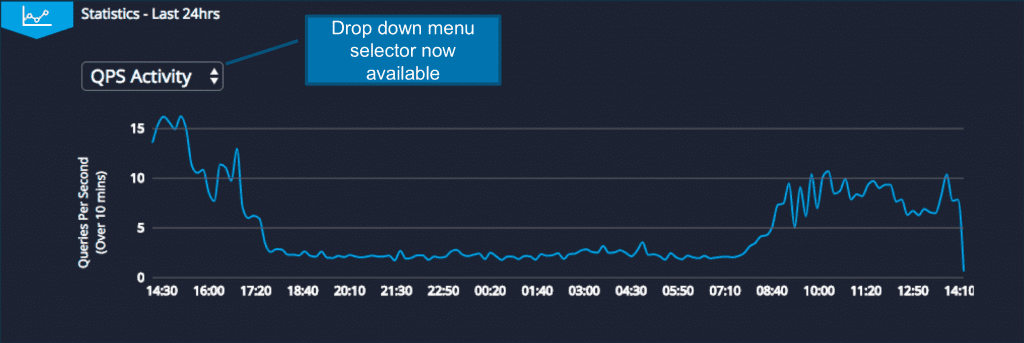
The DNS Activity statistics pane now includes a drop-down allowing selection between a Queries Per Second (QPS) line graph and the previously available Policy Activity view, giving operators more flexible visibility into traffic patterns. Administrators can also create an Analyst user role that grants access to the DNS Activity and Threat Activity tables without exposing other screens, enabling restricted, read-only investigative workflows. Together these updates improve monitoring capability and support role-based access for analysts reviewing DNS and threat telemetry.
The latest release of DNS Edge is now live and includes a number of new features like multi-namespace support for better routing, enhanced volumetric tunneling detection, dashboard improvements, and other foundational enhancements.
Multi-Namespace Support
Since DNS Edge is implemented in the recursive layer, it has the unique advantage of logging and analyzing all queries from clients on the network, but the way it is implemented can also benefit and optimize your environment. With this new release of DNS Edge, users will have more flexibility in configuring their DNS resolution path. They can easily route queries targeting select domains to a specific group of forwarders using Match & Exception domain lists. Not only can they name up to 3 Namespaces as default, but they can set different Namespaces at the Site level, with each Namespace being able to handle hundreds of domains.
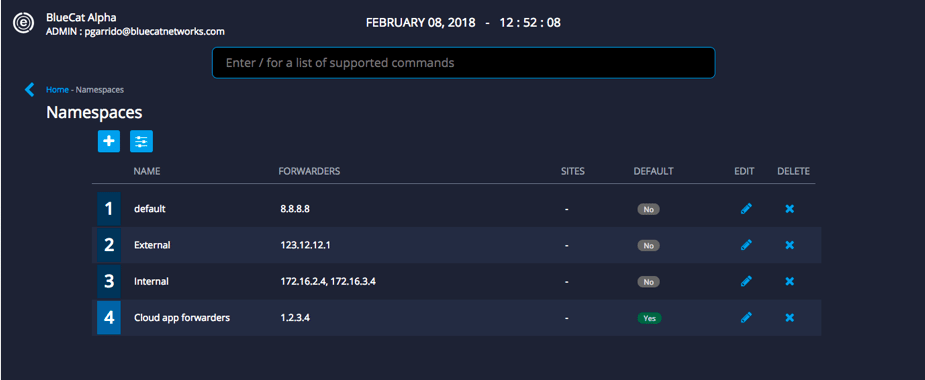
Why is this important? Here are a few examples of how you can leverage Multi-Namespace:
1. Avoid unnecessary sets of records for both internal and external requests.
For example, if there’s an HR web application that both internal employees and external contractors need to access to, there’s no need to maintain identical records for the application on both zones.
Practically speaking, the first Namespace will be an internal list of forwarders; the second will be an external list of forwarders, including the HR web application. When an internal request for the HR web application is made, it will go to the internal Namespace first (assuming it’s prioritized first in the default list); the forwarder will resolve an NXDOMAIN and the query will travel to the second Namespace (in this case, the external forwarders) where it will be successfully resolved. Administrators can maintain a single record for the same sources used by more than one zone simplifies management for Administrators, avoiding common issues of maintaining duplicate records.
2. Lighten the load on internal servers for traffic intended for trusted cloud apps.
Trusted cloud apps that are used regularly on the network like Office365.com can place an unnecessary load on internal servers. An Exception list can be configured for the first Namespace to forward select cloud applications like Office365.com to forward traffic directly to the Authoritative server. This helps in offloading traffic from their internal servers from needing to answer queries for these cloud applications.
This new feature opens up many possibilities and we expect DNS Edge customers will discover many additional use cases that improve overall query performance.
Threat Detection Analytics Updates
DNS tunneling, the technique of performing data exfiltration by encoding data of other programs or protocols in DNS queries and responses, is a major concern for all security professionals. DNS Edge analyzes all queries and flags for methods such as tunneling and domain generation algorithms, but we also continue to optimize our analytics engine.
In the latest updates to DNS Edge, we’ve refined our data exfiltration detection via volumetric tunneling to minimize false-positives. A newly developed System Tunneling List will compile compromised domains suspected of tunneling, and with Tunneling “block” policy configured, these domains will be prevented from resolving. We’ve also updated our volumetric detection capabilities to be based on regular polling of the last hour’s worth of data and looking for common domains that exhibit the signs of the type of tunneling we look for.
DNS Activity Dashboard and Admin Enhancements
The statistics pane now includes a drop-down menu that allows clients to choose between viewing a line-graph displaying Queries Per Second (QPS) or previously displayed Policy Activity.
Also, Admins can now create Analyst user roles which will enable them to view the DNS Activity and Threat Activity tables without having access to any other screens.
With these new updates to DNS Edge, you’ll not only be better able to detect and analyze potential malicious activity, but you’ll be able to optimize your DNS infrastructure.
Published in:

Anna is a passionate content writer who’s always eager to learn something new about cyber security.
Related content

Get answers from the LiveNX data you already have with LiveAssist
Learn how LiveAssist, the AI-powered add-on for LiveNX, turns your network data into fast, guided answers, with value you can see in days.

Get total control of your DDI infrastructure with Micetro’s unified API
Stop juggling between network tools and use Micetro’s RESTful API for complete control over your DDI infrastructure and cloud environment.

BlueCat MCP servers bring network intelligence to your AI assistant
Our MCP servers provide a standard integration layer that makes it easy to connect the AI tools you already use to BlueCat products.

We bet on Intelligent NetOps two years ago. Infoblox now has too.
With Infoblox acquiring Kentik, BlueCat’s CEO confirms its vision for a single platform unifying DDI, network monitoring, and observability.