
Introducing new deployment options for DNS Edge service points
BlueCat now offers the ability to spin up a DNS Edge service point on most BlueCat DNS/DHCP Server (BDDS) models at no additional cost.



 Key takeawaysKey takeaways are generated with AI assistance. Because automated summaries can occasionally contain errors or miss important context, always refer to the full blog post for complete information.
The article explains how BlueCat DNS Edge gives network teams visibility and control over DNS traffic to speed service deployment and optimize hardware and cloud investments. It introduces BlueCat service points as the core of DNS Edge and announces a new option to enable a DNS Edge service point on most BlueCat DNS/DHCP Server (BDDS) models at no extra cost, addressing customers who cannot or prefer not to deploy VMs. The piece illustrates real-world impact with a financial services firm example, showing improved traffic visibility, geographic query routing control, and continued use of existing infrastructure by enabling DNS Edge on BDDS appliances.
What problem does enabling DNS Edge on BDDS appliances solve for organizations that can’t deploy virtual machines?
Enabling DNS Edge on BDDS appliances allows organizations that face architectural constraints or capital expenditure limits to gain DNS Edge capabilities without re‑architecting or deploying VMs. It eliminates the need to build or maintain virtual infrastructure—reducing both CAPEX and OPEX—while providing the same benefits of DNS Edge such as centralized logging of DNS client traffic, visibility into network utilization, and control over geographic routing. This is especially useful for distributed organizations with limited on‑site IT staff or high costs for virtual deployments.
How does enabling DNS Edge on BlueCat DNS servers improve visibility and security for a distributed branch network?
Once DNS Edge is enabled on a BlueCat DNS server and client traffic is pointed to the Service Point’s designated IP, every DNS resolution is logged into the DNS Edge cloud in real time. That centralized logging gives network teams visibility into DNS queries across distributed offices, making it easier to spot network errors and detect malicious activity. Coupled with control over geographic routing and fast resolution at the first hop, the solution helps operators monitor utilization, troubleshoot issues, and enforce policies without deploying additional hardware or changing existing network design.
What are the steps and operational requirements to enable DNS Edge capabilities and DNS resolution on the same BDDS appliance?
According to the article, enabling both DNS Edge capabilities and DNS resolution on the same BDDS appliance is straightforward: after configuring general settings on the appliance, customers simply check a box to enable the Service Point functionality. Detailed configuration steps and guidance are provided in BlueCat’s online documentation. The approach requires no additional cost for supported BDDS models and leverages the appliance to act as the first hop for queries while the service point is managed, upgraded, and monitored from the cloud with minimal operational overhead.
As businesses scale, network teams have to account for a constant increase in the number of devices connecting to the network. Full utilization of hardware and cloud investments is critical to ensuring fast, reliable, and secure service deployment.
With BlueCat DNS Edge, network teams have visibility and control over all DNS traffic to deploy services faster and meet their network initiatives. BlueCat service points are at the heart of BlueCat DNS Edge, replacing the box model used by other DNS providers.
Up to now, the options for deploying BlueCat service points were as a VM via OVA in ESXi, or through cloud native formats for AWS and Azure. These virtual machines are managed, automatically upgraded, and monitored from the cloud with zero operational overhead. Service points sit at the first hop of any networking query, providing faster deployment and real-time service delivery.
Sometimes architectural considerations or capital expenditure constraints prevent deployment of service points as VMs. Our solution? BlueCat now offers the ability to spin up a DNS Edge service point on most BlueCat DNS/DHCP Server (BDDS) models at no additional cost.
Let’s look at how you can enable DNS Edge capabilities on existing infrastructure without having to re-architect the network.
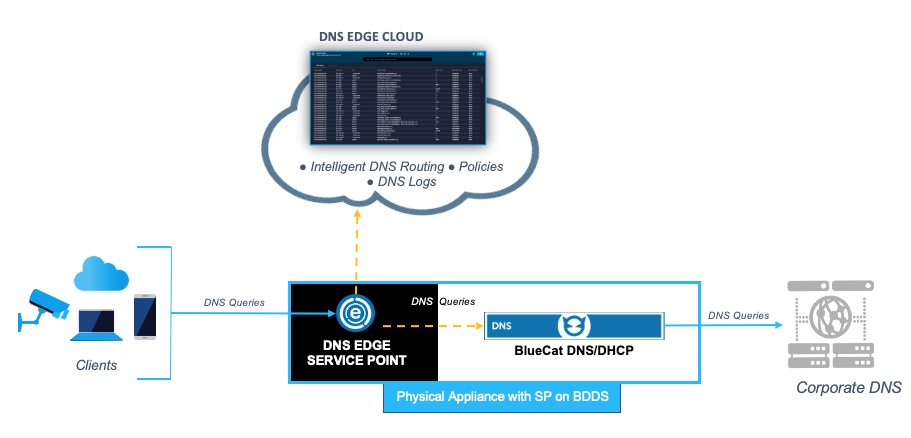
Take a financial services firm that is managing a new distributed network, with hundreds of remote offices located worldwide. Here are some of the challenges in managing the network connectivity of their remote offices and local branches:
- Limited budget for capital and operational expenditures
- The high cost of running a virtual infrastructure outweighs its benefits
- Lack of on-site IT personnel makes it difficult to deploy new services and changes
- No visibility into the network utilization, spotting network errors, and malicious activity
Once the firm enables DNS Edge on their BlueCat DNS servers, all DNS client traffic pointed to the Service Point’s designated IP address is logged into the DNS Edge cloud as it is resolved. Now the firm can fully utilize existing infrastructure while getting:
- Visibility into network traffic via DNS queries
- Control over geographic routing of queries with lightning resolution
So how do customers enable both DNS Edge capabilities and DNS resolution on the same appliance? It’s as simple as checking a box after configuring some general settings.
Learn more about configuring SP on BDDS with our online documentation.
Published in:

Mark is a Senior Product Marketing Manager at BlueCat Networks.
Related content

Get answers from the LiveNX data you already have with LiveAssist
Learn how LiveAssist, the AI-powered add-on for LiveNX, turns your network data into fast, guided answers, with value you can see in days.


LiveWire GEN3 device offerings
BlueCat LiveWire is a packet capture and network forensics platform that provides deep packet-level visibility across hybrid enterprise environments to help…

Get total control of your DDI infrastructure with Micetro’s unified API
Stop juggling between network tools and use Micetro’s RESTful API for complete control over your DDI infrastructure and cloud environment.

BlueCat MCP servers bring network intelligence to your AI assistant
Our MCP servers provide a standard integration layer that makes it easy to connect the AI tools you already use to BlueCat products.