
Configuration Management Tool Comparison: Multi-Vendor Deep Configuration Analysis: Cisco-Focused
Looking for a comprehensive comparison of configuration management tools for enterprise IT? Read our informative post for desired configuration. Learn more.


Notice: This blog post was originally published on Indeni before its acquisition by BlueCat.
The content reflects the expertise and perspectives of the Indeni team at the time of writing. While some references may be outdated, the insights remain valuable. For the latest updates and solutions, explore the rest of our blog
 Key takeawaysKey takeaways are generated with AI assistance. Because automated summaries can occasionally contain errors or miss important context, always refer to the full blog post for complete information.
The article compares NetMRI and indeni as configuration management tools, explaining that NetMRI was developed by Netcordia to help Cisco administrators validate router and switch configurations but provides limited built-in checks for non-Cisco devices. It highlights a real-world operational problem: organizations with mixed-vendor networks (firewalls, load balancers, and non-Cisco gear) must teach NetMRI to interpret those configurations, which is time-consuming, while Infoblox’s DDI focus drives NetMRI’s ongoing emphasis on switching and routing. The key outcome is guidance for readers: Cisco-centric environments should consider NetMRI for deep Cisco visibility and automation, whereas teams needing broad, automated misconfiguration detection across Cisco and non-Cisco devices should evaluate indeni.
What types of devices does NetMRI provide the strongest visibility and configuration checks for?
NetMRI provides the strongest visibility and configuration checks for Cisco switching and routing equipment. The product was built to define checks and ensure that routers and switches conform to desired configurations, offering detailed dissection and analysis of complex Cisco setups. Release notes and demos referenced in the article emphasize new features and focus specifically on switching and routing, reflecting NetMRI’s deep capabilities for Cisco environments.
Why is NetMRI less effective for non-Cisco devices like firewalls and load balancers?
NetMRI is less effective for non-Cisco devices because, while it can pull configurations from vendors such as Check Point, Fortinet, Juniper, Palo Alto Networks and F5, it lacks built-in configuration checks for those platforms. Users must manually teach NetMRI how to interpret those configurations and define what to look for, which is a tedious, labor-intensive process. The article attributes this limitation in part to Infoblox’s strategic focus on DDI and its tight integration with switching and routing rather than layer 4+ devices.
When should an organization choose indeni over NetMRI according to the article?
An organization should choose indeni when it requires deep visibility and automated identification of known configuration issues across both Cisco and non-Cisco devices. indeni is recommended for environments that include Check Point, F5, Fortinet, Juniper, and Palo Alto Networks gear in addition to Cisco equipment, because it can point out common misconfigurations and devices that are non-compliant with the organization’s gold configuration. In contrast, NetMRI is positioned as the go-to for Cisco-heavy shops or mixed environments with substantial Cisco routing and switching investments.
NetMRI was originally developed and sold by Netcordia, founded in 2000 by the world’s first Cisco Certified Internetwork Expert (CCIE). It was created to help Cisco admins solve configuration issues in their network equipment by defining certain checks and ensuring that all switching and routing devices conform to the desired configuration.
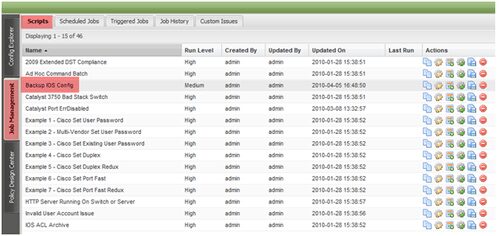
NetMRI is a fantastic configuration management tool for Cisco admins – it’s got incredible visibility into Cisco configurations and the ability to dissect and analyze some of the most complicated setups of Cisco routers and switches. However, it falls quite short for other network devices, especially the non-Cisco ones and those for layers 4 and up. This includes Check Point, Fortinet, Juniper and Palo Alto Networks firewalls as well as F5 load balancers. For these, NetMRI supports pulling the configurations (see DSB list) but comes with no built-in configuration checks. As a user, you are required to teach NetMRI how to understand the configuration of these devices and what to look for. Quite a tedious task.
For example, consider the release notes for NetMRI 6.9.1 (released in 2014). The new features focus solely on switching and routing equipment. The same is true for other recent releases of NetMRI, such as 6.8.1. This is caused by Infoblox’s focus on DDI – (DNS, DHCP and IP Address Management) which are the company’s core business. DDI is tightly integrated with switching and routing, hence the focus on those devices by NetMRI as shown in a demo video of NetMRI.
Therefore, users who run a Cisco shop should consider investing in NetMRI and using that as their go-to tool for analyzing the configuration of their routers and switches. Even those running a mixed environment with a heavy investment in Cisco routing and switching gear, should consider using NetMRI to automate their IP address management and routing.
Users who require deep-visibility into their Cisco AND non-Cisco devices, specifically identifying common misconfigurations as well as pointing out which devices are not compliant with the organization’s gold configuration, should take a look at indeni. With indeni you will be able to identify known configuration issues in your Check Point, F5, Fortinet, Juniper and Palo Alto Networks gear, as well as your Cisco equipment.
Related content

BlueCat MCP servers bring network intelligence to your AI assistant
Our MCP servers provide a standard integration layer that makes it easy to connect the AI tools you already use to BlueCat products.

We bet on Intelligent NetOps two years ago. Infoblox now has too.
With Infoblox acquiring Kentik, BlueCat’s CEO confirms its vision for a single platform unifying DDI, network monitoring, and observability.

BlueCat DDI data boosts Cisco Cloud Control AI-driven operations
BlueCat’s integration with Cisco Cloud Control provides AI agents with access to trusted DDI data for network investigation and remediation.

Automate your DDI modernization path by migrating with Micetro
Automate cross-platform DNS and DHCP migration with Micetro to reduce risk, eliminate manual effort, and modernize infrastructure faster.