Edge for migrations
Migrate your DDI management system to Integrity with ease
 Key takeawaysKey takeaways are generated with AI assistance. Because automated summaries can occasionally contain errors or miss important context, always refer to the full blog post for complete information.
The article describes how BlueCat Edge enables low-risk migrations from legacy DDI (DNS, DHCP, IPAM) systems to BlueCat Integrity by using intelligent forwarding, adaptive plugins, and real-time automation. It addresses the real-world problem of missed legacy DNS changes and the risk of service disruption during cutovers by prioritizing namespace order, capturing DNS queries into Address Manager via Gateway, and allowing reversible namespace reordering as DHCP networks migrate. Operational outcomes include reduced downtime risk, configurable migration controls (zone/IP exclusions, namespace ordering), and seamless integration into an existing NetOps strategy for resilient, scalable networks.
How does BlueCat Edge prevent service disruption during a DDI migration?
BlueCat Edge prevents service disruption by applying a namespace hierarchy that initially prioritizes the legacy DNS system for query responses while forwarding queries to Integrity as a secondary source. Edge uses intelligent forwarding and adaptive plugins to ensure there is an answer for every DNS query, and BlueCat Gateway continuously captures each DNS query and its authoritative response, automatically adding those records to Address Manager without interrupting normal operations. This approach enables gradual, query-by-query migration of records and supports reversing the namespace order when DHCP data has been migrated, keeping the legacy system as a redundancy check until final cutover.
What controls are available to exclude specific DNS data during migration?
Edge provides multiple exclusion controls to prevent selected DNS data from being added to Address Manager during migration. Administrators can exclude DNS records associated with particular IP addresses and ranges either by manually entering them or by uploading a CSV file through Edge’s migration UI. Similarly, sets of DNS zones and specific records can be excluded from Integrity by manual entry or CSV upload. These exclusion capabilities let teams manage which data is migrated and ensure sensitive or irrelevant records remain only on the legacy system during the transition.
How does the migration process handle DHCP and dynamic DNS updates between legacy and BlueCat systems?
During migration, dynamic DNS updates are separated between the legacy and BlueCat environments to maintain consistency: the legacy DHCP server continues to update only the legacy DNS server, while the BlueCat DHCP server updates only the BlueCat DNS server. As DHCP networks and devices are migrated into Integrity, Edge can be reconfigured so that Integrity becomes the first namespace with top priority for DNS responses and the legacy DNS becomes secondary. This staged approach ensures DHCP-associated DNS records are correctly written to the appropriate DNS instance throughout the migration.
The solution: BlueCat Edge
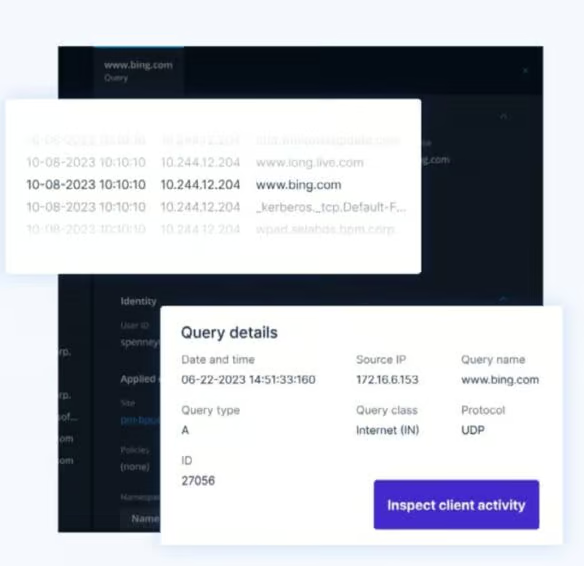
With BlueCat Edge, you can easily migrate from legacy systems to BlueCat Integrity’s DDI management solution. Edge’s intelligent forwarding and adaptive plugins simplify the migration process while mitigating downtime risk. Edge applies a hierarchy to namespaces, prioritizing the legacy system for DNS resolution. Meanwhile, BlueCat’s automation platform, Gateway, automatically captures and adds DNS data, query by query, to BlueCat Address Manager without disrupting normal operations.
Once the migration of DHCP data into the Integrity environment is complete, network admins can reverse the namespace hierarchy, making the legacy system a redundant check for any failed DNS queries before a final cutover.
Features

Namespace order
Initially order all sites in Edge to forward queries to the legacy DNS system, followed by Integrity.

Record migration
As the legacy DNS system provides them, add the queried records and authoritative responses to Address Manager.

Dynamic DNS updates
Ensure that the legacy DHCP server updates only the legacy DNS server, and that the BlueCat DHCP server updates only the BlueCat DNS server.

IP exclusion
Exclude DNS records associated with specific IP addresses and ranges from being added to Address Manager by manually entering them or uploading a CSV file to Edge’s migration UI. Integrity is the first namespace and top priority for DNS responses, followed by the legacy DNS system.
Zone and record exclusion
Exclude sets of DNS zones and records from Integrity by manually entering them or by uploading a CSV in Edge’s migration UI.

Reverse namespace order
As DHCP networks migrate from legacy devices to Integrity, configuration of the corresponding site in Edge ensures that Integrity is the first namespace. It has top priority for DNS responses, followed by the legacy DNS system.
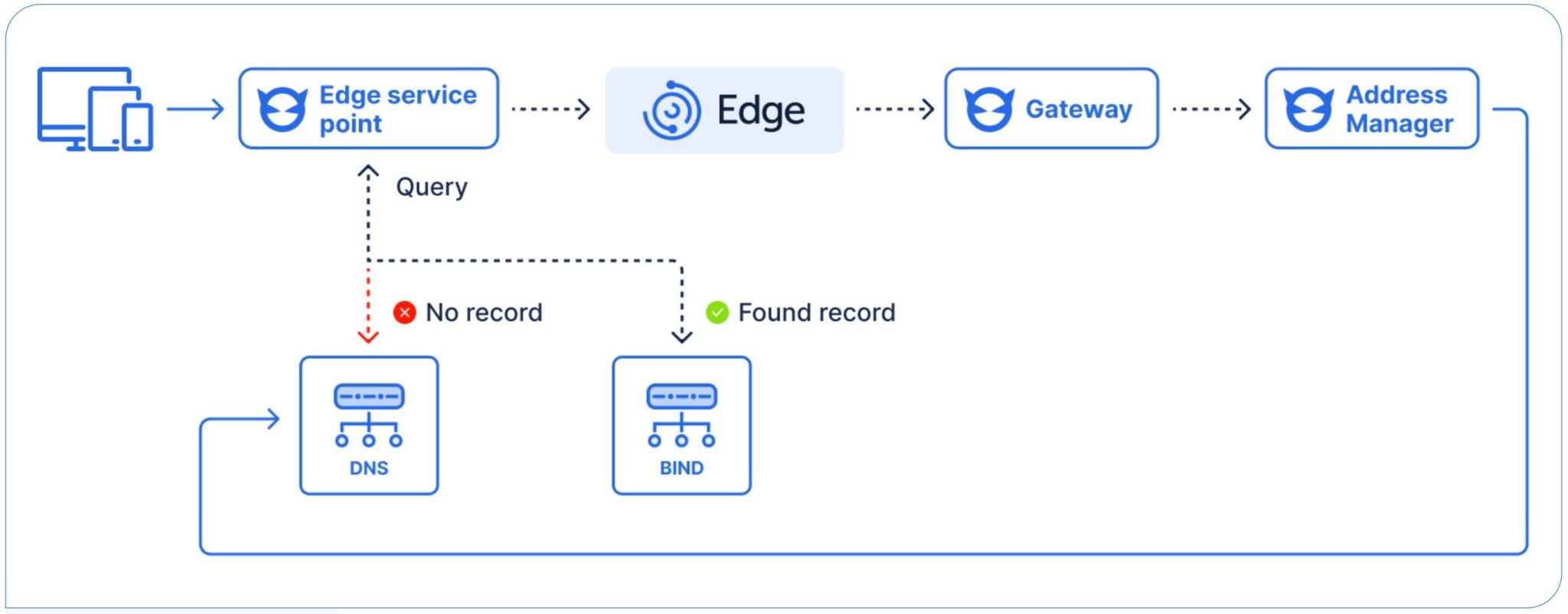
Figure 1. Edge migration
BlueCat’s Intelligent Network Operations (NetOps)
BlueCat’s Intelligent NetOps solutions provide the analytics and intelligence needed to enable, optimize, and secure the network to achieve business goals. With an Intelligent NetOps suite, organizations can more easily change and modernize the network as business requirements demand.