
7 Ways to Manage F5 LTM Traffic With Profiles



Notice: This blog post was originally published on Indeni before its acquisition by BlueCat.
The content reflects the expertise and perspectives of the Indeni team at the time of writing. While some references may be outdated, the insights remain valuable. For the latest updates and solutions, explore the rest of our blog
 Key takeawaysKey takeaways are generated with AI assistance. Because automated summaries can occasionally contain errors or miss important context, always refer to the full blog post for complete information.
The article presents seven Indeni Community best practices for managing F5 load balancer configurations in virtualized environments where connections change rapidly. It focuses on real-world problems like memory exhaustion from long TCP idle timeouts, wasted CPU from re-compressing already-compressed content, performance impacts from overly high compression levels, and security risks from fallback hosts, weak ciphers/protocols, and unencrypted cookie persistence. Implementing these checks through Indeni helps operators detect misconfigurations early to maintain packet flow performance, reduce resource waste, and protect clients from man-in-the-middle and information disclosure risks.
Why is a very long TCP idle timeout on virtual servers problematic?
A very long TCP idle timeout can cause the load balancer to keep many idle connections open for extended periods, which increases memory usage and can potentially lead to memory exhaustion on the device. In dynamic virtualized environments where connections change rapidly, holding unnecessary connections wastes resources and may degrade overall performance. Indeni detects when TCP idle time appears too high and provides remediation steps so administrators can reduce the timeout and prevent resource exhaustion.
What are the downsides of compressing content that is already pre-compressed on an F5 device?
Compressing content that is already pre-compressed increases response times and consumes CPU resources without meaningful size reduction, effectively wasting system capacity. The extra processing can lengthen delivery times for clients while tying up device resources that could be used elsewhere. Indeni alerts when already-compressed content types are configured for compression and points to remediation steps to avoid re-compressing those content types.
How do weak ciphers, weak protocols, and unencrypted cookie persistence affect security on F5 devices?
Weak ciphers and weak security protocols can enable man-in-the-middle attacks by allowing attackers to exploit known vulnerabilities in encryption algorithms or protocol versions; Indeni alerts when SSL profiles use such ciphers or protocols to help administrators remediate them. Unencrypted cookie persistence can disclose internal details like IPs, ports, and pool names to client browsers, providing attackers with information to map the environment. Indeni flags unencrypted persistence cookies so operators can encrypt cookies and reduce information disclosure risks.

In a virtualized environment, configurations and connections can change on a dime. Leverage these 7 best practices from the Indeni Community to ensure the services that rely on your network and sending and receiving packets at full speed.
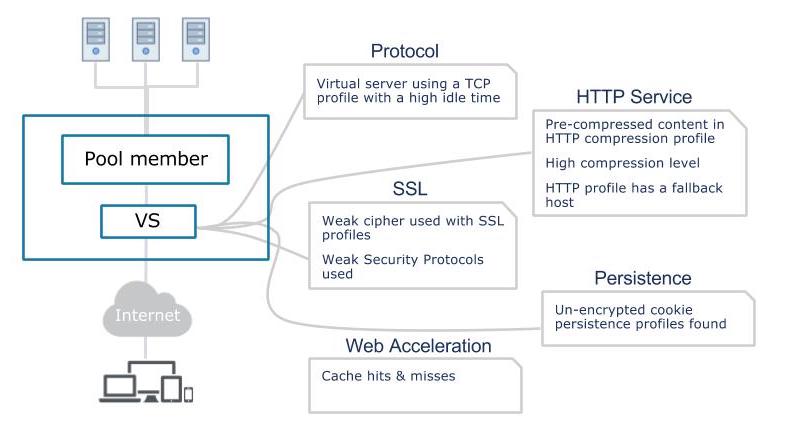
1.Virtual server using a TCP profile with a high idle time
Having very long TCP idle timeouts for virtual servers could make the load balancer keep too many connections open, which in turn could potentially cause memory exhaustion. Indeni will alert when the idle timeout appears too high.
View remediation steps
2.Pre-compressed content in HTTP compression profile
Using the F5 device to compress content is a way of accelerating application content delivery. However, compressing content that is already pre-compressed results in longer response times and is using up system resources in vain. Indeni will alert when already-compressed content types are set for compression.
View remediation steps
3.High compression level
Setting a higher compression level makes compressed content smaller, but the cost of higher CPU usage and longer time to compress the content. The difference in terms of percentage gets lower the higher the level and setting this too high is not recommended. Indeni will alert if the gzip compression level is too high.
View remediation steps
4. HTTP profile has a fallback host
A fallback host redirect a user to a different page/URI. It is in most cases better to use an iRule to rewrite the request. Indeni will alert if fallback is used instead of an iRule.
View remediation steps
5. Weak cipher used with SSL profiles
Weak ciphers could allow for man in the middle attacks. Administrators would ideally want to keep track of their cipher string configurations in order to protect their clients against known attack vectors. This alert verifies that the management interface does not use any weak ciphers.
View remediation steps
6. Weak Security Protocols used
Certain security protocols are now considered weak. Indeni will alert if any SSL profiles are set to use them. Weak protocols could also enable for man in the middle attacks. This alert verifies that the management interface does not use any weak protocols.
View remediation steps
7. Un-encrypted cookie persistence profiles found
According to best practices, cookies should be encrypted when persisting to client browser to avoid security issues. Not encrypting persistence cookies discloses internal information such as internal IP, port and pool name. This information could be used by an attacker to gather information about your environment. Indeni will alert when this is not the case.
View remediation steps
Interested in seeing another use case? Join the F5 Networks discussion on Indeni Crowd or Download Indeni today.
Related content

Get answers from the LiveNX data you already have with LiveAssist
Learn how LiveAssist, the AI-powered add-on for LiveNX, turns your network data into fast, guided answers, with value you can see in days.


LiveWire GEN3 device offerings
BlueCat LiveWire is a packet capture and network forensics platform that provides deep packet-level visibility across hybrid enterprise environments to help…

Get total control of your DDI infrastructure with Micetro’s unified API
Stop juggling between network tools and use Micetro’s RESTful API for complete control over your DDI infrastructure and cloud environment.

BlueCat MCP servers bring network intelligence to your AI assistant
Our MCP servers provide a standard integration layer that makes it easy to connect the AI tools you already use to BlueCat products.