
Stop the ticket bottleneck: Automate DNS, DHCP, and IPAM with Quick Service
Automated DNS, DHCP, and IPAM (DDI) service delivery enables organizations to replace manual, ticket-based workflows with policy-driven, self-service operations. In large enterprise and hybrid environments, manual DDI processes slow down application delivery, increase error rates, and create governance risk.
BlueCat Quick Service automates DNS, DHCP, and IPAM to speed delivery, improve consistency, and strengthen governance while reducing manual effort and risk.


Today’s IT organizations must deliver network services with both speed and consistency. Yet core DNS, DHCP, and IP address management (DDI) tasks still rely heavily on tickets, manual updates, and spreadsheets.
These manual workflows introduce delays, increase the risk of errors, and consume valuable engineering time that could be spent on modernization, cloud, or security initiatives.
DDI automation—standardizing and automating repeatable DNS/DHCP/IPAM workflows—helps teams eliminate bottlenecks, reduce configuration variance, and embed governance into daily operations.
When routine DDI tasks become predictable, controlled, and fast, the network no longer slows the business; instead, it supports rapid delivery and secure growth.
Why manual DDI operations create risk and delay?
Organizations relying on manual processes often face well-known challenges:
Slow response times
Network changes are queued in tickets, delaying application rollouts and environment builds.
Susceptibility to errors
Typos, outdated spreadsheets, or inconsistent updates can produce outages or unintended exposure.
Operational bottlenecks
Engineers spend time on repetitive changes—such as DNS record updates or IP assignments—rather than strategic engineering work.
Inconsistent processes
Without standard workflows, approvals, and methods, compliance is complicated across teams.
Limited visibility
Scattered documentation makes it difficult to identify who made changes and why.
Manual DDI management limits agility, weakens resilience, and strains trust between IT and the rest of the business.
How automated DDI service delivery addresses these challenges?
A workflow-driven model for DNS, DHCP, and IPAM helps organizations deliver consistent, policy-aligned network services. Core patterns include structured intake, conditional approvals, RBAC enforcement, and complete auditability.
BlueCat Alignment: How Quick Service implements automated DDI workflows
The following capabilities reflect Quick Service’s operationalization of workflow-based DDI automation.
1. Automating routine DNS, DHCP, and IPAM requests
Quick Service replaces ticket-driven updates with standardized workflows for tasks such as:
- Assigning IP addresses from available pools
- Creating host and alias records
- Adding or deleting subzones
- Building DHCP ranges using predefined templates
These automations ensure consistent execution, reduce risk, and free engineers from repetitive manual work.
By automating everyday operations, Quick Service speeds delivery and enforces standardized, predictable change.
2. Applying approval workflows for governance
New in version 25.1, Quick Service enables approvals for changes across zones, networks, and related objects. Actions such as creating, editing, or deleting subzones or IP networks can require approval, and users cannot approve their own requests.
The Approval Lifecycle page tracks pending, approved, declined, or canceled requests and logs approver details for accountability.
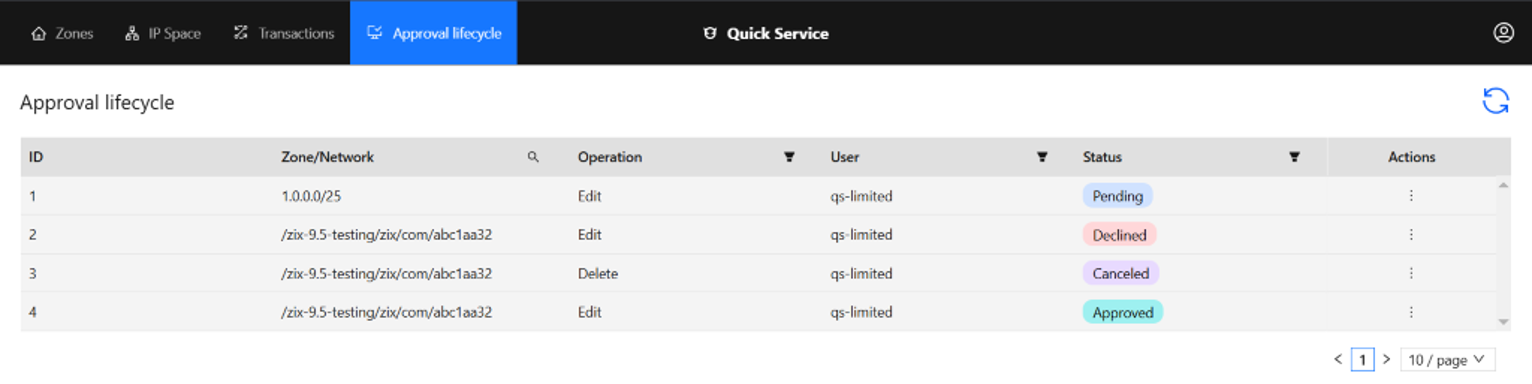
Image: Page providing detailed visibility into all approval requests
Integrated approvals help organizations safeguard critical changes and maintain governance without slowing progress.
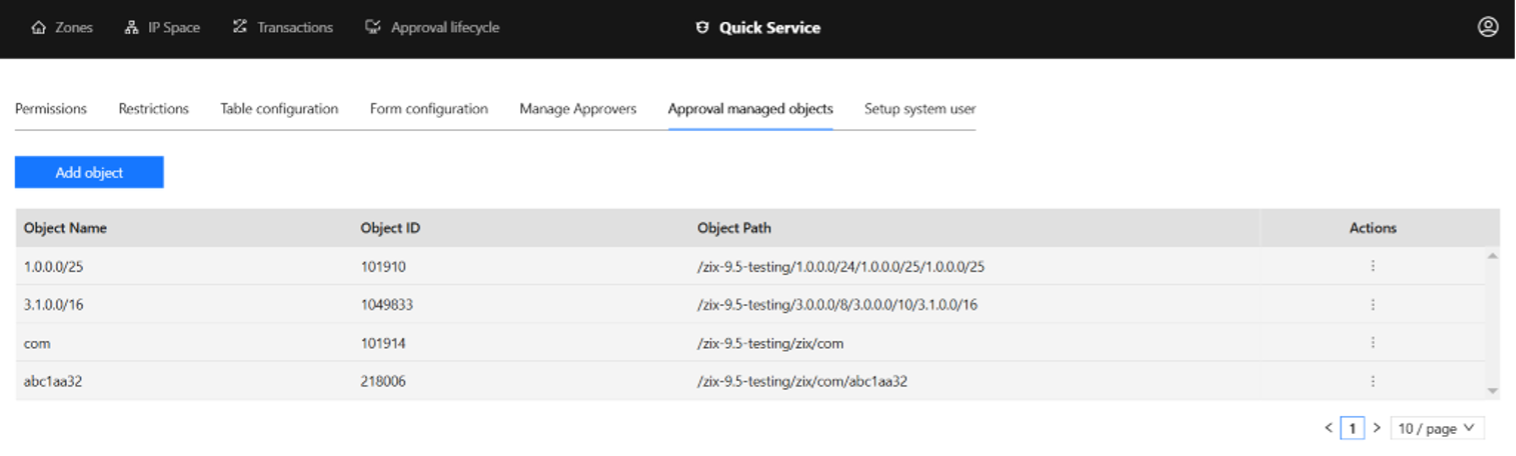
Image: List of objects designated for inclusion in the approval lifecycle
3. Enforcing role-based access control (RBAC)
Quick Service applies RBAC through two complementary mechanisms:
Permissions
User groups receive read-only or read-write access to DDI objects, including DNS zones, DHCP ranges, IP blocks, configurations, and templates.
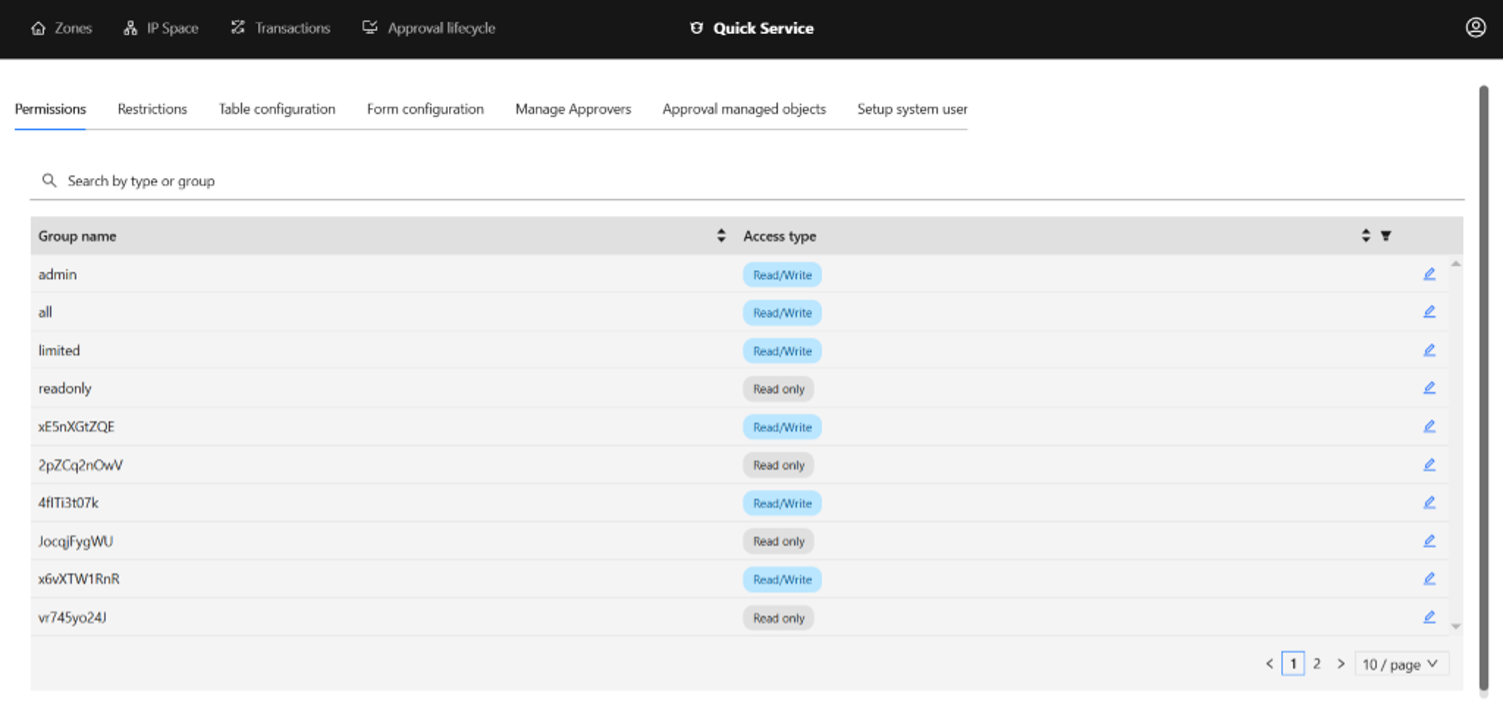
Image: User group permissions configuration in Quick Service
Restrictions
Administrators can restrict access to specific configurations, views, or zones—for example, limiting a development team to staging records or allowing help desk teams to assign IP addresses only from designated subnets.
Together, permissions and restrictions uphold least privilege and support detailed auditing by object type.
RBAC in Quick Service ensures users can access only what they need, strengthening security and accountability.
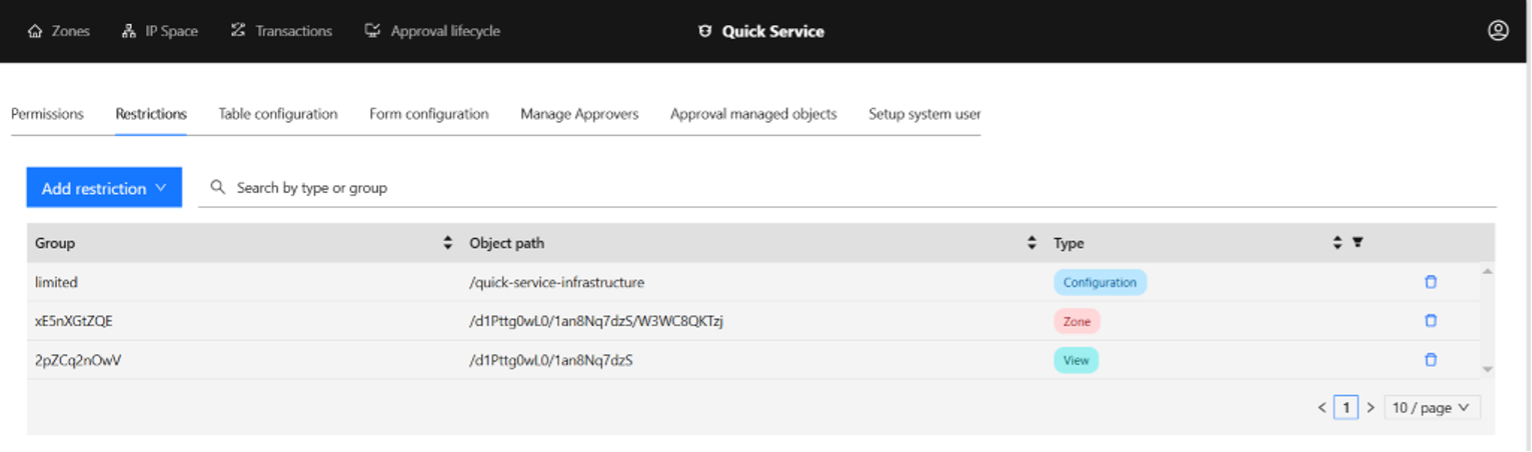
Image: Role-based access and restriction controls in Quick Service
4. Auditing, restoring, and rolling back changes
The Transactions Page retains deleted items—including DNS zones, IP networks, DHCP ranges, and user-defined records—for up to 10 days. It logs the action type, user, and timestamp and enables one-click restoration of critical objects.
Built-in recovery capabilities reduce the impact of mistakes and simplify compliance reporting.
5. A simplified, accessible interface
A clean UI, search tools, guided steps, and light/dark modes make Quick Service approachable for both experts and non-experts. Users can locate a DNS record, update it via a structured form, and submit it for approval—all without deep knowledge of Address Manager.
An intuitive interface broadens the pool of people who can safely contribute to DDI operations.
6. Embedded compliance and governance controls
Compliance principles are built into every workflow, including:
- Mandatory approvals for sensitive changes
- Prohibition of self-approvals
- RBAC-based restrictions on who can update specific configurations
- Complete audit trails for each action
Compliance becomes part of the workflow itself, not an external process layered on afterward.
Business impact: faster, safer, more scalable operations
With Quick Service, organizations can:
- Deliver DDI services in minutes instead of days
- Apply consistent compliance controls
- Reduce outages and improve resilience
- Onboard users quickly with an easy-to-use interface
- Track every change for full accountability
- Strengthen collaboration across teams
A study by Enterprise Management Associates found that 44% of organizations see better IT productivity and agility as the top benefit of a modern DDI solution. Quick Service reflects this trend by enabling teams to shift focus toward automation, cloud initiatives, and improved security.
Quick Service helps organizations modernize network operations while improving reliability and control.
BlueCat Quick Service is more than a set of automations—it is a workflow platform for modernizing DDI operations. Standardizing processes, enforcing governance, and accelerating service delivery help organizations scale confidently and innovate securely.To see Quick Service in action, watch a demo below or request a live walkthrough.

Published in:

Josh Townsend is a Senior Technical Marketing Manager at BlueCat Networks.
Related content

Agentic AI adoption in network observability propels NetOps teams
Network observability is crucial for today’s networks and even more capable with agentic AI, according to new Omdia and BlueCat research.

Stay ahead of network issues with real-time metrics with BlueCat Integrity X
Get real-time DNS, DHCP, and IPAM metrics with BlueCat Integrity X. Detect issues early using native Prometheus telemetry and proactive DDI observability.

Adding business context to DDI with tagging in BlueCat Integrity X
Add business context to DNS, DHCP, and IPAM with tagging in BlueCat Integrity X. Improve visibility, automation, and governance across complex networks.

Security Insights for network security at the edge without complexity
For LiveWire and LiveNX users, analyze flow and packet telemetry for faster threat detection, stronger forensics, and shared visibility.