
Introduction to the Micetro REST API (v25.1+)
Automate and integrate all aspects of your DNS, DHCP, and IP address management
 Key takeawaysKey takeaways are generated with AI assistance. Because automated summaries can occasionally contain errors or miss important context, always refer to the full blog post for complete information.
The article introduces the BlueCat Micetro REST API (v25.1+) as an API-first control plane for automating DNS, DHCP, and IP address management (DDI) across hybrid, multi-vendor, and cloud environments. It describes the API’s resource-based design, common endpoints, authentication (recommended bearer tokens), supported HTTP methods, rich query parameters for filtering/paging, and practical tooling and scripting workflows (Postman, PowerShell, Python) for orchestration, bulk operations, auditing, and secure automation. Operational guidance and best practices cover custom properties, role-based access control, bulk operations, error handling, history auditing, and security practices to ensure reliable, compliant DDI automation at scale.
How do I authenticate to the Micetro REST API for automated scripts and what are the recommended practices?
The recommended method for automation is session-based bearer tokens obtained by authenticating to the /sessions endpoint; the returned JSON includes the session token which you must send as Authorization: Bearer on subsequent API requests. Best practices: never hardcode credentials or tokens in code, store tokens in environment variables or secure vaults, use short-lived tokens and rotate them regularly, enforce least-privilege roles for API users, avoid using admin tokens in automation unless necessary, and audit authentication attempts via event history. NTLM or Kerberos are alternatives for AD-integrated Windows deployments; legacy basic auth is supported but not recommended.
What are the key query parameters for filtering and paging large result sets, and how should I use them in automation?
Micetro supports filter, sortBy, sortOrder, offset, limit, targetRef, and pretty parameters. Use filter for targeted searches (simple, regex, Boolean, sets, or nested expressions) to narrow results; sortBy and sortOrder provide predictable ordering; offset and limit implement pagination—always use limit and process results in chunks (for example 100 at a time) to avoid memory or timeout issues. targetRef anchors paging at a specific object when needed. Combine parameters (e.g., ?filter=name=corp&sortBy=lastModified&limit=25) and prefer filterable bulk endpoints for efficient multi-object automation. For human exploration only, use pretty=true.
What operational best practices does the article recommend for secure, reliable bulk operations and auditing?
For bulk operations, use endpoints that accept batch payloads (dnsrecords, ranges, ipamrecords) to submit multiple objects in a single POST, parse per-object success/failure responses, and break very large jobs into smaller chunks using limit/offset to improve reliability. For auditing and traceability, define and use custom properties via /propertydefinitions to store metadata (owner, environment, cost center) and query change history with event history endpoints (e.g., /history). Additional practices include enforcing least-privilege RBAC via /access and /roles, validating data locally before submission, logging full request/response details for errors, rotating tokens and service account credentials, and regularly reviewing audit logs and failed authentication attempts.
Executive summary
As networks become increasingly hybrid, distributed, and automated, the ability to programmatically manage DNS, DHCP, and IP address management (together known as DDI) systems is essential for maintaining agility and consistency across the enterprise. The BlueCat Micetro REST API delivers a unified, standards-based interface for automating and orchestrating every component of the DDI infrastructure—spanning Microsoft, BIND, Kea, Cisco, cloud platforms, and BlueCat appliances—through a single, cohesive control plane.
Built as an API-first platform, Micetro exposes nearly all DDI functionality through REST endpoints, enabling network admins and DevOps teams to:
- Automate repetitive tasks and workflows
- Integrate with enterprise automation frameworks, CI/CD pipelines, and IT service management systems
- Audit changes and enforce compliance
- Orchestrate services across cloud and hybrid environments
By treating every managed DDI object as a resource accessible through standard HTTP methods, the API simplifies complex administrative tasks, accelerates change workflows, and ensures configuration consistency across environments.
This whitepaper provides a practical introduction to the structure, usage patterns, and operational best practices of the Micetro REST API. Designed for network engineers, DevOps teams, and system integrators, Micetro’s API can automate, orchestrate, and integrate DDI operations across Microsoft, BIND, Kea, Cisco, and cloud environments. This paper highlights how teams can extend Micetro’s automation capabilities through scripting languages such as PowerShell and Python, or by integrating with enterprise automation frameworks.
This paper includes hands-on examples that illustrate how to use the API for automation, troubleshooting, and workflow development. It offers step-by-step guidance for importing the OpenAPI specification into Postman for exploration and testing, along with sample scripts in PowerShell and Python. A final section lists key additional resources to deepen your understanding of and accelerate your automation initiatives with Micetro.
Introduction
Micetro offers a robust and modern REST API for automating and integrating all aspects of DDI. The REST API provides full-featured, secure, and scalable access to your DDI environment. It is the preferred interface for all automation and integration tasks—supporting both everyday workflows and advanced custom automation scenarios for network teams of all sizes. Whether you’re building integrations, creating scripts for routine operations, or managing the full lifecycle of network resources, the Micetro REST API delivers the flexibility and power needed for today’s hybrid, multicloud, and compliance-focused enterprises.
API endpoints:
- Base URL:https://<micetro.yourdomain.tld>/mmws/api/v2/
- Interactive Swagger documentation:https://<micetro.yourdomain.tld>/mmws/api/doc/
- OpenAPI (Swagger) download:https://<micetro.yourdomain.tld>/mmws/api/swagger.json
API documentation and schema are always up to date at these URLs. You can also import them into Postman or other API tools for exploration or workflow testing.
Environmental note:
All POSIX-style examples in this document were validated on Ubuntu 24.04 LTS using the sys-tem-provided curl and standard OpenSSL libraries. Your environment may differ. Variables such as operating system, Micetro version, API URLs, TLS configuration, certificate trust, and authentication settings can require adjustments to the sample commands.
For example, environments using self-signed certificates may require the use of curl -k (insecure mode) to bypass strict TLS verification during testing. Use this flag only in controlled, non-production environments.
Authentication
The recommended authentication for the REST API is via a bearer token (session-based). A bearer token is the most secure and flexible approach for both interactive use and automation. It avoids embedding credentials in every API call and allows for session timeouts and granular privilege control.
How to obtain a session token:

The returned JSON includes a session token. Use this token as a bearer token in the authorization header on all subsequent API requests:

Security note: Never embed passwords in code or share session tokens in logs. Always use environment variables or secure vaults in real automation.
Other supported authentication methods:
- NTLM or Kerberos—for on-premises or Windows Active Directory (AD) environments with Micetro Central installed on a Windows domain member server.
- Legacy—basic authentication is supported but not recommended for automation or scripting.
Supported HTTP methods
In REST, the focus is on resources. You specify a resource by its URL, then apply an operation to it using an HTTP method.
The four most common HTTP methods are GET, PUT, POST, and DELETE, as described in the table below
| Method | Description |
| GET | Retrieve resources and object details (read-only operations) |
| POST | Create resources or trigger specific server-side operations |
| PUT | Update resources (entire object or specific properties) |
| DELETE | Remove resources from the system |
Many endpoints support advanced operations, such as bulk create, batch update, and specialized actions (e.g., audit log queries, bulk DNS record additions, etc.). See the API documentation for each resource.
Top-level API resources or objects
The following table lists all the primary REST API resource endpoints, using lowercase and plural naming. Each endpoint provides access to a key object type or system capability in Micetro.
| Resource | Description |
| adForests | AD forests |
| adSiteLinks | AD site link |
| adSites | AD sites |
| addressSpaces | Organizations |
| appliances | Appliances |
| changeRequests | Change requests |
| cloudNetworks | Cloud networks |
| Resource | Description |
| cloudServiceAccounts | Cloud integration |
| devices | Connectable devices |
| dhcpAddressPools | DHCP address pools |
| dhcpExclusions | DHCP exclusions |
| dhcpGroups | DHCP groups |
| dhcpReservations | DHCP reservations |
| dhcpScopes | DHCP scopes |
| dhcpServers | DHCP servers |
| dhcpSuperscopes | DHCP superscopes |
| dnsRecords | DNS records |
| dnsServers | DNS servers |
| dnsViews | DNS views |
| dnsZones | DNS zones |
| folders | Folders for objects and custom filters |
| groups | User groups |
| interfaces | Device interfaces |
| ipamRecords | IP address management (IPAM) records |
| micetro | General Micetro system information |
| ranges | IP address ranges |
| reportDefinitions | Report definitions |
| reportSources | Report sources |
| reports | Reports |
| roles | User and group roles |
| users | User administration |
For a full breakdown of available methods, data models, and parameters for each resource, visit the interactive API docs at /mmws/api/doc/ or visit https://api.menandmice.com/.
Working with resources
In the context of the Micetro REST API, a resource represents any manageable object or entity within the Micetro system—such as a DNS zone, DHCP scope, IP address, user, or server. Each resource corresponds to a concrete component of your DDI infrastructure that can be accessed and manipulated programmatically through the API.
Resources are the foundation of the Micetro API’s design. Every REST endpoint is centered on a resource, identified by a unique URL, and accessed using standard HTTP methods. Each resource type is grouped into a path, and each resource has a unique reference identifier.
Resource paths and identifiers
- API resource paths use the pattern /mmws/api/v2/<resource> (e.g., /mmws/api/v2/dnszones).
- Each object has a unique ref string (e.g., dnsZones/12345). Most endpoints support referencing objects by either this ref, a unique name, or a numeric ID. When in doubt, always use the ref.
- Many endpoints are hierarchical (e.g., DNS records belong to a zone: /dnszones/<zone-ref>/dnsrecords).
Common query parameters
The Micetro REST API provides rich query parameters for searching, filtering, sorting, and paging results, enabling efficient data retrieval and minimizing bandwidth usage.
| Parameter | Type | Purpose and example |
| filter | string | Filter results on properties. Flexible, supports logical/comparison/set operators. Example: filter=name~^corp AND type=A |
| sortBy | string | Sort results by a property. Most often name, created, lastModified, or a custom property. Example: sortBy=name |
| sortOrder | string | Sort direction, either ascending (default) or descending. Example: sortOrder=Descending |
| offset | integer | Skip a certain number of records for pagination. Example: offset=50 |
| limit | integer | Return a maximum number of records. Example: limit=100 |
| pretty | bool | Pretty-print (indented) JSON for human reading. Not needed in automation. Example: pretty=true |
| targetRef | string | Get a page of results where the specified object appears first (useful for UI-driven automation). |
When and how to use query parameters
filter
- Purpose: Focus results on a subset matching your criteria—great for reports, dashboards, or auto mation that should only process relevant data.
- Syntax highlights: Simple: name=corp.com.
- Regular expression: name~prod-
- Logical: AND, OR, NOT (e.g., type=A OR type=CNAME)
- Sets: type in {A,CNAME}
- Negation: type!=A OR NOT type=A
- Nested: (name~”dev- AND type=A) OR (name~”prod- AND type=CNAME)

sortBy and sortOrder
- Purpose: Control ordering for predictable results, user-friendly UIs, and efficient paging.
- Usage: Can sort by any simple property, custom property, or even computed or derived fields (check docs).
- Default: If not set, default sorting varies by endpoint (often by name or creation date).
- Example: Get most recently updated DNS zones:

offset and limit
- Purpose: Paginate through large result sets. Always use limit for unbounded result lists.
- Best practice: In scripting and automation, always process results in chunks (e.g., 100 at a time) to prevent memory or timeout issues.
- Example: Retrieve records 201-300 in a large set:

targetRef
- Purpose: Anchor paging at a specific object, which is helpful for consistent navigation in UI-based workflows or reconciliation tools.
- Example: Retrieve a results page with a particular record at the start (see docs for usage).
pretty
- Purpose: For human-readable output in exploration. Rarely used in production automation.
- Example:

Tips, patterns, and advanced usage
- Use filters on custom properties just like on built-in fields: filter=CustomTag=Finance
- Combine query parameters: e.g., ?filter=name=corp&sortBy=lastModified&limit=25
- Bulk resource APIs (such as DNS records, ranges, etc.) are filterable for multi-object automation.
- Many resource queries are case-sensitive—check the API docs for details specific to each resource.
- Resource-specific filters (e.g., dnsrecords supports type, data, time to live, etc.) enable highly targeted searches.
- Always use limit and offset when writing batch automation scripts and when retrieving large datasets.
- For the most advanced use, nested and complex Boolean filter expressions are supported—see Swagger and OpenAPI examples.
Automation and troubleshooting examples
The following examples illustrate a variety of real-world automation and troubleshooting scenarios using Curl and the API. For even more examples, see the scripting sections below.
List all DNS servers

Request XML output (instead of JSON)

List A records starting with ‘vm’ in a zone

Add a DNS record

Advanced filtering by multiple types

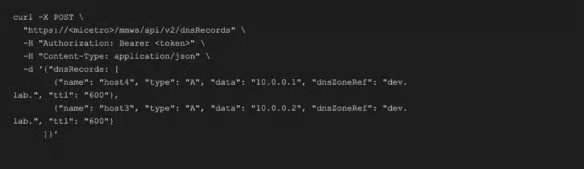
Bulk create DNS records
Get event history for a DNS zone

Create a custom property (property definition)

Get all DHCP scopes, sorted by DHCP server

Get all DHCP leases for a scope

Filtering on a custom property


Combining query parameters

Best practices
This section recommends best practices for designing, automating, and securing integrations built on the Micetro REST API. Because the API provides full programmatic access to DNS, DHCP, and IP address management resources, it’s essential to follow consistent standards that promote reliability, security, and maintainability. The following guidelines focus on key operational areas—including custom properties, role-based access control, bulk operations, change history, error handling, and security—to help ensure that your scripts and integrations follow proven patterns for safe and efficient interaction with Micetro.
Custom properties
- Use /propertydefinitions endpoints to define and manage custom fields on objects for business or technical metadata (e.g., asset owner, environment, location, or cost center).
- Store automation state, change history, and ownership tags as custom properties for traceability and reporting.
- Use custom property filters for reports and scripts: filter=owner=devops
- Document custom property names and types in your internal API style guide.
Role-based access control
- Every resource supports granular permissions—grant access on zones, ranges, groups, and more.
- Use /access endpoints to audit and manage permissions for any user or group.
- Always enforce least privilege for all API users (never use admin tokens in automation unless required).
- Use roles (created via /roles) to represent real team or function-based access.
- Rotate role assignments and regularly review audit logs for sensitive changes .
Bulk operations
- Endpoints like dnsrecords, ranges, and ipamrecords support batch create or update—submit multiple objects in a single POST for speed and efficiency.
- Bulk operations return structured responses, including per-object success or failure; always parse and report errors in automation.
- Use limit and filter to break large jobs into smaller, more reliable chunks.
- Batch updates are ideal for onboarding, migrations, and compliance fixes.
History
- Use event history endpoints (e.g., /history) to query all changes made to a resource or to audit user actions over time.
Error handling
- All error responses are structured JSON with codes and messages (see API docs for the list).
- Automation should always check HTTP status codes and parse error JSON for robust handling.
- Validate all data locally before submitting requests (e.g., IP address formats, property types).
- Log errors with complete request and response details for audit and troubleshooting.
- In bulk operations, handle both partial and total failures gracefully.
Security
- Use short-lived session tokens and store them in environment variables or secret vaults, never hardcoded.
- Rotate service account passwords or tokens regularly; never reuse tokens between environments (e.g., development and production).
- Restrict API user accounts to the minimum required privileges and scope.
- Review API access logs and failed authentication attempts regularly (see /history and admin console).
- Prefer HTTPS endpoints for all API calls and verify certificates.
- Automate session or token expiration checks in all persistent automation.
Postman use and workflows
The Micetro REST API is fully documented through an OpenAPI (Swagger) specification that you can import directly into tools such as Postman for interactive exploration and workflow automation. This section explains how to load the API definition, configure a Postman environment, and set up authentication workflows using session tokens. Following these steps provides a complete, ready-to-use workspace for testing endpoints, chaining authenticated requests, and managing common automation scenarios such as bulk updates or change requests. By keeping your Postman collections synchronized with the latest Micetro OpenAPI specification, you ensure your integrations remain accurate, efficient, and aligned with the current API schema.
Importing the API
- Download the OpenAPI/Swagger spec: https://<micetro>/mmws/api/swagger.json
- Import into Postman as a collection for complete, up-to-date endpoint and schema references.
- Create or configure an environment with these variables:

Using Postman for workflows
- Login workflow: Create a POST request to /sessions and set {{token}} from the response using a test script or environment variable.
- Chaining requests: Use Postman environments to automatically set Authorization: Bearer {{token}} in headers for all requests.
- Collections and Automation: Use folders for grouped workflows (e.g., “DNS records”, “Bulk operations”, “Change requests”). Save frequently used filters or bulk updates as reusable requests.
- Bulk import and testing: Import Swagger or OpenAPI directly for every new Micetro release to
Example: Automated Postman token acquisition (test script)
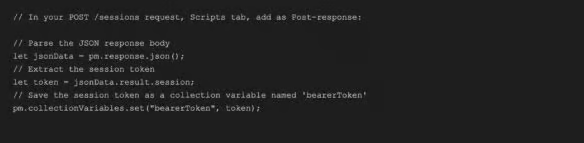
Then, in subsequent requests, use the variable: Authorization: Bearer {{bearerToken}}
Scripting examples for PowerShell
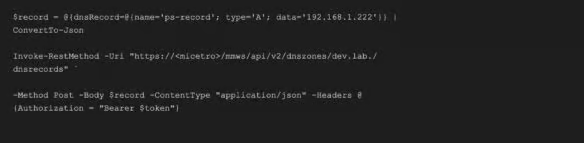
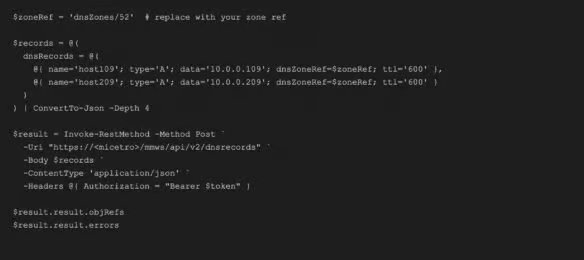
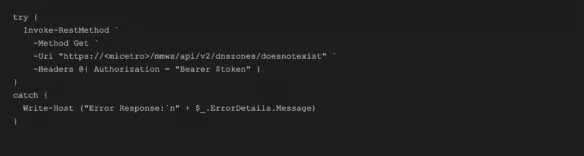
Using a scripting language such as PowerShell provides a powerful and flexible way to automate interactions with the Micetro REST API. PowerShell allows administrators and DevOps teams to script repeatable workflows, integrate Micetro data into broader IT automation frameworks, and perform complex operations across DNS, DHCP, and IP address management resources with minimal manual effort. Because PowerShell natively supports RESTful requests, JSON parsing, and secure credential handling, it’s ideal for building reliable, production-grade automation—whether for bulk updates, scheduled reporting, or integrating Micetro with other systems and service pipelines. Below are basic examples of how to use the Micetro API within PowerShell to authenticate, add records, and handle errors.
Authenticate and list DNS zones
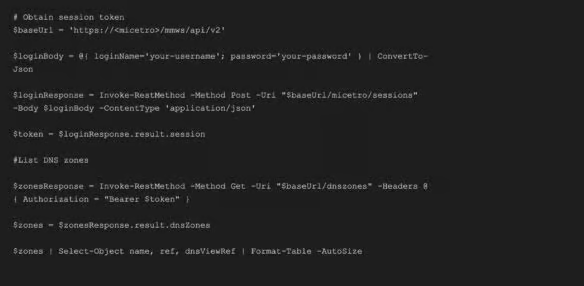
Add a DNS record
Bulk create DNS records
Error handling example
Scripting examples for Python
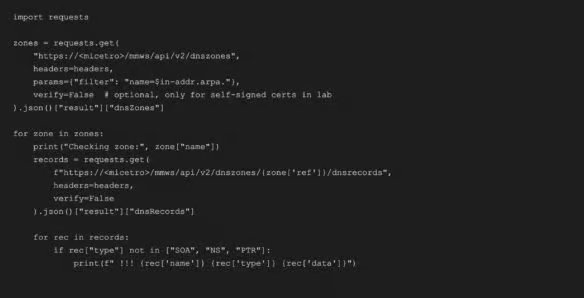
Python offers a versatile, cross-platform approach to automating interactions with the Micetro REST API. Its rich ecosystem of libraries for HTTP requests, JSON handling, and data processing makes it easy to build portable automation that runs consistently across Windows, Linux, and macOS. Whether used to integrate Micetro into existing IT workflows, perform analytics on DNS and IP address management data, or orchestrate large-scale configuration changes, Python provides a flexible foundation for extending Micetro’s capabilities beyond the UI.
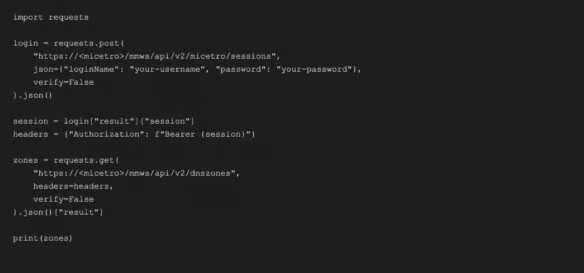
The following section offers brief examples to get started with using the Micetro API in Python.
Authenticate and list DNS zones
Add a DNS record
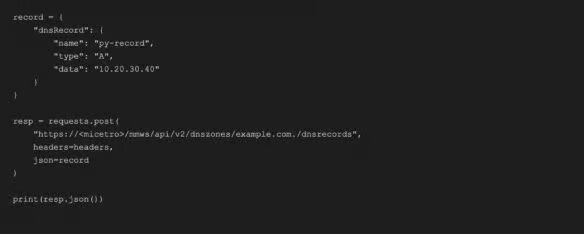
Bulk create DNS records

Find suspicious records in reverse zones
Error handling example


Key additional resources
To help you continue developing, automating, and integrating with Micetro, the following resources provide detailed technical guidance, API references, and community support. These materials ensure that your integrations remain aligned with current versions and best practices as Micetro evolves.
Micetro REST API documentation
- Interactive API documentation: https://<micetro>/mmws/api/doc/Explore endpoints, parameters, and live examples directly in your browser.
- OpenAPI/Swagger specification: https://<micetro>/mmws/api/swagger.jsonDownload the full schema for import into Postman or other API tools.
Developer and automation resources
- Micetro documentation portal: https://docs.bluecatnetworks.comGet comprehensive guides on API usage, automation modules, scripting, and system configuration.
- Automation examples: https://github.com/menandmiceVisit the Micetro GitHub for sample scripts in PowerShell and Python, plus advanced use cases with Ansible and Terraform.
- Postman collections:Import the latest Swagger definition to keep workflows up to date with every Micetro release.
Community and support
- BlueCat Care portal: https://care.bluecatnetworks.comAccess knowledge base articles, product updates, and technical assistance.
- BlueCat Community: https://community.bluecatnetworks.comJoin discussions with peers, share automation examples, and stay informed about new Micetro capabilities and releases.
- For advanced troubleshooting or custom automation, always consult the interactive API documentation and Swagger schema first. They reflect the latest API structure and supported parameters across Micetro versions.