
Omdia Micetro Technical Validation 2026
Simplifying DDI Management and Orchestration in Hybrid and Multicloud Environments
By Alex Arcilla, Principal Analyst – Validation Services Omdia
MARCH 2026
 Key takeawaysKey takeaways are generated with AI assistance. Because automated summaries can occasionally contain errors or miss important context, always refer to the full blog post for complete information.
This Omdia Technical Validation evaluates BlueCat Micetro as a unified DDI (DNS, DHCP, IPAM) management and orchestration solution for highly distributed on‑premises, hybrid, and multicloud environments. It addresses the real-world problem of fragmented, manual DDI workflows—spreadsheets and siloed servers—that cause operational inefficiency, increased errors, and reduced network availability by centralizing normalized DDI metadata, relationships, and state into a single web interface and API overlay without requiring rip‑and‑replace of existing infrastructure. The validation shows Micetro improves operational efficiency, uptime, and security while lowering capital and operational expense through centralized visibility, standardized workflows, agent‑free options where appropriate, and automation-ready APIs.
How does BlueCat Micetro handle existing multi‑vendor DDI infrastructure without requiring disruptive changes?
According to the Omdia validation, Micetro is deployed as a vendor‑agnostic overlay that connects to existing DNS/DHCP servers, Active Directory forests, and orchestration systems like Cisco Meraki without requiring rip‑and‑replace changes to network devices. Authoritative DNS and DHCP data remain on the source systems while Micetro centralizes normalized metadata, relationships, and operational state into the chosen database backend. Changes made in Micetro are pushed to source systems (and vice versa), enabling centralized control and automation while preserving existing infrastructure and reducing deployment disruption.
What practical operational benefits did Omdia observe when using Micetro for DNS, DHCP, and IPAM tasks?
Omdia observed that Micetro eliminated much of the manual effort for common DDI tasks by centralizing visibility and enabling wizard‑driven workflows and a unified API. For DNS, administrators can edit zones and records in a single interface with change history and fast search across millions of records. For DHCP, scope management and AD site assignments are discovered and adjusted centrally to prevent access and replication issues. For IPAM, Micetro aggregates router, VLAN, VRF, and ARP details, supports failover assignment, subnet monitoring, PTR verification flags, and automation to proactively detect and resolve IP conflicts and utilization issues, improving uptime and lowering operational overhead.
How does Micetro support automation and reduce the need for specialized vendor skills?
Omdia notes Micetro provides a unified API overlay and standardized web interface that expose the same workflows used for manual operations, enabling automation and self‑service without accounting for each vendor’s proprietary APIs or schemas. By normalizing DDI metadata and relationships in a central repository, Micetro ensures functional parity between manual and automated workflows across distributed environments. This reduces the need to acquire multiple vendor‑specific skills, lowers agent sprawl through agent‑free Microsoft DNS/DHCP management where appropriate, and helps organizations automate routine tasks to decrease operational complexity and costs.
Introduction
This Omdia Technical Validation documents our evaluation of BlueCat Micetro. We review how this solution helps organizations increase the efficiency and effectiveness of managing DNS, DHCP, and IPAM (DDI) data. Using Micetro can ultimately help in maximizing network availability and reliability while decreasing both capital and operational expenses.
Background
IT environments remain highly distributed for a reported 92% of organizations, with applications hosted across on-premises, cloud, colocation, and edge environments. Given this state, it is no surprise that 82% of organizations stated that their network environment is more complex than it was two years ago (Figure 1).
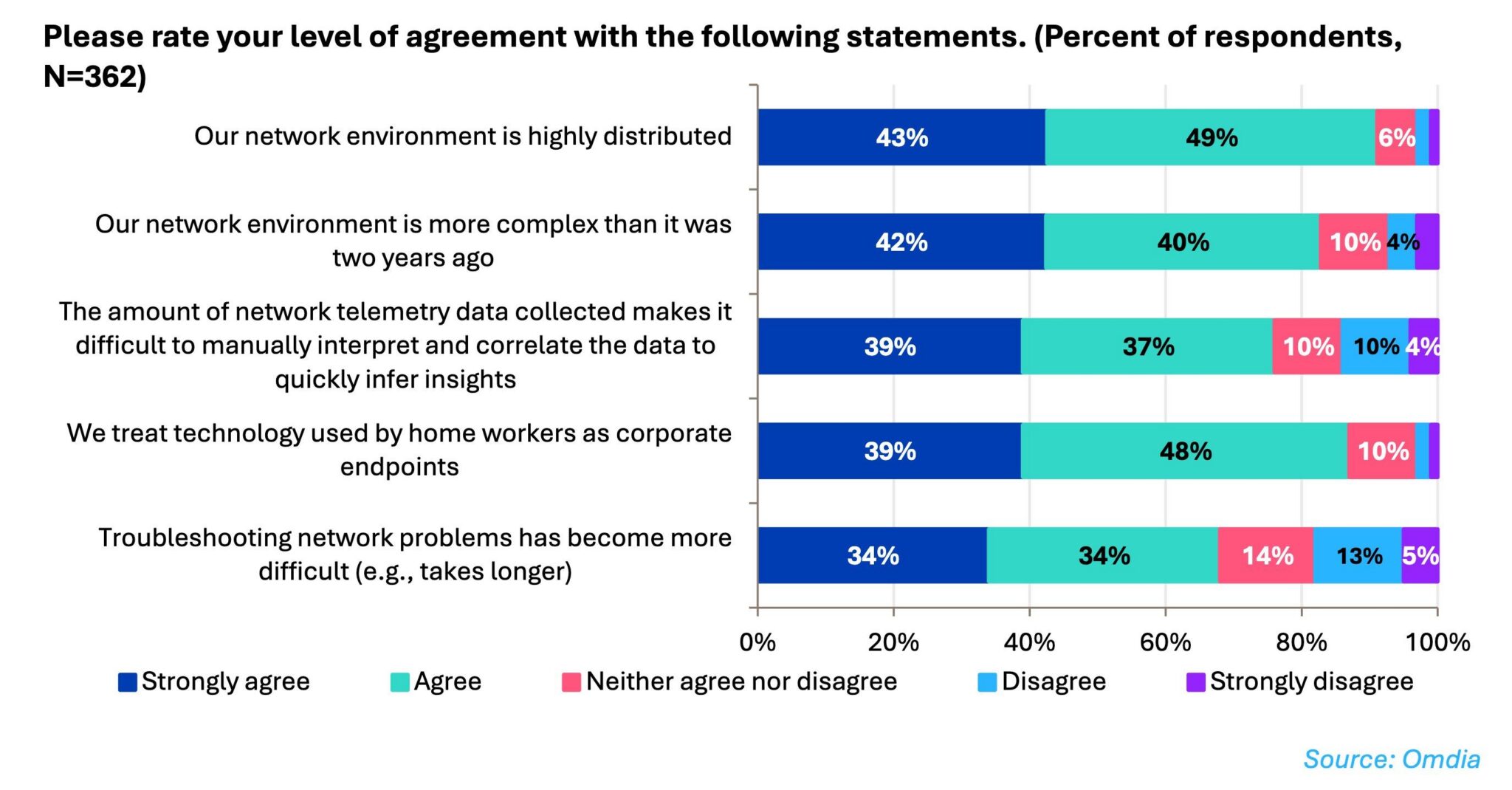
Figure 1. Highly distributed network environments are also considered complex
DDI management for on-premises environments is a tedious yet necessary task, as organizations need to manually stitch data from multiple silos (e.g., spreadsheets, servers, routers) to determine and update the relationships amongst the data. Maintaining this detailed level of network visibility is already difficult when dealing with multiple resources within data centers, branches, and edge locations.
As more organizations embrace hybrid and multicloud environments, DDI management becomes even more difficult, as on-premises and cloud DDI data are also maintained separately, leading to more manual work to maintain the proper relationships between the data. This results in a lack of comprehensive network visibility required for the consistent application of network and security policies along with operational inefficiencies in network management and control.
Installation of a DDI solution can also become an issue. Many follow a “rip and replace” model that requires network engineering teams to change their infrastructure to accommodate a new solution, rather than working with the existing network infrastructure.
Ideally, a DDI solution would remove the manual effort organizations typically spend on gathering DDI data, updating the relationships existing amongst the data to align with changing network requirements. The solution would centralize and update network visibility from a DDI perspective and enable workflow automation and orchestration.
BlueCat Micetro
BlueCat Micetro is designed to help organizations simplify DDI management and orchestration. The solution unifies DDI management across on-premises, hybrid, and multicloud environments (see Figure 2). Organizations can leverage Micetro as its “single source of truth” when discovering and updating the data and its relationships to achieve comprehensive network visibility and control via a single web interface.
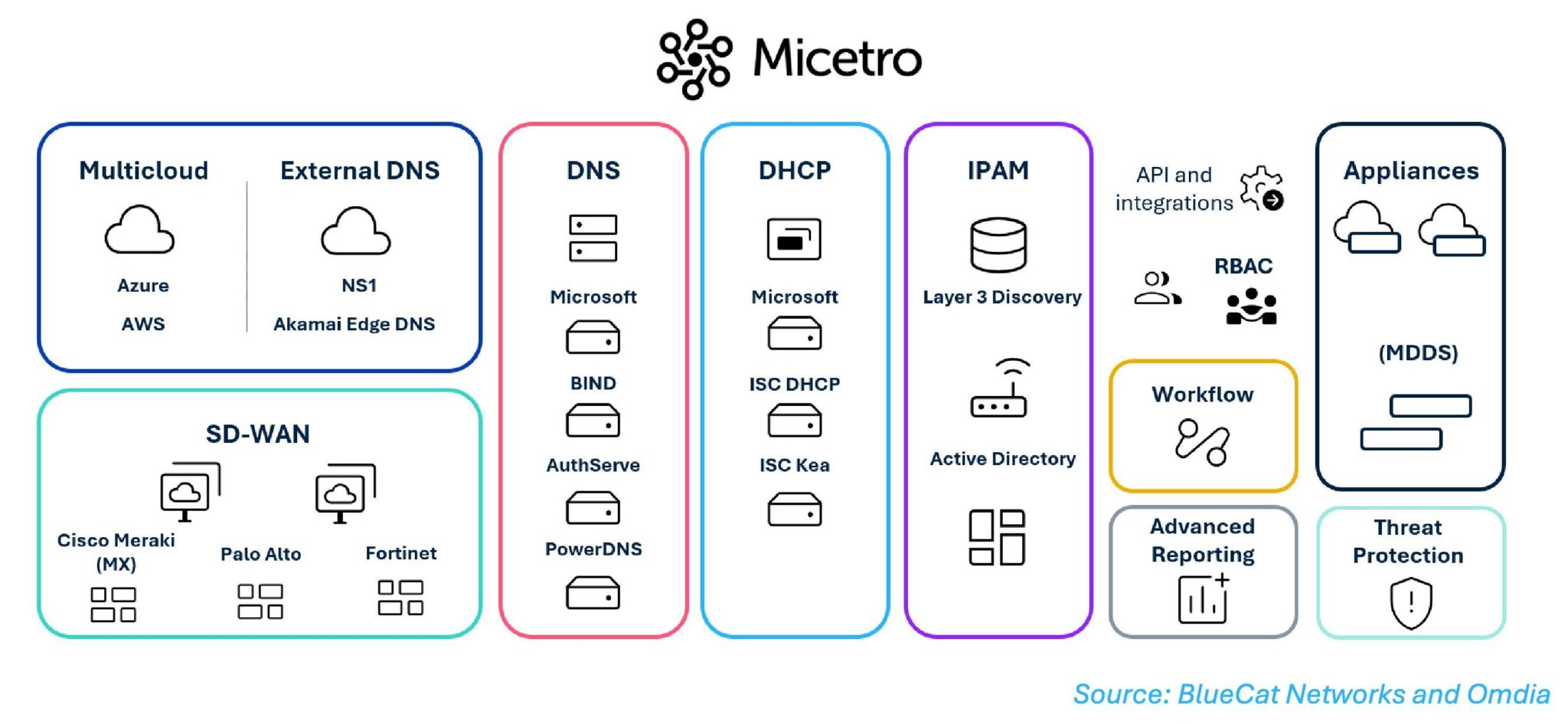
Figure 2. BlueCat Micetro
This vendor-agnostic solution enables organizations to work within multi-vendor networks, as DDI data originates from a broad range of DNS/DHCP server types, along with Active Directory (AD) forest integration and Cisco Meraki SD-WAN orchestration. Implementing Micetro can be accomplished without disrupting normal operations, as no “rip and replace” of existing devices occurs; the solution is simply an overlay onto an organization’s existing network environment. Micetro also reduces agent sprawl by supporting agent-free management for Microsoft DNS and DHCP, where appropriate, using lightweight proxy agents only when required.
Micetro centralizes the storage of all normalized DDI metadata, relationships, and operational states within an organization’s choice of Micetro database backend. Authoritative DNS and DHCP data remain on the source systems. Organizations no longer need to struggle with managing siloed data, as changes in Micetro are pushed to the source system and vice versa.
Organizations also do not need to acquire new skill sets, as BlueCat Micetro standardizes workflows across vendor-specific products. These workflows, available through the Micetro web interface, are exposed through its unified API, ensuring functional parity between manual operations and automated integrations.
With Micetro, organizations can reap the following benefits:
- Improved network consistency. Instead of managing DDI data and their interrelationships manually (e.g., via spreadsheets), Micetro gathers and maintains these records, even when changes are made to the source data. This reduces the chance of DDI-related errors that can unnecessarily cause network issues.
- Centralized visibility and management. Organizations can manage and control DDI data via a single web interface, as the relationships between DNS servers, DHCP servers, and IP addresses are presented without manually cross-referencing multiple data sources. Micetro eliminates the need to manually track, update, and resolve DDI errors.
- Unified API overlay for enabling automation and orchestration. Instead of accounting for vendor-specific APIs, schemas, and behaviors when automating operational workflows, Micetro offers a centralized API overlay that enables organizations to build automation and self-service workflows that can be applied consistently across highly distributed environments. When automating and orchestrating common tasks, organizations can reduce operational complexity and overhead.
- Improved uptime. Using Micetro’s built-in tools for IPAM accuracy, DNS workflow transparency, DHCP reliability, xDNS redundancy for DDoS defense, and reporting for trend and vulnerability analysis, organizations can increase overall network availability by maintaining network consistency and isolating potential threats and attacks.
- Lower expenses. With the combination of eliminating forklift upgrades, reducing the need to acquire new skills, and automating workflows, Micetro helps decrease overall capital and operational expenses.
Omdia technical validation
Using briefings and online demonstrations, Omdia validated the benefits that organizations can expect to gain from using BlueCat Micetro. We specifically focused on how Micetro can significantly reduce the time and effort spent on DDI management through specific use cases. To place our review into perspective, Omdia assumed that organizations rely on manually driven data gathering and updates, while records are stored electronically in one or more documents (e.g., spreadsheets).
Simplified DNS management
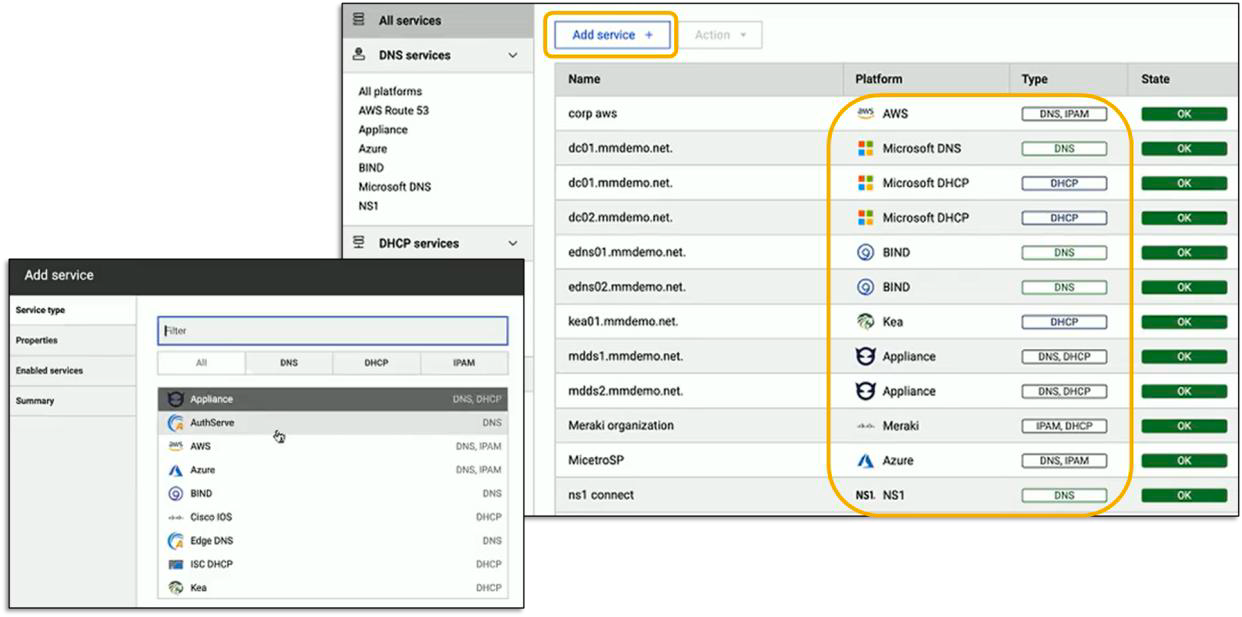
Before delving into Micetro’s DNS management capabilities, Omdia first viewed the DDI services present in the network environment. We noted how Micetro centralizes DDI visibility, as all available services and their sources (e.g., appliances installed on-premises, public clouds) are displayed in a single interface (see Figure 3). Administrators do not need to maintain multiple documents to access this information.
Adding a new service is as simple as clicking on “Add New Service,” which initiates a wizard-driven process. Once Micetro connects to the data source, whether on-premises or in a public cloud, data is pulled into the chosen central repository. This eliminates the need to manually gather data and relevant details (e.g., DNS zones, configuration, record types, IP address pools) from all available DDI services. Omdia noted the time and effort saved in manually collecting and recording such data.
Source: OMDIA
Figure 3. Centralized visibility of DDI data
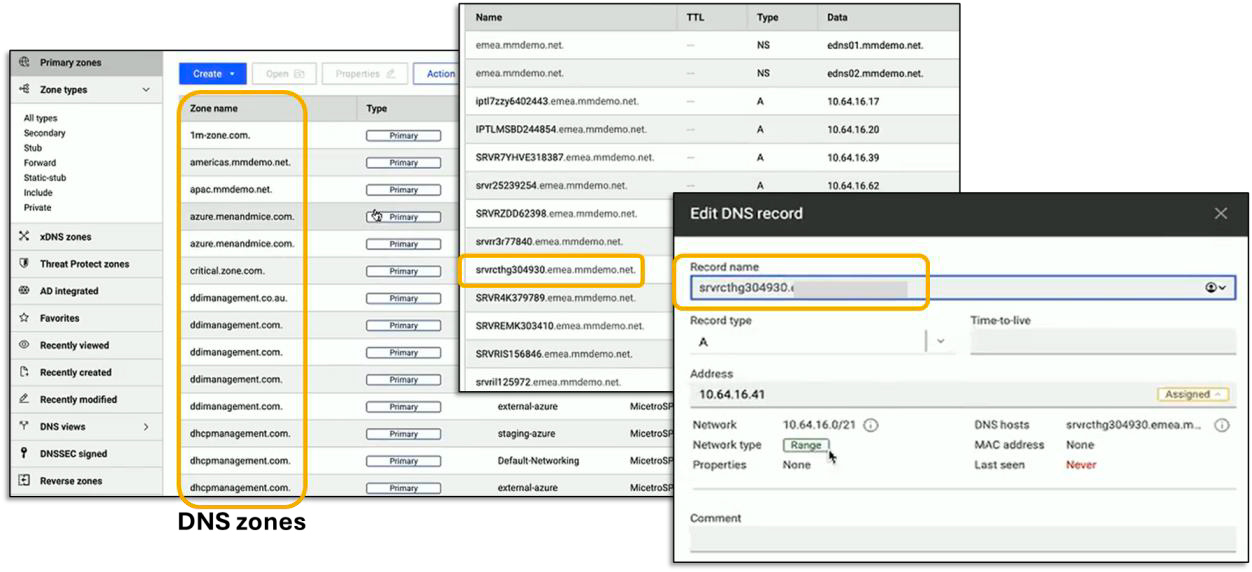
Omdia proceeded to examine Micetro’s DNS management capabilities. After clicking on the DNS tab, we saw that all DNS data within the network was displayed (see Figure 4).
Source: OMDIA
Figure 4. Editing DNS records within a single DNS zone
To edit any DNS records, we only needed to select and open a DNS zone, then choose the record to edit (see right of Figure 4). With this capability, the need to edit DNS records manually on the source device is eliminated. Once the changes are made in Micetro, they are pushed out to the network (and vice versa). Micetro also maintains change history to assist with traceability.
By updating records via the Micetro interface, not only do organizations decrease operational overhead, but they also reduce network errors, thereby maintaining high network availability.
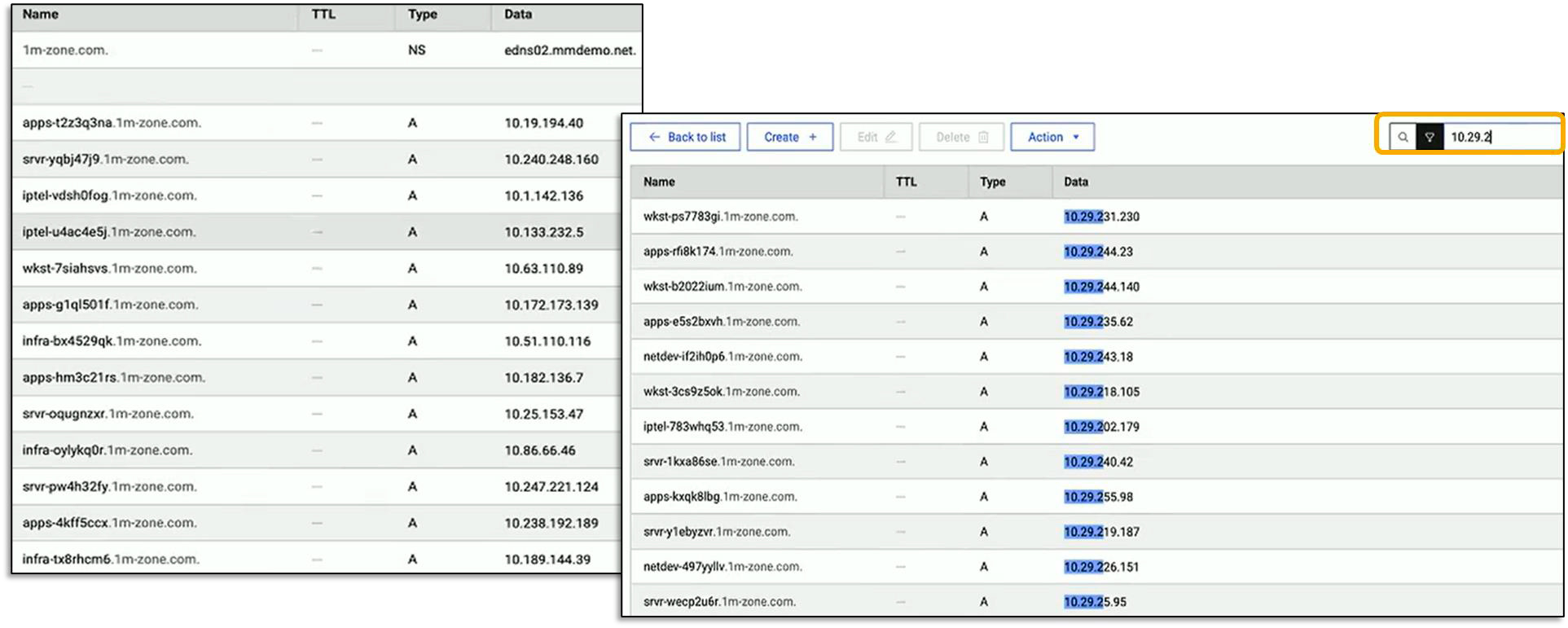
When dealing with DNS records amongst multiple documents, locating specific zones can also be slow and cumbersome. Micetro can speed up this task, as the solution has been designed to be fast and responsive once DDI data is centralized. As shown in Figure 5, we opened up the “1m-zone.com” DNS zone and found that it contains over one million records. When searching for records containing “10.29.2,” Micetro instantly displayed the 1,062 records containing the partial IP address.
Source: OMDIA
Figure 5. Searching for “10.29.2” in one million DNS records
Simplified DHCP Management
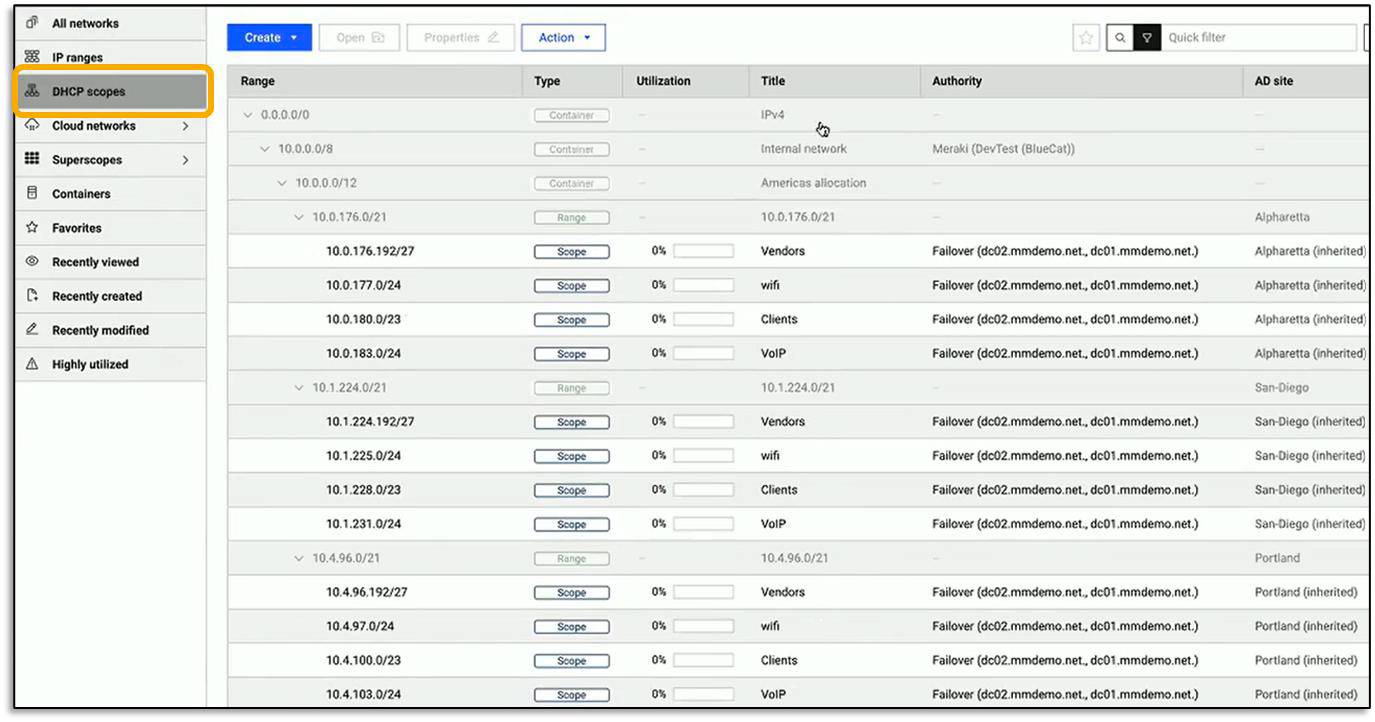
To evaluate how Micetro simplifies DHCP management, Omdia navigated to the “DHCP scopes” menu option and viewed the existing scopes within our test environment (see Figure 6). Centralizing DHCP scope data can help an administrator manage network configurations for multiple subnets. Manually tracking details such as available IP address ranges, subnet mask, gateway (router), and DNS servers is tedious and time-consuming, but Omdia again observed that Micetro increases operational efficiency, as manual effort is practically eliminated.
Source: OMDIA
Figure 6. Centralizing visibility and management of DHCP scopes
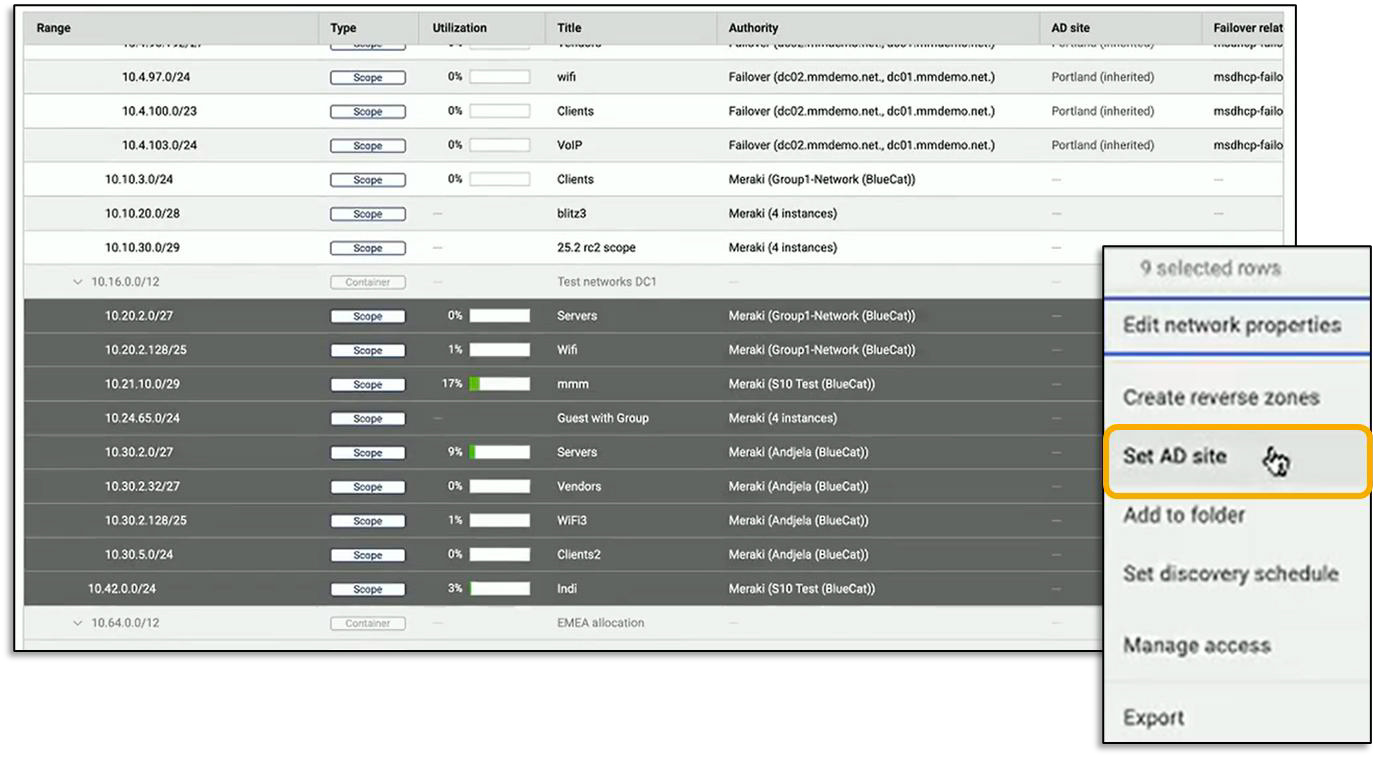
Organizations that use AD want to ensure that network access requests are authenticated before an IP address is assigned. To ensure that all scopes are associated with the appropriate AD site, we sorted the list to uncover those scopes not yet assigned (see Figure 7). Assigning the uncovered scopes to an AD site only required that we select those scopes, right-click, and choose “Set AD site” from the pop-up menu. Assigning scopes helps increase AD reliability and efficiency so that access is granted without unnecessary delay. If not, organizations can face issues such as increased client login times and delayed access to network resources, which can affect normal operations (e.g., data replication between data centers).
Source: OMDIA
Figure 7. Assigning DHCP scopes to an AD site
Without Micetro’s centralized visibility, an administrator would most likely discover unauthorized access after the fact. Instead, uncovering unassigned IP addresses proactively closes this gap.
Simplified IPAM
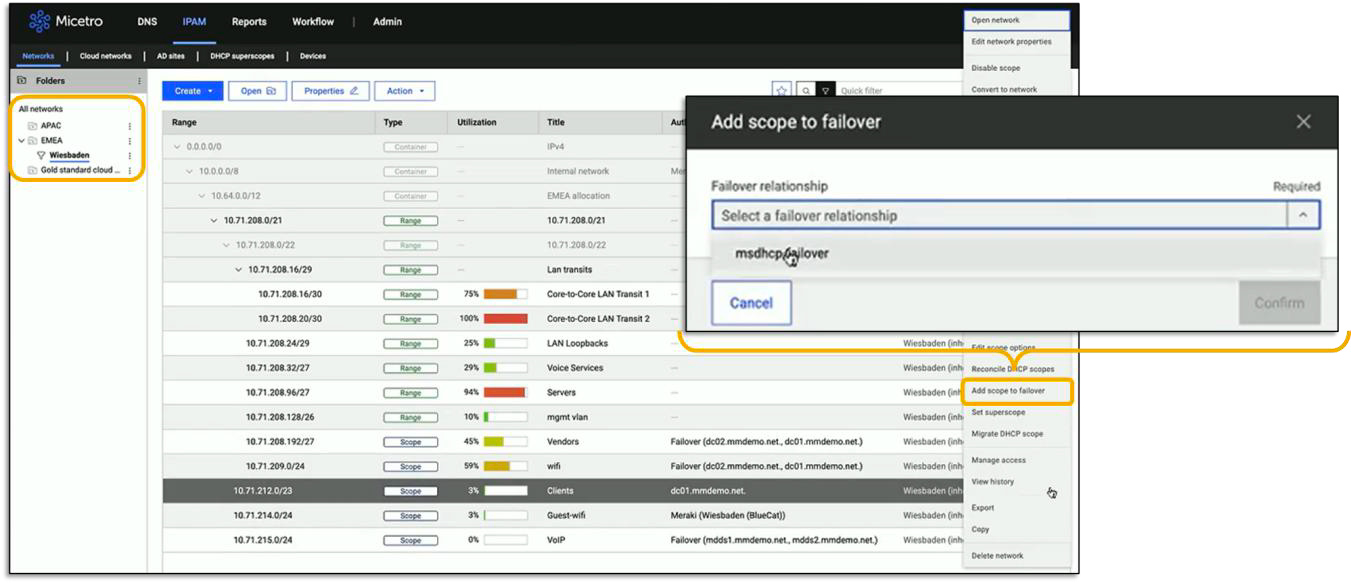
To evaluate Micetro’s IPAM management capabilities, Omdia navigated to the IPAM tab of the Micetro interface. While all DHCP scopes can be displayed at once, Micetro can enable users to organize them into folders. In this demo, scopes were grouped according to regions and cities where on-premises networks are located (e.g., APAC, Wiesbaden in EMEA) along with public cloud resources (see top left of Figure 8).
Source: OMDIA
Figure 8. Selecting IP address scope for failover purposes
While scopes are prominently displayed, Micetro records other data from the routers (beyond data recorded in DHCP servers) such as subnets associated with the router interface, VLANs to which IP addresses are assigned, VRF2 instances, and ARP tables.3 With this level of detail, administrators have a comprehensive view of the network.
Instead of discovering configuration errors when a network issue occurs, Micetro can flag issues that can be resolved proactively. To illustrate, Omdia observed that a scope (range) of IP addresses, assigned to “Clients,” did not have any redundancy in case a connection failed (see Figure 8). With Micetro, we simply right-clicked on the relevant line item, selected “Add Scope to Failover,” and chose from the available options to function as a failover connection(s). Administrators no longer need to search through documents to find and validate the availability of an appropriate scope to be a failover option or access the relevant network devices to implement these changes.
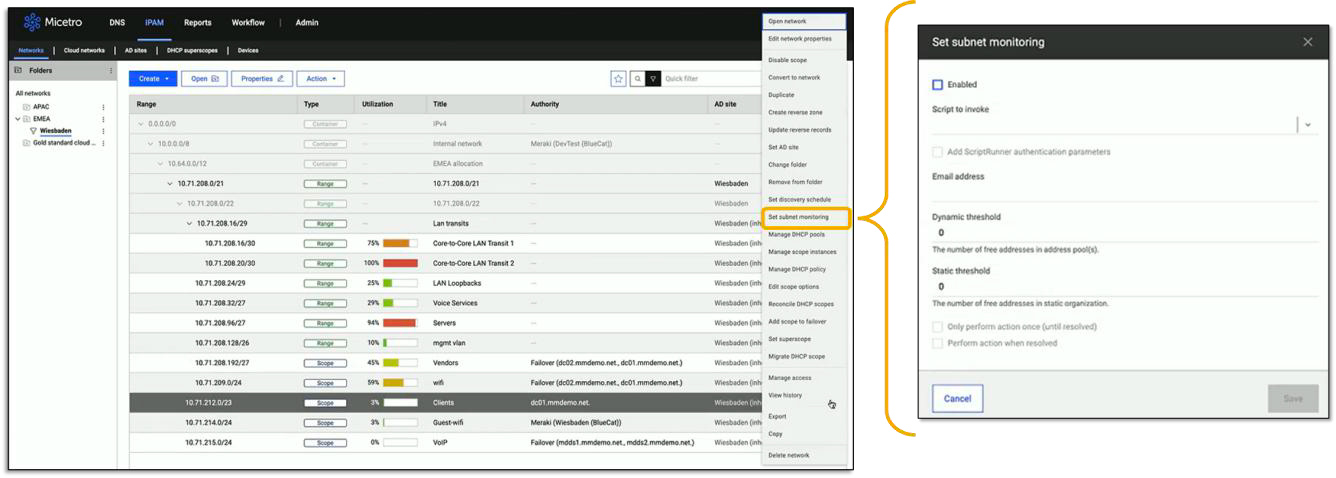
From this view, we could also monitor subnet utilization by right-clicking on any scope and selecting “Set subnet monitoring” (see Figure 9). Here, we selected the scope named “Client.” By activating this alert setting, an administrator can track real-time utilization of IP addresses within the selected scope. This helps to proactively ensure that users always have connectivity to that specific subnet.
Source: OMDIA
Figure 9. Monitoring subnet utilization
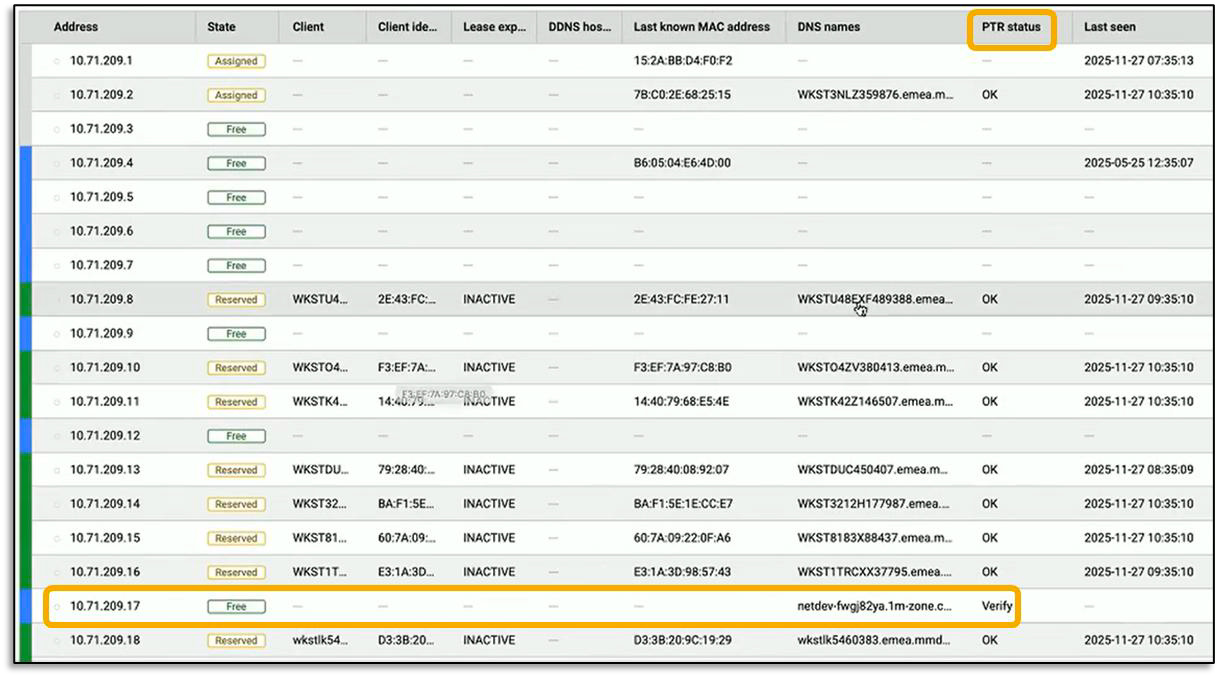
Omdia then examined the IP addresses associated with a single DHCP scope. We selected the line item associated with “10.71.209.0/24” and revealed all IP addresses within the scope (see Figure 10). This view provided details such as whether an IP address is available or reserved, DNS names, and last-known MAC address. We could also monitor DNS PTR status to ensure that the mapping of an IP address to a fully qualified domain name (FQDN) was the same as in reverse. Administrators only need to check those IP addresses flagged with “Verify” under “PTR Status,” eliminating the need to review all IP addresses. Once discovered, administrators can use Micetro to resolve any issues with automation.
Source: OMDIA
Figure 10. All IP addresses associated with 10.71.209.0/24
Conclusion
DDI management is a tedious yet necessary task, as organizations typically rely on manually driven processes to manage and update DDI data. Yet, the emergence of hybrid and multicloud environments makes DDI management more difficult. This results in a lack of comprehensive network visibility required for the consistent application of network and security policies along with operational inefficiencies in network management and control.
BlueCat Micetro is designed to simplify DDI management and orchestration. The solution unifies DDI management across on-premises, hybrid, and multicloud environments, and an organization can leverage Micetro as its “single source of truth” when discovering and updating the data and its relationships to achieve comprehensive network visibility and control via a single web interface.
Based on our observations of how Micetro operates in specific use cases, Omdia validated that this solution benefits organizations by increasing the efficiency of DDI management. Instead of gathering data from multiple devices and updating those devices individually to reflect the proper relationships between DDI data, organizations can use Micetro to centralize the visibility and control of DDI data. By doing so, organizations can:
- Increase website availability, performance, and security when ensuring that the mapping between domain names and IP addresses is correct.
- Eliminate network conflicts when ensuring that IP addresses are available and allocated properly, as well as prevent unauthorized devices from gaining network access.
- Scale visibility and control without the need to add more infrastructure.
Omdia’s validation reinforces that BlueCat Micetro can significantly simplify DDI management, regardless of network complexity and size. We are confident that Micetro can support your organization should you face challenges in implementing and operating a DDI management solution and strongly suggest placing this solution on your shortlist.
Copyright notice and disclaimer
The Omdia research, data, and information referenced herein (the “Omdia Materials”) are the copyrighted property of TechTarget, Inc. and its subsidiaries or affiliates (together “Informa TechTarget”) or its third-party data providers and represent data, research, opinions, or viewpoints published by Informa TechTarget and are not representations of fact.
The Omdia Materials reflect information and opinions from the original publication date and not from the date of this document. The information and opinions expressed in the Omdia Materials are subject to change without notice, and Informa TechTarget does not have any duty or responsibility to update the Omdia Materials or this publication as a result.
Omdia Materials are delivered on an “as-is” and “as-available” basis. No representation or warranty, express or implied, is made as to the fairness, accuracy, completeness, or correctness of the information, opinions, and conclusions contained in Omdia Materials.
To the maximum extent permitted by law, Informa TechTarget and its affiliates, officers, directors, employees, agents, and third-party data providers disclaim any liability (including, without limitation, any liability arising from fault or negligence) as to the accuracy or completeness or use of the Omdia Materials. Informa TechTarget will not, under any circumstance whatsoever, be liable for any trading, investment, commercial, or other decisions based on or made in reliance of the Omdia Materials.
Footnotes
1 Source: Enterprise Strategy Group (now Omdia) Research Report, The Role of AI and Automation in Networking, August 2024.
2 Virtual routing and forwarding (VRF) is a technology that allows multiple instances of a routing table to coexist within the same router at the same time. This allows for overlapping IP addresses.
3 An address resolution protocol (ARP) table acts as temporary storage of IP-to-MAC mappings, enabling a host to contact a router.