
Case Study: DNS data identifies network performance issues
In this case study, we see how DNS data provides critical clues to identifying and mitigating network performance issues.



 Key takeawaysKey takeaways are generated with AI assistance. Because automated summaries can occasionally contain errors or miss important context, always refer to the full blog post for complete information.
The article describes how DNS visibility helped a large enterprise diagnose and resolve a major VDI performance issue caused by cascading PTR and LLMNR queries from a new workstation image. By analyzing client-level DNS telemetry in BlueCat's DNS Edge (including high NXDOMAIN volumes, simultaneous PTR timestamps, and integration with Splunk and network utilization data), the team identified a firewall setting that triggered reverse lookups which failed due to inconsistent Windows reverse registration. Disabling the firewall reverse lookup restored performance, eliminating roughly 5,000 queries per second and resolving the VDI connectivity problems while highlighting the value of on-network DNS security and analytics for root-cause investigations.
What DNS indicators revealed the root cause of the VDI performance problems?
The investigation surfaced two key DNS indicators: exceedingly high NXDOMAIN volumes and a large number of PTR (reverse lookup) queries with identical timestamps across problem subnets. These signals pointed to failed reverse name-lookups originating simultaneously from many hosts. When triangulated with network utilization and packet captures, the team also observed a surge of LLMNR broadcasts tied to the same failed reverse lookups. Together, the NXDOMAIN spikes, synchronized PTR timestamps, and LLMNR activity revealed a cascading lookup failure rather than an application-layer issue.
How did BlueCat tools and integrations help the team investigate the issue?
BlueCat’s DNS Edge provided granular, client-level DNS telemetry and a DNS insights and analytics tab that visualized high-volume query types and temporal patterns. The platform allowed easy pivoting from logs into graphical views, and the team leveraged a free Splunk app integration to drill deeper into query patterns. These capabilities enabled rapid correlation of DNS logs with subnet behavior and network utilization data, helping the team identify that the local firewall was the top DNS consumer and trace the chain of PTR failures and ensuing LLMNR broadcasts.
What corrective action resolved the problem and what was the operational impact?
The team disabled the firewall’s reverse lookup function on the affected workstation image. That single configuration change immediately eliminated the cascade of PTR and LLMNR queries, restoring VDI connectivity across impacted subnets. Operationally, the change reduced DNS load by roughly 5,000 queries per second—about half of the network’s queries—dramatically lowering strain on core infrastructure and resolving the performance degradation caused by the reverse-lookup cascade.
The Domain Name System (DNS) is a powerful tool for enhancing visibility into all aspects of a network. At an individual query level, DNS records are a strong indicator of user intent – useful for tracking anomalous behavior back to the source device or IP address. In aggregate, DNS traffic paints a picture of how well a network is operating – useful for an overall assessment of network security and performance.
One of BlueCat’s large enterprise customers recently discovered how powerful the DNS protocol can be in identifying and mitigating large-scale network performance problems.
It all started with a noticeable lag in performance for users of the company’s virtual desktop infrastructure (VDI). Certain subnets with newer workstation images were facing particular connectivity problems. These subnets usually had between 1,000-3,000 active VDI clients.
DNS data provides critical clues
Looking into the DNS request data collected by BlueCat’s intelligent security system, a clear pattern started to emerge. The problematic subnets showed exceedingly high NXDOMAIN volumes, indicating that something wasn’t resolving correctly. At the same time, the subnets also showed a large amount of anomalous PTR (reverse lookup) activity.
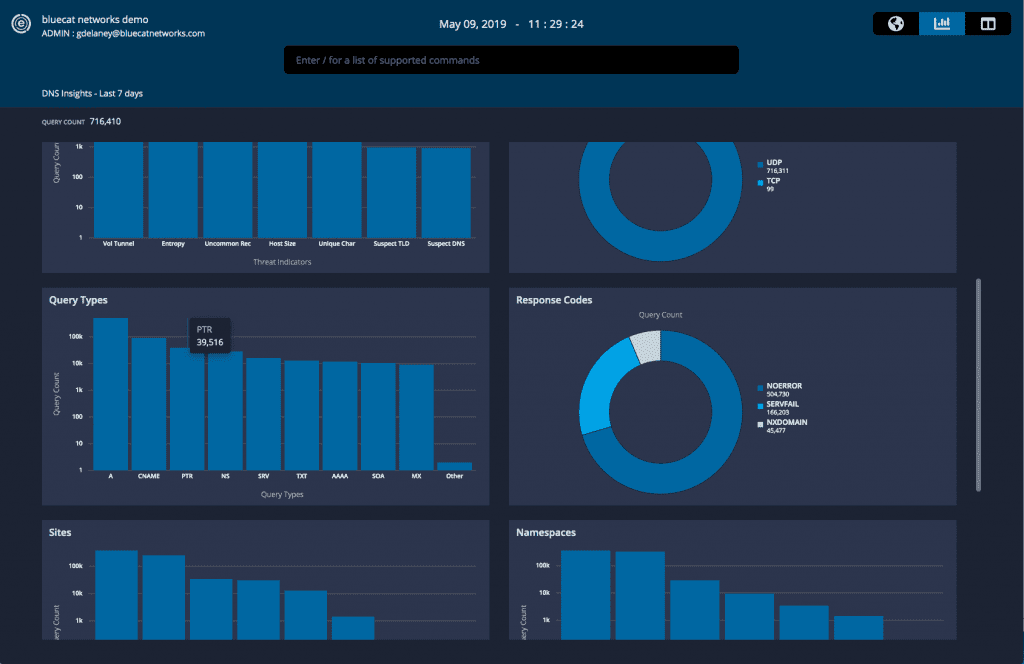
The PTR activity all had the same timestamp, indicating a simultaneous barrage of reverse lookups from across the network.
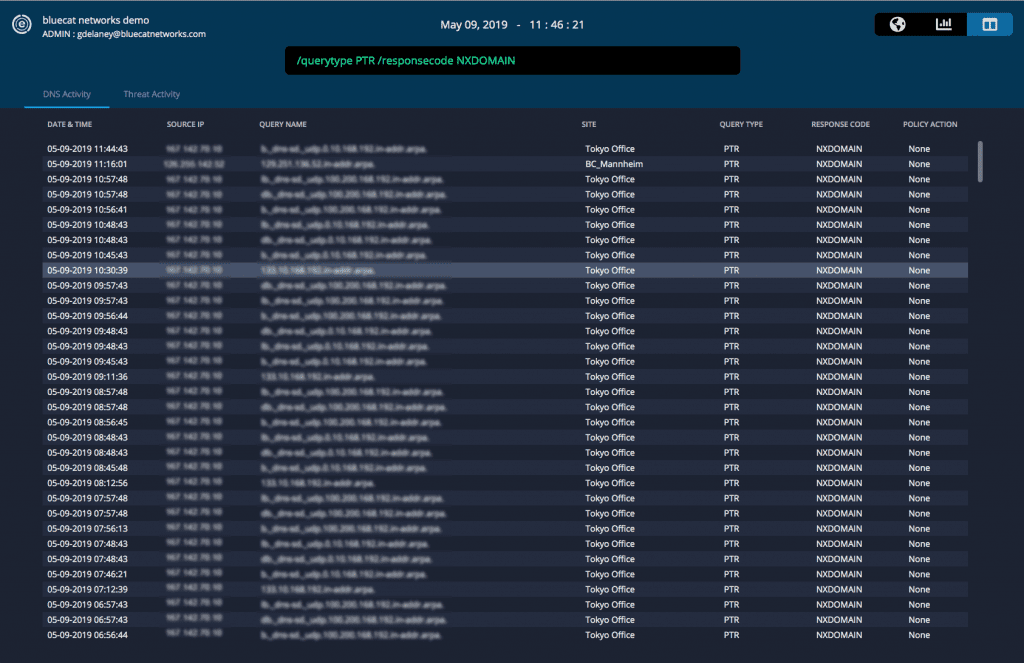 With BlueCat, users can easily adjust the search command to pull up relevant logs. With one click, pivot into the DNS insights and analytics tab for a graphical view of those logs. Integrate easily with Splunk with our free Splunk app to drill deeper into query patterns.
These data points were then triangulated against network utilization information for various applications. It emerged that the local firewall was the largest consumer of DNS on the network. Looking at packets from workstations impacted by performance issues, a large number of Link-Local Multicast Name Resolution (LLMNR) queries were also identified.
Identifying root causes
High utilization of DNS by the local firewall in combination with a surge of LLMNR queries finally allowed the team to piece together the issue. Here’s what was happening:
A newer version of a workstation image contained a firewall setting that enabled reverse name look-ups on connections. That same image had LLMNR and NetBios enabled.
For an inbound connection, the firewall would attempt to perform a reverse name look-up through a PTR query. Those queries failed due to a Windows registration issue – the clients were not consistently registering reverse records. The DNS result was an NXDOMAIN.
When the lookup failed, the client would send out an LLMNR broadcast to all other clients on the subnet. Those clients would then perform PTR queries on the same record, producing the same NXDOMAIN result.
The firewall kept producing PTR and LLMNR queries across the network in an increasing cascade. There were so many lookups that network performance began to degrade – hence the connectivity issues faced by VDI clients in a growing number of subnets.
Solving the problem and monitoring results
Once they discovered the source of the issue, the team turned off the firewall’s reverse lookup function. Returning to the DNS Edge console, the team saw results in real time. That simple switch immediately improved network performance to the tune of around 5,000 queries per second – around half of all network queries! The change quickly restored VDI connectivity and dramatically reduced the strain on core network infrastructure. The spike in PTR and NXDOMAIN queries vanished.
In this case, the granular, client-level DNS data from DNS Edge provided a critical clue which allowed the network team to identify the source of performance issues. At a basic level, this shows the core value of collecting and analyzing DNS data. Without this information at hand, the team may have gone down the wrong path in attempting to mitigate VDI performance issues. They would have never expected DNS as a source of the problem. They probably would have pursued other (wrong) root causes instead.
This also highlights the value of a DNS security system which can be deployed at the source of queries. Externally-facing DNS firewalls would not have detected the PTR and NXDOMAIN queries, as they never made it to the network boundary. Only by looking deeper into the network was the team able to discover the critical information needed to rectify the core issue.
Learn more about the security gold just sitting on your DNS servers, and how it can be used for root cause investigations, in our video about reducing incident response time.
Related content

Get answers from the LiveNX data you already have with LiveAssist
Learn how LiveAssist, the AI-powered add-on for LiveNX, turns your network data into fast, guided answers, with value you can see in days.

Get total control of your DDI infrastructure with Micetro’s unified API
Stop juggling between network tools and use Micetro’s RESTful API for complete control over your DDI infrastructure and cloud environment.

BlueCat MCP servers bring network intelligence to your AI assistant
Our MCP servers provide a standard integration layer that makes it easy to connect the AI tools you already use to BlueCat products.

We bet on Intelligent NetOps two years ago. Infoblox now has too.
With Infoblox acquiring Kentik, BlueCat’s CEO confirms its vision for a single platform unifying DDI, network monitoring, and observability.