
DNS Edge: Our First 2019 Release (We’re just getting warmed up)



 Key takeawaysKey takeaways are generated with AI assistance. Because automated summaries can occasionally contain errors or miss important context, always refer to the full blog post for complete information.
The article announces the first 2019 release of BlueCat DNS Edge, focused on improving visibility, control, and operational troubleshooting for DNS queries. Key enhancements include interactive DNS insight graphs that let operators click data points to refine filters and drill into query details, display of Authoritative Nameserver information in query details to enable policy creation against registrars or known nameservers, and the ability to clear caches for all Service Points at a Site to accelerate service moves and reduce support impact. These features are presented as ways to speed root-cause discovery, enforce security and operational policies, and reduce customer downtime when DNS or service IP changes occur.
How do the new interactive DNS insight graphs help with troubleshooting?
The interactive DNS insight graphs let users click on a specific data point to automatically adjust filters and update all related graphs, enabling fast narrowing from broad metrics to the exact subset of interest. Users can click subsequent data points to drill deeper and then jump to the DNS activity page to view the individual queries driving those results, for example isolating low-volume NXDOMAIN queries that may indicate a server misconfiguration. This workflow accelerates finding the “needle in the haystack,” reducing time to identify problematic query types and the underlying causes.
What operational control does displaying Authoritative Nameserver information provide?
Including Authoritative Nameserver details in DNS query records gives administrators visibility into which external nameservers are providing answers, allowing them to create targeted policies based on that data. For example, organizations can add registrars or nameservers with poor reputations to a domain list and block or restrict responses from those authoritative sources, or apply policies per Site to allow only trusted authoritative nameservers for IoT or point-of-sale devices. The interface also offers checkboxes to apply policies on either the query or the answer or specifically against authoritative nameservers, enabling finer-grained security and operational controls.
When and why would an administrator use the Service Point cache-clearing feature?
An administrator would clear Service Point caches at a Site when changes that should take effect immediately—such as moving a corporate service to a new IP address—are blocked by existing cached responses that have not yet expired. Clearing the cache for all Service Points on a per-Site basis forces DNS resolvers to fetch updated records rather than relying on stale cached entries, avoiding customer-facing outages and reducing help-desk load. This feature is presented as a simple, site-level action (a button click) to speed deployment changes and eliminate avoidable user impact without waiting for TTL expiry.
The polar vortex may have cooled things down, but BlueCat DNS Edge is getting warmed up. We just kicked off the first 2019 release, providing customers easier insight and more visibility and control when a DNS query is answered.
Let’s walk through the main highlights and how organizations will use them.
DNS Insight Graphs Become Interactive
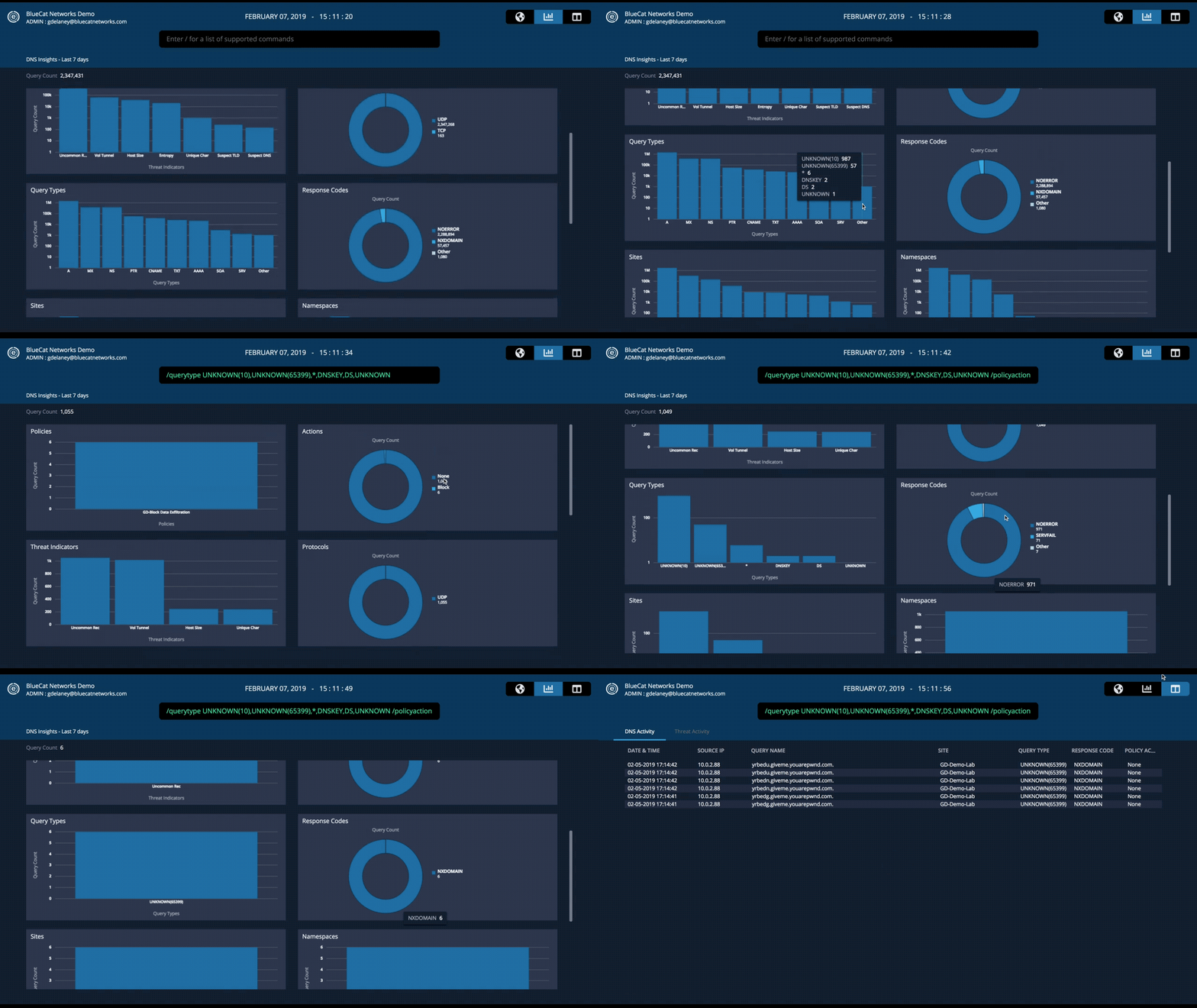
What’s the cliché phrase? “It’s like finding a needle in a haystack.” It’s been said time and time again when talking about DNS, and we couldn’t agree more. This update gets you to the needles you care about, faster. Now you can hone in on a specific data point with a simple click, adjusting the filter and all graphs around that data point. Click subsequent data points to drill deeper. Then, navigate over to the DNS activity page to review the queries behind the results. It’s like having a giant magnet to find the needles – and who doesn’t like giant magnets?
Check out this animation of the feature in action. In this example, we may be interested in viewing low-volume queries not affected by policies, leading us to discover query types that are NXDOMAIN—perhaps indicating a server misconfiguration. To look closer at all queries matching this search, we can click the DNS activity tab to view all queries matching this criteria within the last 30 days.
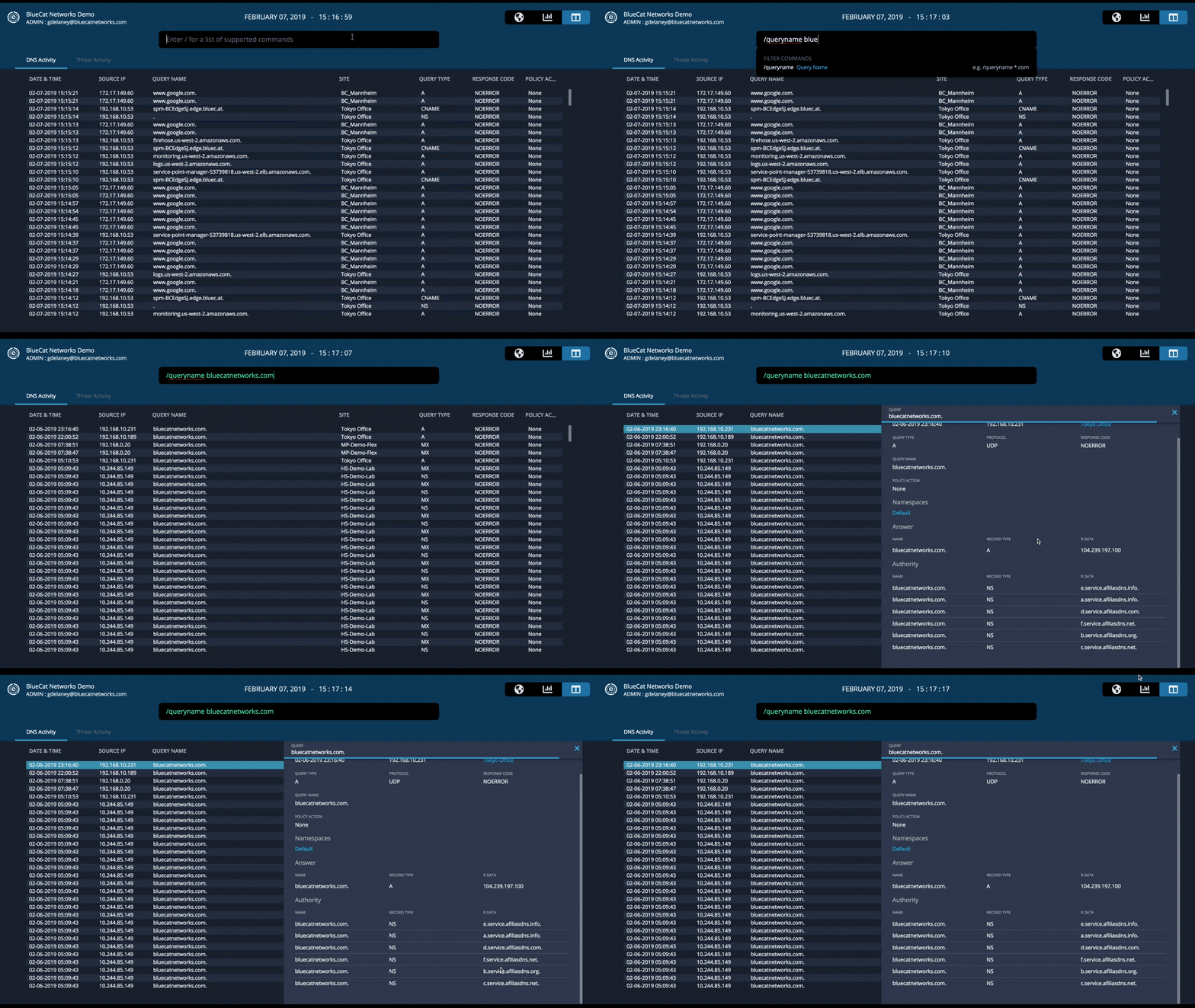
More data with each query! Adding Authoritative Nameservers to the details
Recently discovered were tactics by adversaries to hijack DNS infrastructure. Now, DNS Edge displays the Authoritative Nameserver within the details of a DNS query.
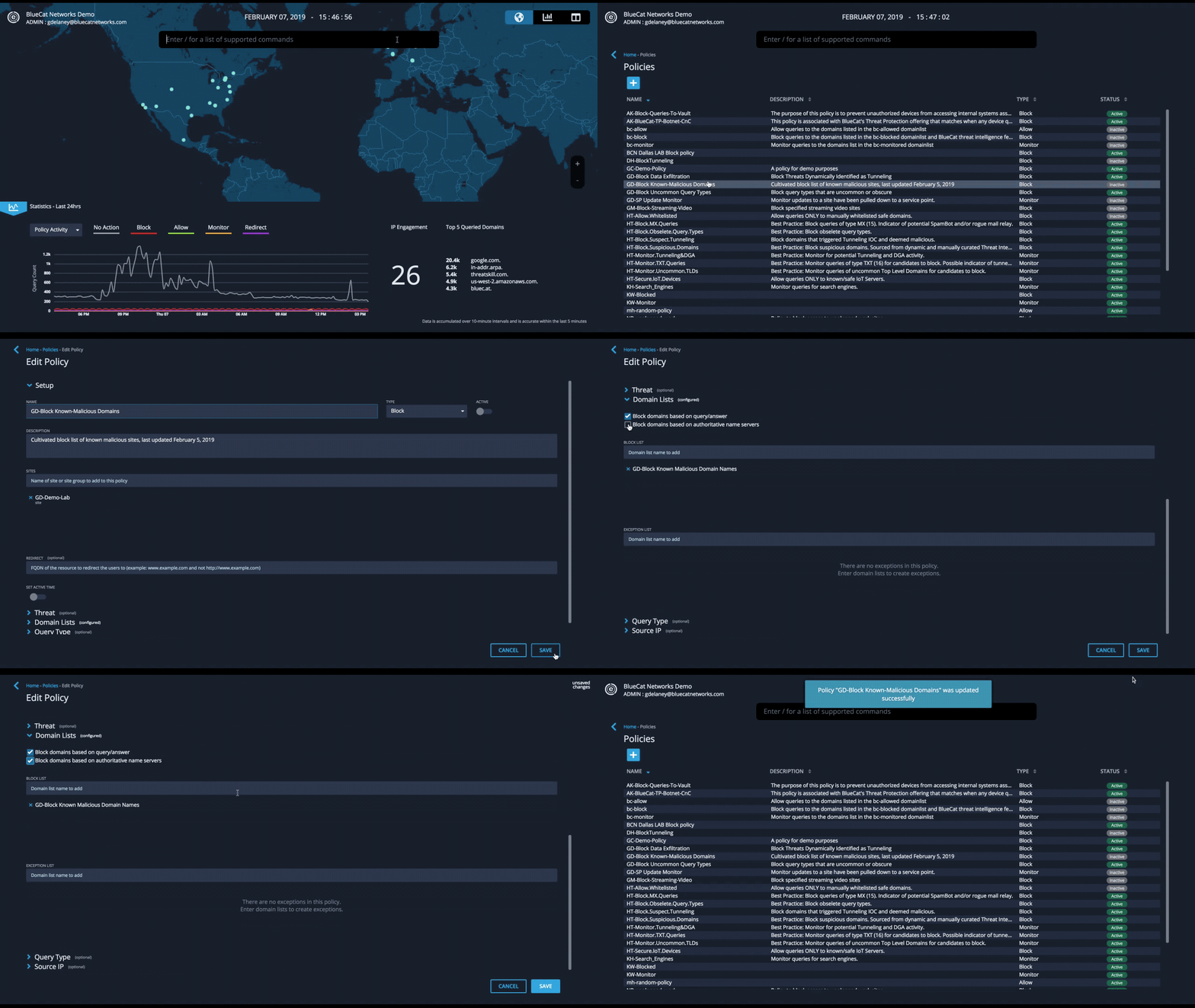
And there’s more! Create policies against this data. Do you have a list of registrars with a poor reputation? Simply add to a domain list and create a policy against the domain for their Authoritative Nameservers. Do you have a Site with purpose-built IoT devices like Point-of-Sales machines? Create a policy to limit responses from Authoritative Nameservers you know and trust. This animation shows the added checkboxes to apply the policy on “query or answer” or “authoritative nameservers.”
Cache clearing of Service Points for Sites
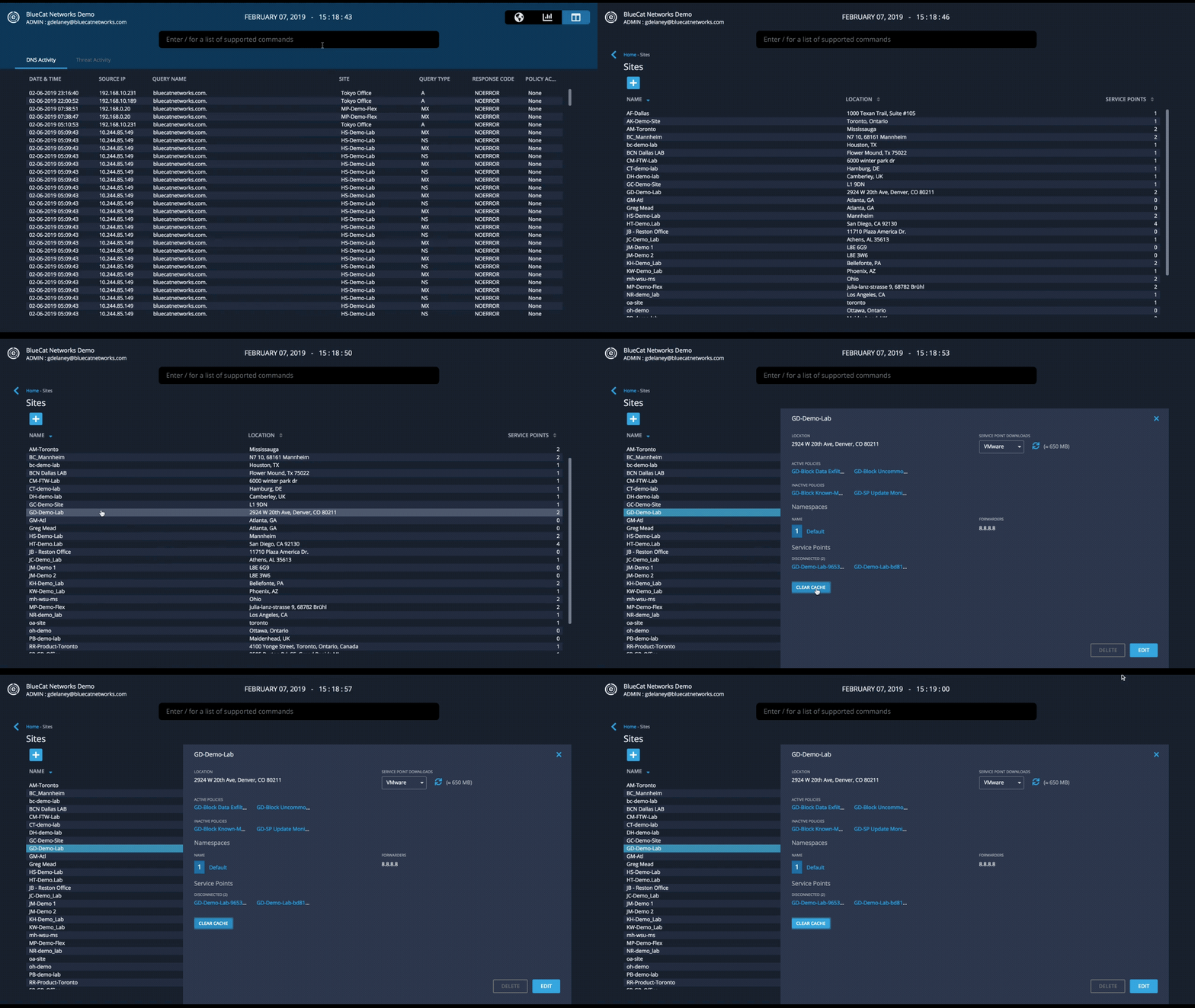
We all love caching – it makes for faster query resolution and lightens the load on your network and the internet as a world-wide whole. But for some changes, for example, a Network Administrator moving a corporate service from one IP address to another, clearing the cache before TTLs expire would save a lot of headache for support teams fielding calls from your customers unable to reach the service. With this update, easily clear the cache for all Service Points on a per-Site basis. No ibuprofen needed.
In this animation, we navigate to a Site and with the click of a button, clear the cache for all Service Points for this Site.
With DNS, there is no cooling down—it help runs your network, the internet and more. At BlueCat, things are heating up and we’re excited to deliver you more intelligent security on your DNS traffic with BlueCat DNS Edge.

Mark is a Senior Product Marketing Manager at BlueCat Networks.
Related content

Get total control of your DDI infrastructure with Micetro’s unified API
Stop juggling between network tools and use Micetro’s RESTful API for complete control over your DDI infrastructure and cloud environment.

BlueCat MCP servers bring network intelligence to your AI assistant
Our MCP servers provide a standard integration layer that makes it easy to connect the AI tools you already use to BlueCat products.

We bet on Intelligent NetOps two years ago. Infoblox now has too.
With Infoblox acquiring Kentik, BlueCat’s CEO confirms its vision for a single platform unifying DDI, network monitoring, and observability.

BlueCat DDI data boosts Cisco Cloud Control AI-driven operations
BlueCat’s integration with Cisco Cloud Control provides AI agents with access to trusted DDI data for network investigation and remediation.