
BlueCat LiveAssurance – Avoid network disruption
Use automation to identify, troubleshoot, and remediate issues
 Key takeawaysKey takeaways are generated with AI assistance. Because automated summaries can occasionally contain errors or miss important context, always refer to the full blog post for complete information.
BlueCat LiveAssurance is a proactive observability, troubleshooting, and remediation solution that continuously measures security, performance, and configuration metrics across network and security infrastructure to prevent disruption. It connects to devices via SSH, HTTPS, and SNMP to run collection scripts, auto-triage detected issues with root-cause diagnosis, and provide recommended remediation steps and best-practice guidance to IT operations teams. LiveAssurance also supports automated configuration backup, change validation (Manifest), anomaly detection with machine learning, integrations with identity, ticketing and monitoring systems, and cloud-based benchmarking to accelerate troubleshooting and reduce operational risk.
How does LiveAssurance detect and diagnose network or security device issues without human intervention?
LiveAssurance continuously collects device metrics, logs, configurations, and other telemetry using SSH, HTTPS, SNMP and API calls. Collection scripts run continually and undergo automated analysis; when the system detects anomalies or deviations from benchmarks and best practices it performs auto-triage and root-level diagnosis using built-in analysis workflows. Results are presented visually (including workflow diagrams) and include the identified probable cause and recommended remediation steps drawn from a curated knowledge base and vendor-specific best practices so IT teams can rapidly validate and remediate issues.
What capabilities help ensure changes or upgrades did not cause service disruption?
LiveAssurance’s Manifest capability automates validation of change requests by taking comprehensive snapshots before and after upgrades, patches, or configuration changes and comparing them to confirm services have resumed. Manifest generates a record of changes made during the maintenance event and identifies signs of unsuccessful changes, giving operations teams clear evidence that infrastructure is back to its normal state. This reduces manual effort in post-change verification and provides auditable results to support safe rollouts and troubleshooting when a change introduces issues.
Which integrations and operational tools does LiveAssurance provide to improve IT operations workflows?
LiveAssurance integrates with common IT systems and workflows including email, syslog, APIs, SNMP traps, ticketing systems (such as ServiceNow), monitoring platforms (for example SolarWinds or BigPanda), and data visualization tools (Grafana or Tableau). It centralizes authentication through LDAP, RADIUS, or SAML 2.0, supports role-based access control and granular device permissions, and provides custom and system-defined reports (including PCI and CVE-focused reports). Additional operational features include visual tracking of metrics over time, anomaly detection via machine learning, automated configuration backups for supported devices, and an audit log to review changes and user activity.
The solution: BlueCat LiveAssurance
LiveAssurance uses SSH, HTTPS, and SNMP protocols to connect and run collection scripts on network and network security devices using API calls, CLI commands, SNMP MIB, logs, or configuration files. These scripts run continually and undergo continuous analysis. LiveAssurance notifies IT operations teams of potential issues, identifies the potential cause of the problem without human intervention, and provides diagnostic results along with actionable remediation steps. IT operations teams can then fix issues before they cause disruption.
Key capabilities
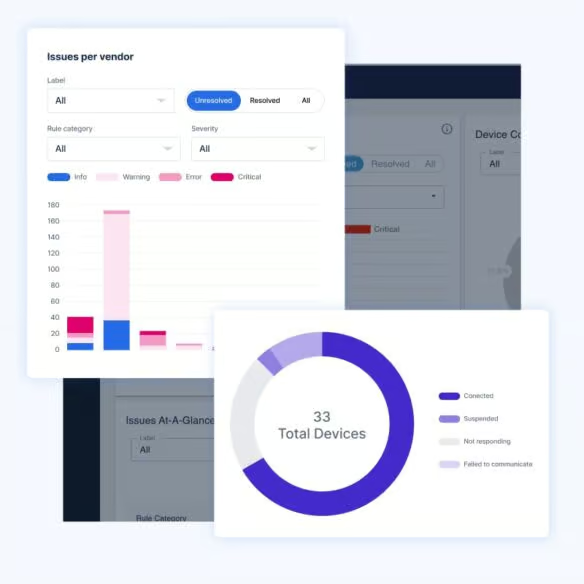
Upon LiveAssurance’s detection of an issue, you can autonomously or manually run CLI commands and API queries according to best practices. LiveAssurance analyzes data to determine the cause of the problem, without any human intervention. Analysis results are presented visually in workflow diagrams, along with recommended resolution steps.
Validating changes and identifying signs of an unsuccessful change can be a time-consuming and manual process. With Manifest, LiveAssurance automates the process of validating that services have resumed following change requests. Using automation, Manifest conducts comprehensive snapshot comparisons and generates a record of changes made during an upgrade, patch, or configuration change. It gives IT operations teams peace of mind that critical infrastructure is back to its normal state after applying updates.
With LiveAssurance, you can schedule daily, weekly, or monthly device backup to prepare for cases of device failure. This capability is supported for F5 load balancers and select Check Point, Palo Alto Networks, Fortinet, Juniper Networks, and Broadcom Symantec (formerly Blue Coat) firewalls. Check with your sales representative for details.
LiveAssurance uses machine learning models to identify outliers and unusual behaviors. Awareness of anomalies helps identify early symptoms of emerging issues, allowing you to address them before they become bigger problems.
LiveAssurance offers a variety of tools to bolster network operations management and accelerate troubleshooting, including:
With LiveAssurance, you can improve the efficiency of IT operations teams through the integration of email, syslog, APIs, and SNMP traps. Furthermore, users can:
LiveAssurance’s cloud-based analytics service contains production data collected from its users to provide proactive customer support. The data includes issues identified in user environments, scripts executed, and metrics collected.