
Check Point appliances refresh: how do you compare?


Notice: This blog post was originally published on Indeni before its acquisition by BlueCat.
The content reflects the expertise and perspectives of the Indeni team at the time of writing. While some references may be outdated, the insights remain valuable. For the latest updates and solutions, explore the rest of our blog
 Key takeawaysKey takeaways are generated with AI assistance. Because automated summaries can occasionally contain errors or miss important context, always refer to the full blog post for complete information.
This article reports on indeni Insight data showing that Check Point 2012 and newer appliances now account for almost three quarters of firewalls monitored, a substantial increase from under half ten months earlier, reflecting an ongoing appliance refresh trend. It discusses how organizations commonly use the summer months to perform hardware and software upgrades because approvals and maintenance windows are easier to obtain before holiday change freezes. The piece emphasizes that Check Point recommends full rebuilds when upgrading firewalls (even for software-only upgrades), warns of configuration drift risks such as missing routes or kernel parameter changes, and advises thorough testing pre- and post-deployment.
What evidence does the article provide that Check Point appliance upgrades are accelerating?
The article cites indeni Insight telemetry which shows that 2012 and later Check Point appliances now represent almost three quarters of the firewalls the service is connected to, compared with less than half ten months earlier (referencing a prior September report). This shift demonstrates a significant move toward newer appliances across the user base. The article also notes that many organizations take advantage of the summer period to complete hardware and software upgrades, contributing to the faster refresh cycle.
Why does the article recommend performing a full rebuild when upgrading a Check Point firewall instead of restoring a backup?
According to the article, Check Point’s recommended upgrade method is a complete rebuild even for software-only upgrades because most critical configurations, particularly the security policy, reside on the management server rather than the appliance. Rebuilding avoids issues that can arise from direct restore operations, but the article warns that rebuilds can still introduce problems such as missing routes, altered kernel parameters, or lost SecureXL settings. Therefore, thorough testing before and after putting rebuilt appliances into production is advised.
What operational timing and risks should organizations consider when planning Check Point appliance refreshes?
The article observes that organizations often schedule upgrades in the summer when maintenance windows and executive approvals are easier to secure and before holiday change freezes. It also highlights operational risks associated with the rebuild upgrade approach: configurations can change unexpectedly (for example routes, kernel parameters, and SecureXL settings might be lost). The recommendation is to test extensively both prior to and after deployment and to be mindful that older appliances in the field generally remain supported until April 2017, giving teams time to plan upgrades carefully.
We often get asked if we have data pertaining to the upgrade processes and cycles of Check Point users around the world. The short answer is, YES. The longer one, is that thanks to our indeni Insight service we get a deep view into the Check Point firewall user base. Once in a while, we publicly share the findings we’ve come to based on that data, like we did last September.
Today we’ll take a look at the appliance refresh process across our user base. Apparently the 2012 (and later) appliances are gaining a stronger foothold with almost three quarters of the Check Point firewalls indeni is connected to being these newer appliances. This is in contrast to less than half, just 10 months ago (see the September report referenced above).
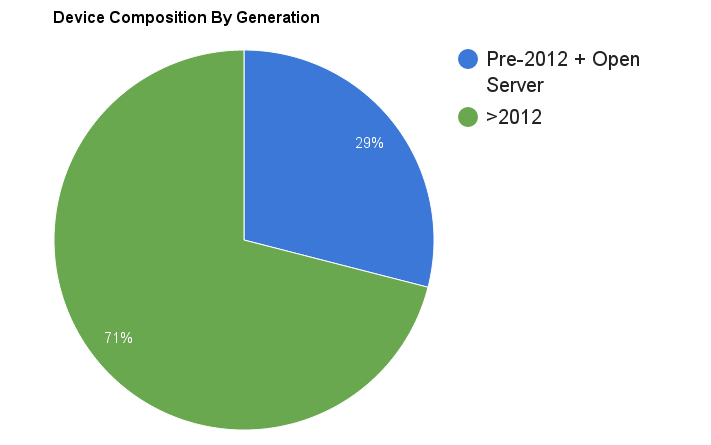
This is a pretty good ratio, considering most older appliances still have until April 2017 before they reach end of support.
In our daily conversations with Check Point customers (some, who are not indeni customers, yet) we see that summer-time is being utilized to complete hardware and software upgrades. It is usually a more relaxed time and easier for the higher ups to approve maintenance windows. It is also before the holiday season, a time of change freeze for most companies.
During this process, we suggest you keep in mind that the recommended way of upgrading a Check Point firewall is through a complete rebuild, even in the case of just a software upgrade. This is better than simply backing up the firewall configuration and restoring it. It is possible because most of the interesting configurations – the security policy – are actually stored on the management server.
However, this approach can also result in issues – routes that are missing, kernel parameters that are no longer set the way they should, SecureXL settings that have been lost, etc. So be extra careful and test things thoroughly before putting the new firewalls in production, as well as after. The list of top 10 issues people run into when working with Check Point firewalls can be found here.
Happy upgrading!
Related content

Get answers from the LiveNX data you already have with LiveAssist
Learn how LiveAssist, the AI-powered add-on for LiveNX, turns your network data into fast, guided answers, with value you can see in days.


LiveWire GEN3 device offerings
BlueCat LiveWire is a packet capture and network forensics platform that provides deep packet-level visibility across hybrid enterprise environments to help…

Get total control of your DDI infrastructure with Micetro’s unified API
Stop juggling between network tools and use Micetro’s RESTful API for complete control over your DDI infrastructure and cloud environment.

BlueCat MCP servers bring network intelligence to your AI assistant
Our MCP servers provide a standard integration layer that makes it easy to connect the AI tools you already use to BlueCat products.