
Comparing indeni and Check Point’s SmartWorkflow and Compliance blades


Notice: This blog post was originally published on Indeni before its acquisition by BlueCat.
The content reflects the expertise and perspectives of the Indeni team at the time of writing. While some references may be outdated, the insights remain valuable. For the latest updates and solutions, explore the rest of our blog
 Key takeawaysKey takeaways are generated with AI assistance. Because automated summaries can occasionally contain errors or miss important context, always refer to the full blog post for complete information.
The article explains how SmartWorkflow and the Compliance blade manage firewall policy change tracking and regulatory configuration checks, while indeni focuses on firewall operational health and OS-level settings to ensure continuous performance. In real-world environments this combination addresses both policy correctness and the run-time availability of firewall infrastructure—covering rulebase auditing, regulation adherence (DSD, HIPAA, PCI DSS), and operational telemetry such as CPU, memory, NIC, DNS, NTP, and clustering issues. The key outcome is that indeni complements SmartWorkflow and Compliance by detecting many live operational problems (connectivity, resource limits, log flow, hardware faults, routing divergences) that policy and compliance blades do not detect, helping keep the network secure and resilient.
What distinct roles do SmartWorkflow, the Compliance blade, and indeni play in securing and operating firewalls?
SmartWorkflow enforces a formal policy lifecycle for firewall rulebase changes—editing, reviewing, approving and auditing policy updates—so administrators can track and control what traffic is allowed. The Compliance blade continuously validates management, Software Blades and security gateway configurations against regulatory and best-practice requirements (for example DSD, HIPAA, PCI DSS), producing alerts and audit reports on policy violations. indeni does not track rulebase changes or policy compliance; instead it monitors operational health and OS-level configurations—performance metrics, kernel parameters, NIC/DNS/NTP behavior, cluster state, licensing and connectivity—detecting live faults and resource limits that can cause outages or degraded security posture.
Which specific operational issues can indeni detect that SmartWorkflow and the Compliance blade do not?
indeni detects a range of run-time and infrastructure problems outside the scope of policy change and static compliance checks. Examples include gateway inability to access a certificate authority, policy installation causing high CPU that could trigger cluster failover, rapid increases in firewall log file growth risking loss of logging, kernel table and connection table limits approaching or reached, cluster member NIC failures or critical ClusterXL states, packet drops and NIC transmit/receive errors, high memory usage, slow or failing DNS and NTP servers, routing table divergence between cluster members, ARP table limits, and VPN gateways dropping unexpected packets. These operational alerts help ensure the firewall is alive and functioning, not just correctly configured.
How does combining SmartWorkflow, Compliance blade, and indeni improve overall network security and availability?
Using SmartWorkflow and the Compliance blade ensures firewall configurations and rule changes follow governed processes and regulatory requirements, reducing misconfigurations and compliance gaps. Adding indeni provides continuous operational monitoring and early warning of infrastructure and runtime failures—CPU/memory pressure, NIC errors, logging/connectivity problems, table limits, DNS/NTP outages, cluster inconsistencies—that could otherwise cause outages or expose the network despite correct policies. Together they offer complementary coverage: policy correctness and auditability from the blades, and live health and OS-level validation from indeni, resulting in a more resilient, secure, and compliant firewall deployment.
The summary:
SmartWorkflow helps you track your rulebase, the Compliance blade helps you identify specific configurations that are not in compliance with known security regulations. Both exist in order to ensure your firewall configuration is secure and so, your network is secure. indeni’s role is to make sure your firewall works – performance, log flow, routing, kernel parameters, SIC connectivity, licensing, contracts, etc.
Therefore, indeni is an amazing fit with your SmartWorkflow and Compliance blades.
The longer version:
SmartWorkflow:
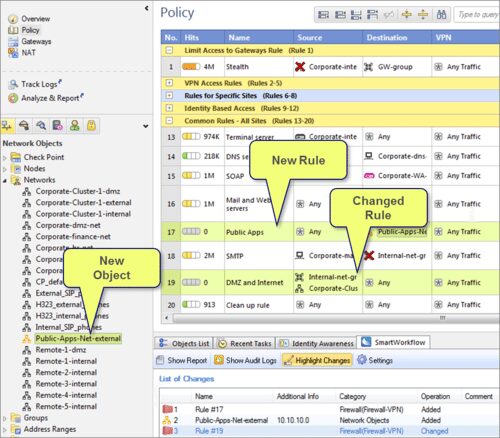
From checkpoint.com: “The Check Point SmartWorkflow Software Blade provides a seamless and automated process for policy change management that helps administrators reduce errors and enhance compliance. Enforce a formal process for editing, reviewing, approving and auditing policy changes from a single console, for one-stop, total policy lifecycle management.”
What that means is that you have a way of tracking changes made to the firewall rulebase (policy) to ensure that these changes are being done in the correct way. The reason for doing this is simple: the firewall is the gatekeeper to your network and you want to make sure that the traffic it lets in is the one you want it to.
indeni has no ability to track the firewall policy or identify changes to the rules. We have specifically refrained from doing that as we know the market has very capable solutions for dealing with this challenge – some provided by the firewall manufacturer (like SmartWorkflow) and some by third parties.
Compliance Blade:
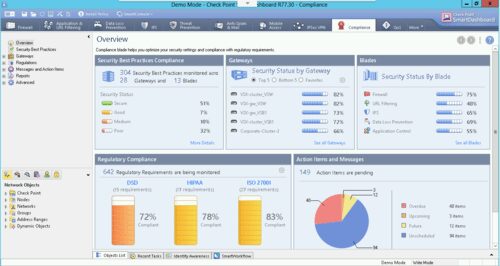
From checkpoint.com: “The Check Point Compliance Software Blade monitors your management, Software Blades and security gateways to constantly validate that your Check Point environment is configured in the best way possible. The Check Point Compliance Software Blade provides 24/7 security monitoring, security alerts on policy violations, and out-of-the-box audit reports.”
So the compliance blade is there to make sure you are in compliance with the variety of regulations that you must adhere to – DSD, HIPAA, PCI DSS, etc. Each of those regulations lists a set of requirements that must be followed on your firewalls – from ensuring stateful inspection is used to how connections are timed out. Each regulation has a different set and there’s some overlap between them.
indeni focuses on the operational health of the firewall, as well as OS-level configurations that need to be done for compliance purposes (like what users are defined). Therefore, it augments the compliance blade by ensuring that the firewall isn’t only secure and following security best practices, but also alive and kicking.
The bottom line:
indeni is a great fit with the SmartWorkflow and Compliance blades. It ensures that your security meets standards and regulations and your network is up and running without issues. With indeni, you can find all of the issues listed below, which you cannot find with the SmartWorkflow and Compliance blades:
- Gateway cannot access certificate authority
- Policy installation resulted in high CPU load cluster may failover
- Firewall log file increase rate critical – possible connectivity loss to log server
- Firewall kernel table limit approaching or reached
- ClusterXL member is in a critical state
- Cluster member down due to NIC error
- Some received packets have been dropped by NIC (SA#24915)
- High memory usage
- DNS servers configured but responding too slowly
- Use of NTP servers configured but not operational
- Firewall Connection Table Limit Approaching or Reached
- A NIC has failed recently (SA#24915)
- RX traffic drastically reduced post fail over possible ARP issue
- Two cluster members differ in their routing tables (SA#66322)
- DNS server resolution test failed
- NAT connections (fwx_alloc) table limit approaching or reached
- Errors have been found in packets transmitted by NIC (SA#24915)
- ARP table is approaching its limits (SA#25890)
- VPN gateway is dropping unexpected packets (SA#22255)
- NIC duplex set to half with speed of 10mbps or 100mbps (SA#24967)
Related content

Get answers from the LiveNX data you already have with LiveAssist
Learn how LiveAssist, the AI-powered add-on for LiveNX, turns your network data into fast, guided answers, with value you can see in days.

Get total control of your DDI infrastructure with Micetro’s unified API
Stop juggling between network tools and use Micetro’s RESTful API for complete control over your DDI infrastructure and cloud environment.

BlueCat MCP servers bring network intelligence to your AI assistant
Our MCP servers provide a standard integration layer that makes it easy to connect the AI tools you already use to BlueCat products.

We bet on Intelligent NetOps two years ago. Infoblox now has too.
With Infoblox acquiring Kentik, BlueCat’s CEO confirms its vision for a single platform unifying DDI, network monitoring, and observability.