
DNS automation: Simplifying the transition between GitLab and production
Moving automation workflows from development and testing labs into the production phase usually involves some administrative hassle.¬† Here’s how we fix that.


 Key takeawaysKey takeaways are generated with AI assistance. Because automated summaries can occasionally contain errors or miss important context, always refer to the full blog post for complete information.
The article describes a BlueCat script that streamlines promoting network automation workflows from GitLab repositories into BlueCat's DNS automation platform, addressing administrative friction that typically accompanies moves from lab to production. It highlights the real-world problem of time-consuming reconfiguration, permission setting, server restarts, and the need for rollback protection when workflows fail in production, and explains that the script automates resource import while preserving backups. The result is a smoother, safer deployment path that reduces manual steps and preserves previous workflow versions for rapid reversion if errors occur.
What specific deployment problems does the BlueCat GitLab integration script solve?
The script addresses the administrative overhead and risk when moving automation workflows from labs into production. It removes many manual steps such as resetting configurations, setting permissions, reloading resources, and restarting servers by automatically importing resources from a GitLab repository into the BlueCat automation platform. It also implements built-in protection by backing up utility folders, files, and workflows on the Gateway server so operators can revert to a previous edition if a promoted workflow misbehaves in production.
How does the promotion workflow handle existing production resources to prevent data loss?
Before applying promoted workflows, the process automatically backs up currently deployed utility folders, files, and workflows on the Gateway server. This ensures that the existing production state is preserved so operators can re-establish the prior configuration in case the new workflow produces errors. By maintaining those backups, the workflow provides a hedge against failed promotions and supports safe reversion to earlier workflow editions without losing the original code.
Where can teams obtain the GitLab-to-BlueCat promotion workflow described in the article?
The article states that the promotion workflow—BlueCat’s script connecting GitLab repositories to the BlueCat automation platform—is available for download from the BlueCat Labs repository. Teams using GitLab and BlueCat’s DNS automation platform can obtain the workflow there to streamline import of resources and to leverage the built-in backup and reversion protections described.
The most effective network automation programs are constantly evolving. As business requirements change, as scale enlarges support needs, as new technologies complicate existing procedures, IT managers can’t just sit on their laurels. They have to be out in front of organizational change, ensuring that the automated processes they built in the past will stand the test of time.
Labs, repositories, and test environments make this agile development process possible. As the underlying logic and requirements of automation change, these toolkits are what developers and IT managers use to create and adjust what they deploy out in the field.
Smoothing out the production deployment process
Moving automation workflows from development and testing labs into the production phase usually involves some administrative hassle. You have to set the permissions. You have to reconfigure systems. You have to load everything up. Usually you have to restart the servers. It all takes more time than it should.
There’s also a need for some built-in protection against automation workflows which don’t perform as designed out in the wild. If you promote a workflow from the lab into a production environment and discover an error, there should be a way to backtrack while preserving the original code in a back-up location.
To promote a more seamless flow between lab and production environments while offering a hedge against errors, BlueCat created a script which connects the GitLab repository used by many internal development teams and BlueCat’s own DNS automation platform. The workflow automatically brings resources from GitLab into the BlueCat automation platform without the need to reconfigure and reset a bunch of resources.
How it works
When you want to promote a workflow from GitLab to the BlueCat automation platform, you’ll be prompted to select the configuration parameters which are already available.
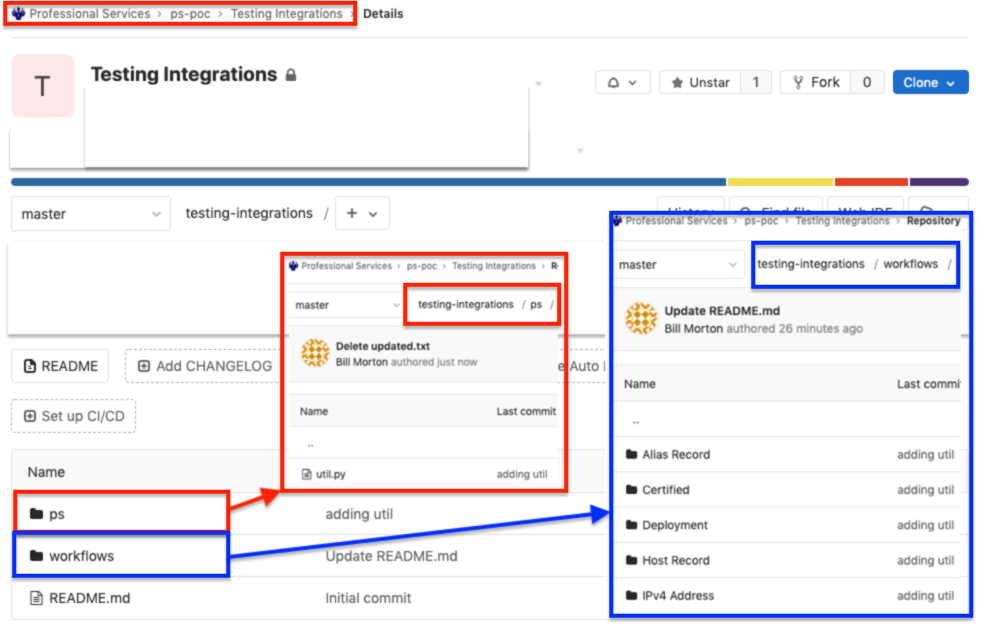
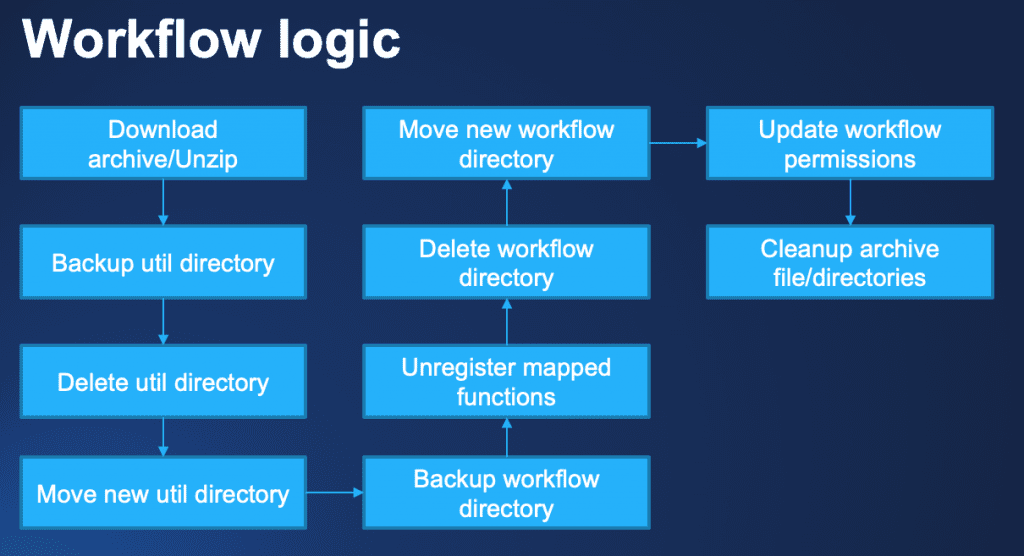
The workflow automatically backs up utility folders, files, and workflows currently deployed on the Gateway server to ensure that nothing is lost in the event of reversion to a previous edition of a workflow.
Download the workflow today on our BlueCat Labs repository.

BlueCat provides core services and solutions that help our customers and their teams deliver change-ready networks. With BlueCat, organizations can build reliable, secure, and agile mission-critical networks that can support transformation initiatives such as cloud adoption and automation. BlueCat’s growing portfolio includes services and solutions for automated and unified DDI management, network security, multicloud management, and network observability and health.
Related content

Get answers from the LiveNX data you already have with LiveAssist
Learn how LiveAssist, the AI-powered add-on for LiveNX, turns your network data into fast, guided answers, with value you can see in days.

Get total control of your DDI infrastructure with Micetro’s unified API
Stop juggling between network tools and use Micetro’s RESTful API for complete control over your DDI infrastructure and cloud environment.

BlueCat MCP servers bring network intelligence to your AI assistant
Our MCP servers provide a standard integration layer that makes it easy to connect the AI tools you already use to BlueCat products.

We bet on Intelligent NetOps two years ago. Infoblox now has too.
With Infoblox acquiring Kentik, BlueCat’s CEO confirms its vision for a single platform unifying DDI, network monitoring, and observability.