
Fortigate’s FortiDDoS Review



Notice: This blog post was originally published on Indeni before its acquisition by BlueCat.
The content reflects the expertise and perspectives of the Indeni team at the time of writing. While some references may be outdated, the insights remain valuable. For the latest updates and solutions, explore the rest of our blog

DDoS attacks are becoming a plague for companies that rely on the Internet to operate their business. Scripts to operate a DDoS attack are easily accessible and can make your Internet connection completely unusable.
DDoS attacks use “armies” of malware-infected machines to flood the servers with un-legitimate traffic. Soon the server’s resources are entirely depleted making it unavailable for the legitimate users.
In our last blog we’ve presented the Checkpoint’s DDoS attack mitigation solution, and in this article, we investigate Fortinet’s FortiDDoS. The Primary principle is similar: FortiDDoS also utilizes dedicated hardware on site with in-cloud protection as a backup. While Checkpoint is using Radware’s cloud solution, Fortigate uses Verisign DDoS cloud solution. We also discuss a selection of differentiating features for FortiDDos.
FortiDDoS Characteristics
FortiDDoS comes with different models, suitable for small, medium and large enterprises. Fortigate states a device can stop a DDoS attack in a matter of seconds. FortiDDoS has up to 36 Gbps throughput and is capable of defending from Layer 3, Layer 4 and Layer 7 attacks. FortiDDoS can protect its users from known attacks in addition to unknown attacks, called zero-day attacks. It uses behavior-based DDoS protection, so it doesn’t need to rely on signature files and, according to Fortigate, it provides a minimal amount of false-positive detection. It is also capable of monitoring thousands of different parameters at the same time. FortiDDoS can protect its users from every type of DDoS – volumetric attacks, application-based attacks, SSL/HTTPS attacks.
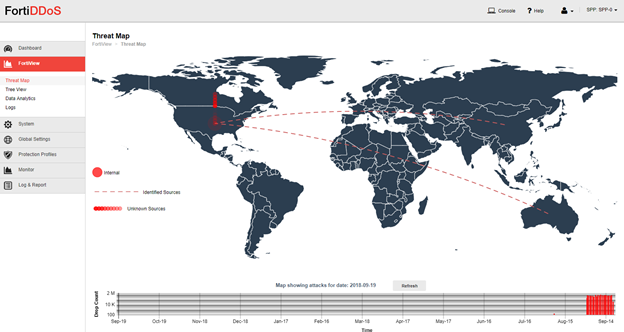
Customizable ASIC Approach
Fortigate is uses its proprietary Application Specific Integrated Circuit Traffic Processors (FortiASIC-TP2) to provide quick and effective protection from the ever-evolving threat of DDoS attacks. FortiDDoS surgically removes Network and Application layer attacks, allowing only legitimate traffic flow to the client.
Fortinet is the only company using 100 % custom ASIC approach for their DDoS appliances, protecting the users from both known and zero-day attacks. By using ASIC, FortiDDoS doesn’t rely on signature files to be updated. However, it’s computing and comparing thousands of traffic parameters, recognizing the patterns or both normal and abnormal traffic flows. Both inbound and outbound traffic have guaranteed protection.
Fortigate FortiDDoS claims a nearly 40% lower latency than other solutions and that it detects anomalies faster than any other product on the market.
How does it work?
FortiDDoS initially attempts to stop the attack using its behavior-based approach. If the attack is too significant and the device itself is unable to mitigate the attack completely, the traffic redirects to the cloud where it’s cleaned from un-legitimate traffic. Similar to the Check Points solution, only the legitimate traffic sends back to the client.
So, for example, a whole range of DDoS attack is using manipulation of ACK, RST, and FIN packets, usually never replying the server with ACK packet, to finish the three-way handshake. FortiDDoS understands there was never a connection established and instantly drops the packets as foreign, meaning they have zero impact on the user.
People responsible for the development of FortiDDoS solution are trying hard to ensure servers’ memory, and real-time resources won’t be overwhelmed during the attack. For example, a massive SYN attack over a 10GE link can theoretically generate up to 16 million packets, and FortiDDoS is capable of mitigating up to 24 million packets – completely protecting 10GE links from massive attacks.
Policies For Everyone
One nice touch about FortiDDoS is that you can have different policies for different network segments. Thus, the attack centers into one network segment, not all of them. This aspect of the solution is especially useful for Systems Integrators, Managed Services Providers, ISPs and other companies that have many clients they need to protect, using different policies.
Configuring DNS Flood Mitigation Parameters
Here, we have chosen to demonstrate how to set up protection from symmetrical DNS flood attacks which are trying to deplete server’s memory or CPU resources to bring it to a halt. DNS flood attack is a Layer 7 type of an attack and a form of a UDP flood attack since DNS is relying on UDP to provide name resolution.
Configuration:
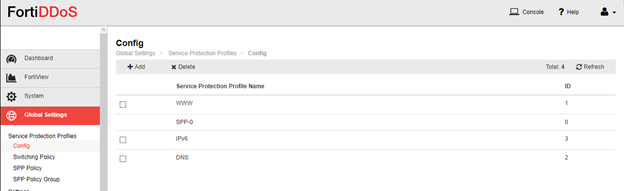
In Global Settings – Service Protection Profiles create SPP for DNS traffic.
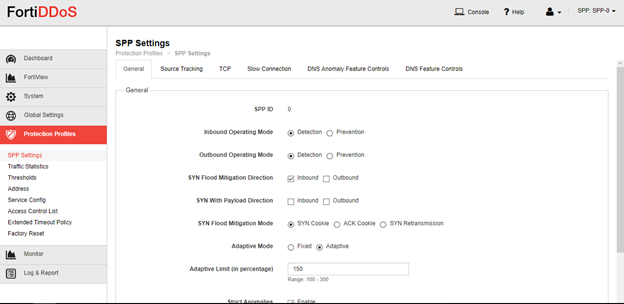
Go to Protection Profiles – SPP settings – General tab and ensure SPP is in Detection mode.
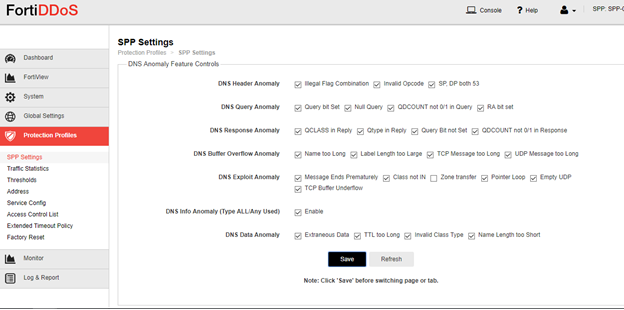
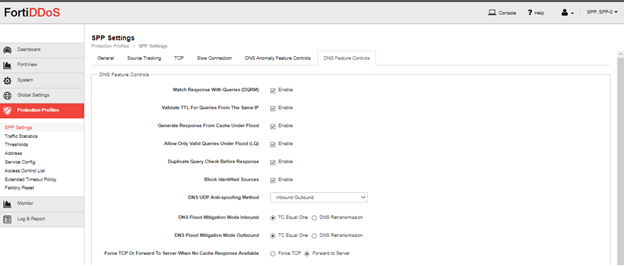
Go to Protection Profiles – SPP settings – DNS Protocol Anomalies tab and enable all anomalies.
Do the same on DNS Feature Control tab.
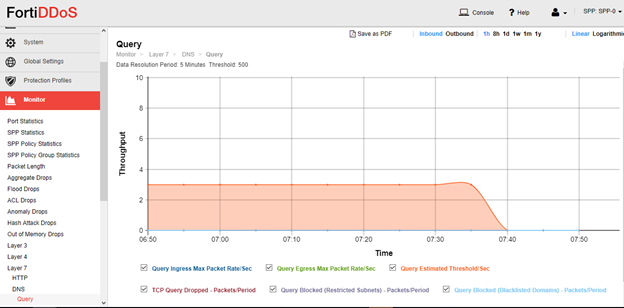
Go to Monitor Graphs – Layer 7 – DNS and observe accumulation of traffic statistic at least for a full week before switching to Prevention mode.
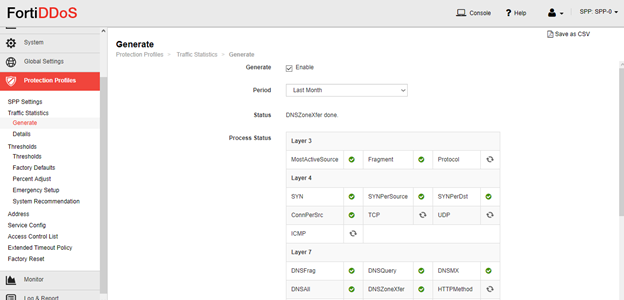
Configure thresholds for UDP and TCP rates. First go to Protection Profiles – Traffic Statistics and generate statistics. Afterwards go to Protection Profiles – Thresholds – System Recommendation and generate thresholds.
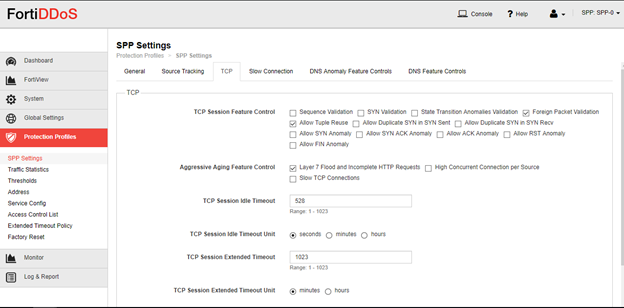
Go to Protection Profiles – SPP settings – TCP tab and turn on Foreign Packet Validation and Layer 7 Flood.
Now go to Protection Profiles – SPP Settings – General tab and change to Prevention mode.
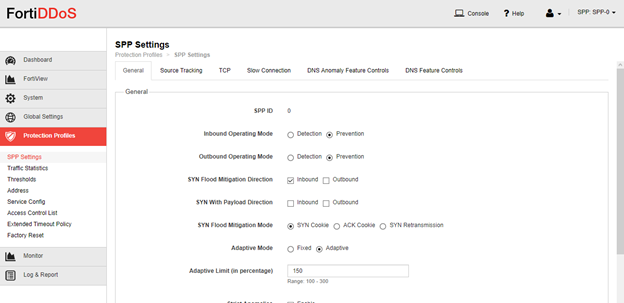
That’s it. Now to test this you only need to be attacked with a DNS flood DDoS attack.
Conclusion
You are probably here, reading this because you’re thinking about purchasing a DDoS attack mitigation solution. Mainly if your company relies on the Internet to operate and each minute of downtime can cause severe financial loss. Fortinet FortiDDoS has some unique features that make it competent on the market. Fortigate states their solution can block the attacks in a matter of seconds. Moreover, the nice thing is you can always grab a demo version and play with it for 30 days.
 Key takeawaysKey takeaways are generated with AI assistance. Because automated summaries can occasionally contain errors or miss important context, always refer to the full blog post for complete information.
This article compares Fortinet’s FortiDDoS DDoS mitigation solution to other approaches and explains how it defends organizations that depend on Internet availability from volumetric, network, and application-layer attacks. It describes FortiDDoS’s on-premises hardware plus cloud backup model (using Verisign for cloud scrubbing), its behavior-based, signature-less detection powered by custom FortiASIC-TP2 processors, multi-model throughput up to 36 Gbps, and policy segmentation for protecting different network segments. The piece also gives a step-by-step example of configuring DNS flood (Layer 7 UDP) mitigation, operational testing guidance, and notes outcomes such as rapid attack stopping, low latency claims, and a 30-day demo availability.
How does FortiDDoS detect and stop both known and zero-day DDoS attacks without relying on signature updates?
FortiDDoS uses a behavior-based detection approach rather than signature files. It computes and compares thousands of traffic parameters and recognizes patterns of normal and abnormal flows in real time, allowing it to identify deviations that indicate attacks, including zero-day events. Additionally, FortiDDoS leverages proprietary FortiASIC-TP2 Application Specific Integrated Circuit traffic processors to perform very fast, hardware-accelerated analysis and surgical removal of malicious network and application layer traffic. If on-premises mitigation is insufficient, traffic is redirected to the cloud scrubbing service (Verisign) and only legitimate traffic is returned to the client.
What capacity and attack types can FortiDDoS defend against, and how does it protect high-speed links like 10GE?
FortiDDoS models support up to 36 Gbps throughput and are designed to mitigate Layer 3, Layer 4, and Layer 7 attacks, including volumetric floods, application-based attacks, and SSL/HTTPS attacks. Fortinet claims the appliance can mitigate massive packet-rate attacks—for example, it can handle up to 24 million packets, which is sufficient to protect 10GE links from theoretical high-rate SYN floods. The combination of behavior-based detection, ASIC acceleration, and the ability to failover traffic to cloud scrubbing provides protection for both inbound and outbound flows across diverse attack vectors.
What are the operational steps to configure FortiDDoS to protect against a symmetrical DNS flood, and how should it be tested?
To configure DNS flood protection, create a Service Protection Profile (SPP) for DNS in Global Settings → Service Protection Profiles. In the SPP settings: set Detection mode on the General tab; enable all anomalies under DNS Protocol Anomalies and DNS Feature Control tabs; generate traffic statistics under Protection Profiles → Traffic Statistics and produce system-recommended thresholds under Protection Profiles → Thresholds. Enable Foreign Packet Validation and Layer 7 Flood under the TCP tab. Monitor Layer 7 DNS graphs for at least a week to observe normal traffic before switching the SPP General tab to Prevention mode. Test by subjecting the service to a DNS flood attack; only then will you observe prevention behavior in practice.
Related content

Get answers from the LiveNX data you already have with LiveAssist
Learn how LiveAssist, the AI-powered add-on for LiveNX, turns your network data into fast, guided answers, with value you can see in days.


LiveWire GEN3 device offerings
BlueCat LiveWire is a packet capture and network forensics platform that provides deep packet-level visibility across hybrid enterprise environments to help…

Get total control of your DDI infrastructure with Micetro’s unified API
Stop juggling between network tools and use Micetro’s RESTful API for complete control over your DDI infrastructure and cloud environment.

BlueCat MCP servers bring network intelligence to your AI assistant
Our MCP servers provide a standard integration layer that makes it easy to connect the AI tools you already use to BlueCat products.