
Hybrid Mesh Firewall Management with Indeni


Notice: This blog post was originally published on Indeni before its acquisition by BlueCat.
The content reflects the expertise and perspectives of the Indeni team at the time of writing. While some references may be outdated, the insights remain valuable. For the latest updates and solutions, explore the rest of our blog
 Key takeawaysKey takeaways are generated with AI assistance. Because automated summaries can occasionally contain errors or miss important context, always refer to the full blog post for complete information.
This article explains how hybrid mesh firewalls—composed of on-premise firewalls, cloud firewalls, and Firewall-as-a-Service (FWaaS)—create multi-administrative-domain complexity that makes troubleshooting and availability visibility critically important. It describes operational requirements for monitoring and automation across deployment types and shows how Indeni provides a single management console with proactive alerts, device health checks, auto-scaling support, GRE/IPSec tunnel monitoring, and connector performance monitoring to reduce downtime and finger-pointing. The article emphasizes ensuring connectivity to management servers and on-premise FWaaS connectors so organizations maintain service availability and simplify hybrid mesh firewall operations.
How does Indeni help manage conventional on-premise firewalls across a hybrid mesh environment?
Indeni provides a single management console that aggregates operational data from on-premise firewalls and remote devices, enabling visibility into the overall environment. It delivers proactive alerts, device health checks, categorized issue segmentation, recommended remediation steps, and automated investigative actions for common high-impact problems to reduce troubleshooting time. Indeni also checks high-availability readiness, verifies reachability of critical external services (NTP, DNS, identity and management servers, feeds), identifies security risks and compliance gaps, enforces vendor best practices, and issues notifications for ongoing maintenance and organizational standards to prevent disruptions.
What features does Indeni offer for cloud firewalls and auto-scaling deployments?
For cloud firewalls under your administrative domain, Indeni supports multiple firewall form factors including virtual appliances in public clouds and can be deployed from a management server in the private data center. It ensures a trusted, persistent connection between cloud firewalls and their management server so policies and configurations are updated timely, and it monitors connectivity to the firewall manager as a fundamental capability. Indeni also supports auto-scaling by periodically querying firewall managers for scale-out events, dynamically adding newly detected instances for monitoring and automation, and removing devices during scale-in events.
How does Indeni support monitoring and troubleshooting when using FWaaS provided by a third party?
Although FWaaS instances are managed by service providers, Indeni helps you ensure the overall service chain is operational by focusing on the customer-controlled components that connect to the FWaaS. Indeni monitors on-premise FWaaS connectors (deployed in data centers and public clouds), including their performance, and provides comprehensive support for GRE and IPSec tunnels used to link your locations to the FWaaS. By verifying connector health and tunnel status, Indeni reduces finger-pointing by confirming your side of the connection is functioning and by surfacing issues before they cause disruptions.
With the emergence of cloud and firewall as a service (FWaaS), network firewalls are evolving into hybrid mesh firewalls. In this magazine article (page 114), I discussed hybrid mesh firewall management requirements. Hybrid mesh firewalls have various deployment types to secure on-premise cloud environments and remote users with firewalls. Cloud firewalls and FWaaS introduce the concept of different administrative domains. Each administrative domain provides a separation of management across multiple organizations. This adds complexity making troubleshooting especially challenging. When a user accesses an application, it crosses multiple administrative domains. When something goes wrong, imagine the finger pointing that can potentially happen. So, even though FWaaS is not your direct responsibility, you need a similar level of visibility as you do with your on-premise firewalls. You should always be aware of the availability of the firewall service.
In this blog, we’ll discuss how Indeni supports your hybrid mesh firewall deployment in a multi-vendor environment across different administrative domains. We’ll cover key monitoring and automation requirements.
Hybrid Mesh Firewall Monitoring & Automation
For each deployment type, we’ll explore the management requirements. We’ll look at how Indeni supports Hybrid Mesh Firewalls.
#1 – Conventional On-Premise Firewalls
You manage and control your on-premise firewalls. From a single management console, you expect to see operational data relating to your data center and remote firewalls to get a sense of the big picture.
Today, Indeni supports all leading firewall vendors. From an intuitive GUI, you can easily navigate to critical information about your firewalls. You can quickly identify issues in your environment. Indeni is known for its proactive alerts. Indeni has an uncanny ability to identify lurking issues that can become bigger problems. With advance notifications of hidden issues, you can avoid costly disruptions.
Issues are segmented by categories so you can easily identify the type and severity of the issues. The categories include:
- Device health checks, including proactive alerts and recommended remediation steps to quickly restore services. For some of the common and high impact issues, we can kick off automated investigative steps that are normally run manually to determine the root cause of the problem. This automation not only drastically reduces the time spent on troubleshooting issues, but also reduces the total time that the problem can affect your environment
- High Availability readiness such as identifying misconfigurations to ensure the switchover is seamless in the event of a failure and ensuring HA best practices are adhered to
- Ensuring critical external services are reachable such as NTP, DNS, Identity servers, management servers, rating services, black/white lists, threat intelligence feeds, etc.
- Identifying security risks, including regulatory compliance, common vulnerabilities and exposures
- Ensuring vendor and industry best practices are followed to minimize problems
- Advanced notifications for easily forgotten ongoing maintenance tasks to avoid service disruptions
- Ensuring organization standards are followed for audit purposes and problem avoidance
#2 – Cloud Firewalls
If the cloud firewalls are under your administrative domains, you can use the Indeni management console to manage them. Firewall vendors support a variety of form factors including appliances and virtual machines for public cloud deployments. Indeni can support many different form factors and cloud-based firewalls.
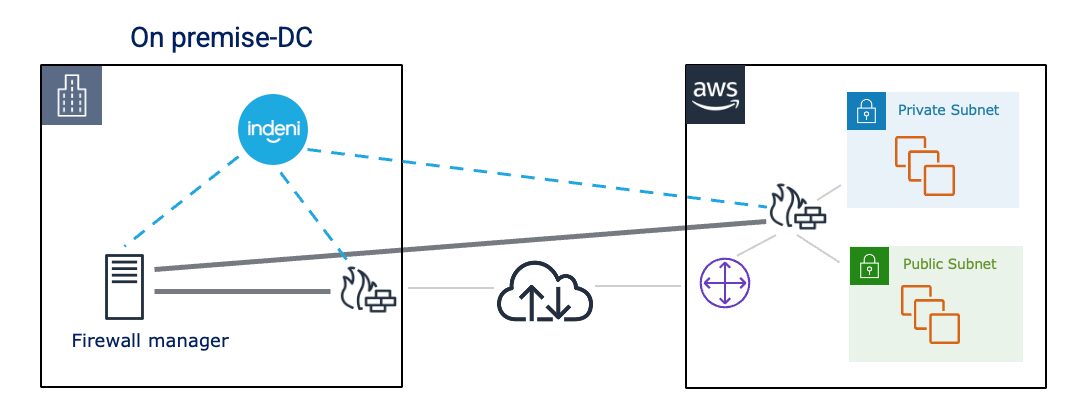
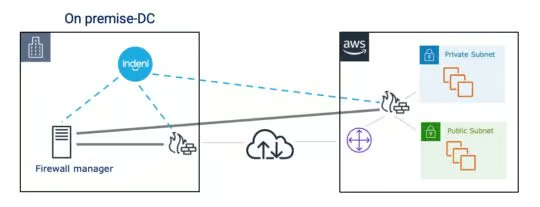
In a typical hybrid cloud deployment, the management server is deployed in the private data center along with your on-premise firewalls. You also have your cloud-based firewalls in the public cloud. For these cloud-based firewalls, it is important that a trusted connection is always maintained between your cloud firewall and its management server, whether it’s to ensure firewall policies are updated in a timely manner or configuration updates are pushed to the cloud firewalls. One of the unique capabilities of Indeni is that we’re purpose built for firewalls. Therefore, we understand that firewalls require many critical external services to properly do their job. In this case, ensuring connectivity to the firewall manager is a basic feature of Indeni.
One of the advanced features of cloud-based firewalls is auto-scaling. Firewall instances in a public cloud can scale up or down in response to changes in demand. Indeni supports auto-scaling for certain firewalls. We periodically query the firewall manager to learn about new firewall instances in a scale out event. Upon detection of a new device, we dynamically add it to the system for monitoring and automation. When we detect a scale-in event, we remove the device from the system.
If the cloud firewalls are not under your administrative domains, they are considered as FWaaS. We’ll discuss how Indeni supports FWaaS in the next section.
#3 – FWaaS
FWaaS is a network security technology referring to a cloud firewall that delivers firewall capabilities similar to your on-premise firewalls. These firewalls are managed by your service providers. They can be offerings from your cloud service providers or security vendors. Although you don’t manage them, you want to ensure the provider’s firewalls are working. You expect them to detect issues before they cause disruptions. More importantly, you need to ensure the necessary components on your side that are connecting to the service are working to avoid finger pointing.
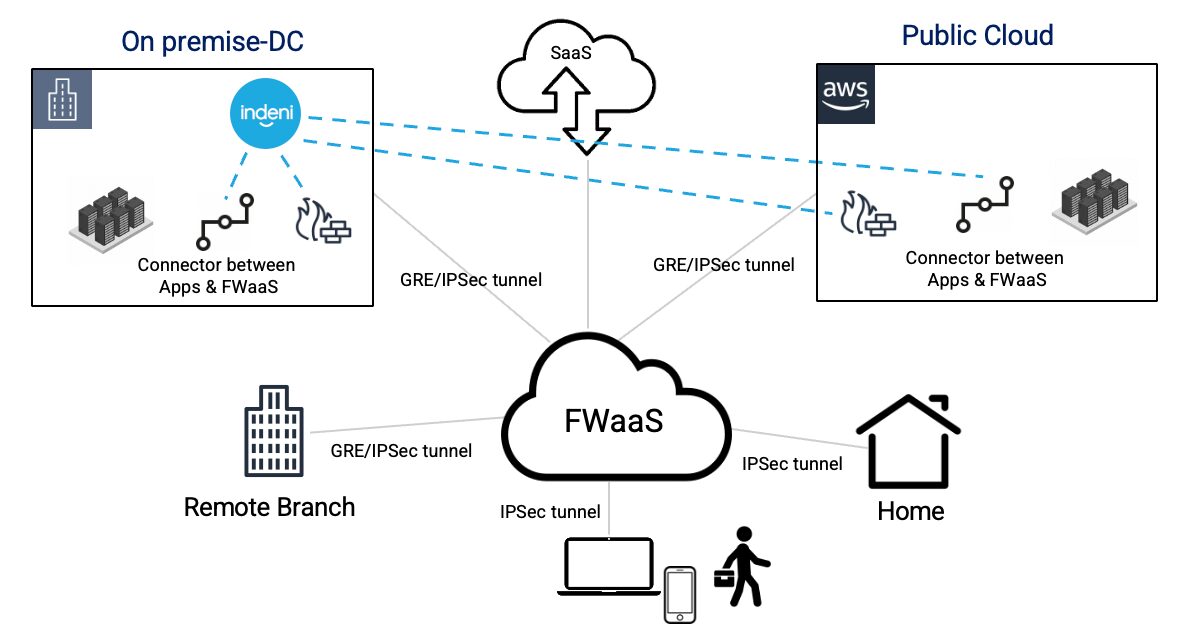
With FWaaS, your users can access applications in the data center, public cloud and SaaS securely from anywhere. FWaaS sits between a user and an application. It inspects all the traffic and controls which applications are available to the user, regardless of whether the application is behind your on-premise firewalls, deployed in a public cloud or a SaaS application.
FWaaS typically leverages an on-premise component, often called connector, to connect your applications and the service. A connector provides the secure authenticated interface between your applications and the FWaaS. The connectors are deployed in the data center and the public cloud. To connect the data center and the FWaaS, you establish either GRE or IPSec tunnels to connect the two locations. Today, Indeni has comprehensive support to monitor both GRE and IPSec tunnels. Indeni can also monitor the performance of these connectors. With FWaaS, the first thing you want to ensure is that these on-premise components are working as intended. You can learn more about our support here.
Summary
As you continue your hybrid cloud journey to secure your on-premises and multi-cloud environments, you can use Indeni as a single management console to provide the visibility you need for your hybrid mesh firewalls. We will continue to enhance our hybrid mesh firewall visibility and automation requirements to simplify your management needs. We invite you to share your requirements with us [email protected].

Ulrica de Fort-Menares is the Vice President of Product Management for Infrastructure Assurance.
Related content

Get answers from the LiveNX data you already have with LiveAssist
Learn how LiveAssist, the AI-powered add-on for LiveNX, turns your network data into fast, guided answers, with value you can see in days.

Get total control of your DDI infrastructure with Micetro’s unified API
Stop juggling between network tools and use Micetro’s RESTful API for complete control over your DDI infrastructure and cloud environment.

BlueCat MCP servers bring network intelligence to your AI assistant
Our MCP servers provide a standard integration layer that makes it easy to connect the AI tools you already use to BlueCat products.

We bet on Intelligent NetOps two years ago. Infoblox now has too.
With Infoblox acquiring Kentik, BlueCat’s CEO confirms its vision for a single platform unifying DDI, network monitoring, and observability.