
Multi-tenancy & IP Address Management
Solving the IP range overlap management problem for Enterprises and MSPs


Notice: This blog post was originally published on Men&Mice before its acquisition by BlueCat.
The content reflects the expertise and perspectives of the Men&Mice team at the time of writing. While some references may be outdated, the insights remain valuable. For the latest updates and solutions, explore the rest of our blog
 Key takeawaysKey takeaways are generated with AI assistance. Because automated summaries can occasionally contain errors or miss important context, always refer to the full blog post for complete information.
This article explains how multi-tenancy creates operational challenges for large enterprises and managed service providers (MSPs) that need to keep customers or business units separated while managing overlapping IP address spaces. It outlines two IPAM-centered approaches using Micetro: migrating tenants to unique address ranges (with tracking via indexed custom properties, validation checks, smart folders, and API automation) and using Address Spaces to manage overlapping networks with per-tenant permissions and audit trails. The piece stresses that visibility, consistent UI/APIs, and careful network isolation reduce human error and MTTR when operating multi-tenant DNS, DHCP, and IPAM environments.
What practical steps does Micetro provide to support migrating customers away from overlapping IP address ranges?
Micetro supports migrations by enabling indexed custom properties (for example, a boolean “Migrated” field or text fields for customer IDs) so admins can track which addresses have been changed. It validates whether IP addresses are still in use using ICMP (ping), SNMP, and LLDP, allowing you to filter based on those checks. Smart Folders save those filters for dynamic access, and the API can automate DNS and cleanup tasks. Together these features give a searchable audit trail and allow per-customer reporting while you transition to a consolidated, non-overlapping address schema.
How do Address Spaces in Micetro help manage overlapping networks without migrating addresses?
Address Spaces let you create isolated logical spaces per customer or business unit so identical IP ranges can be managed independently. You can assign access permissions scoped to each Address Space and retain full audit trail information for activity within that scope. Working inside a given Address Space provides a consolidated view of DNS, DHCP, and IP objects for that tenant and allows limited delegation to internal tenant admins. The article emphasizes that network design and strict isolation remain critical when choosing to operate overlapping ranges.
Why is visibility and consistency important for multi-tenant DDI, and how does Micetro address that?
Visibility and consistency reduce human error and lower mean-time-to-resolution in complex multi-tenant environments by providing a centralized context for DNS, DHCP, and IP management. Micetro delivers this through a single overlay UI and consistent APIs that span multiple tenants, sites, and platforms, enabling centralized reporting, filtering (via custom properties and Smart Folders), and automation. These capabilities let MSPs and large enterprises maintain big-picture oversight while preserving tenant separation and operational efficiency.
If you’re a large enterprise or managed service provider, you may be using multi-tenancy to keep customers separated. Multi-tenant architectures can be complex to design and even more difficult to manage. A good IPAM solution will offer a few ways to simplify management without having to let go of big picture context and visibility.
What is multi-tenancy?
Generally speaking, multi-tenancy is used to give multiple customers or business units their own networking and policies, even though they’re being managed by the same IT organization or managed service provider (MSP). It sounds really similar to how we use subnets or VLANs, but it goes a few steps further. Think about if Netflix and Hulu were managed by the same provider, as an example. They wouldn’t be okay with just being on different subnets with only some ACLs between them.
Prior to software-defined networking (SDN), multi-tenancy could require multiple routers, firewalls, and other Layer 3 hardware devices to keep the tenants separate. With the onslaught of SDN solutions like Cisco ACI and VMware NSX multi-tenancy has become a bit easier to implement with technologies like VRFs (Virtual Routing and Forwarding) and virtualized firewalls running in the background. However, MSPs and large enterprises which find themselves consistently onboarding new customers or acquiring new businesses are spending a lot of time figuring out how to deal with overlapping networks or address spaces.
Why so many overlapping address spaces?
Because of the way the IPv4 protocol was designed, companies are often using the same networks/IP ranges for their internal resources. For example, if you were to check the IP address of the computer or phone you’re working on right now, it likely starts with 192.168.x.x or 10.x.x.x because these are the internal private IP address ranges available to all of us.
With IPv6 we don’t have this same issues because unique addresses are used for every device, but there aren’t many companies who have migrated to IPv6 internally yet, so MSPs and Enterprises will likely be dealing with the overlapping IP address range issue for a while to come.
How can IPAM solutions simplify this issue?
We’ll concentrate on two ways to solve this issue. The first would be to migrate companies to a new IP address range and the second would be to enable managing overlapping ranges.
Avoiding overlapping IP address ranges
It seems like everything in IT is a migration project. Whether you’re moving to cloud, refreshing hardware, or changing the IP schema of resources on a network, it’s a migration project. Migration projects require a few things to make them go smoothly, the first of which is tracking. Whether you’re manually changing IP addresses or automating it, you’ll want to track what has been changed and when it was changed in case anything goes wrong.
One way of tracking is to create custom properties which are indexed so that they’re easily filtered and searchable. In Micetro, you can create these custom properties yourself. You could create a text field or even a simple boolean property of yes or no to understand whether an IP address is no longer in use because it’s been migrated to the new schema.
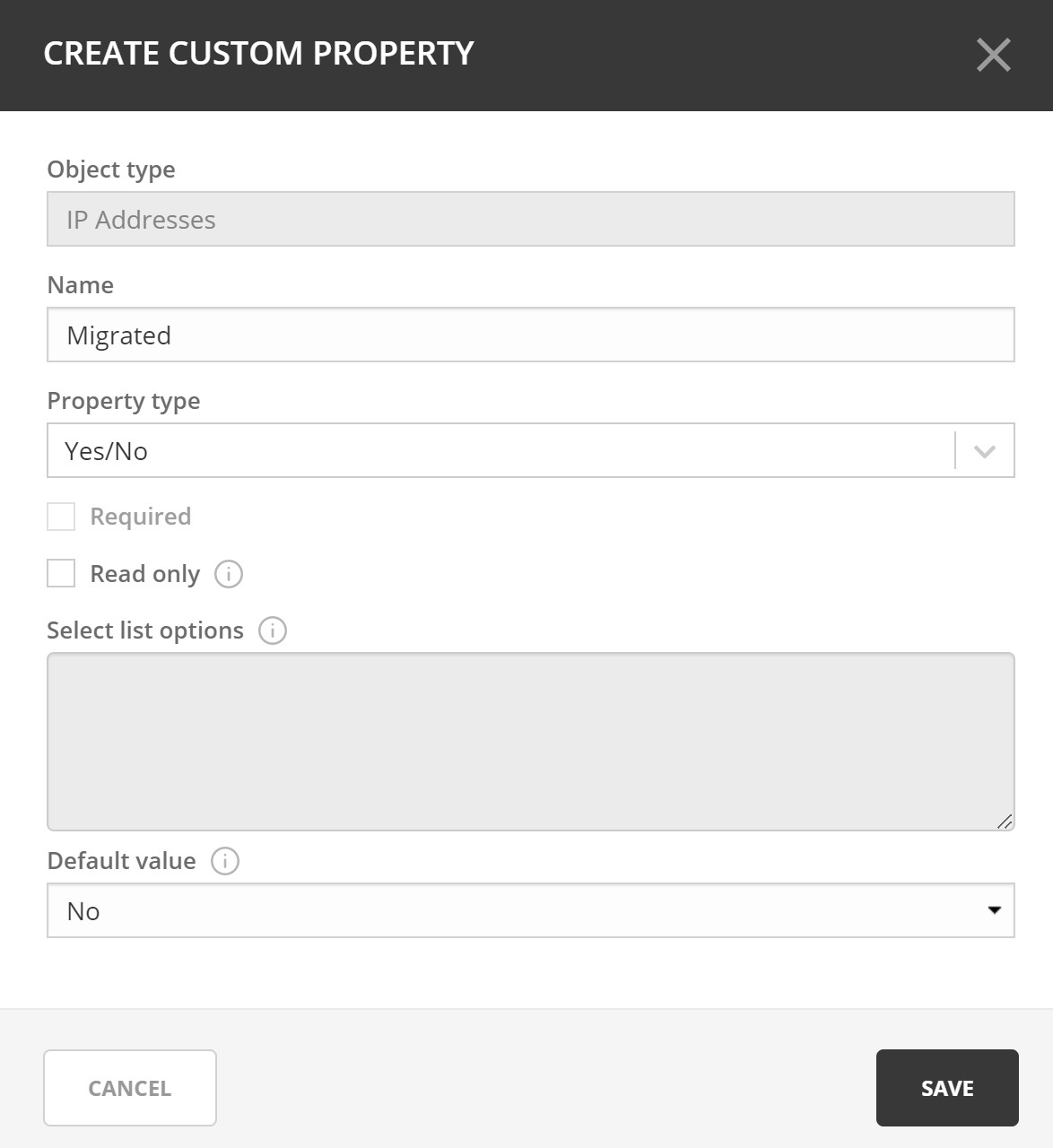
Micetro will also do the work of validating whether an IP address is still being used by using ping (ICMP), SNMP, and LLDP. We can then help you filter based on these values to see what’s been migrated. A Smart Folder can be created to save this filter, which will give you a dynamic folder which saves this filter so you can easily get back to it. You may then choose to automate clean up activities then, based on the custom property value.
While you’re working on the migration, there will likely need to be some DNS work done here as well. Luckily Micetro will help you track that, and even automate those tasks using the API. Once everything has been migrated, your customers will all be on different networks, and you can still use the IPAM functionality in Micetro with full visibility to everything while keeping it all within the same address space.
Again, using custom properties to specify a customer name or customer ID, you can also create smart folders to keep your customers administratively/organizationally separate. This will make it easier to manage and will allow you to do things like create reports that only contain the pertinent information to that customer or business unit.
Address spaces for overlapping IP ranges
Micetro offers another option for MSPs and Enterprises that would prefer not to have to migrate resources to another network. Note, if you are using overlapping networks, isolation is very important. Separating networks will require a lot of network design work to ensure the isolation and security of your customers or BUs. Micetro can help you manage this easily using the concept of Address Spaces, though.
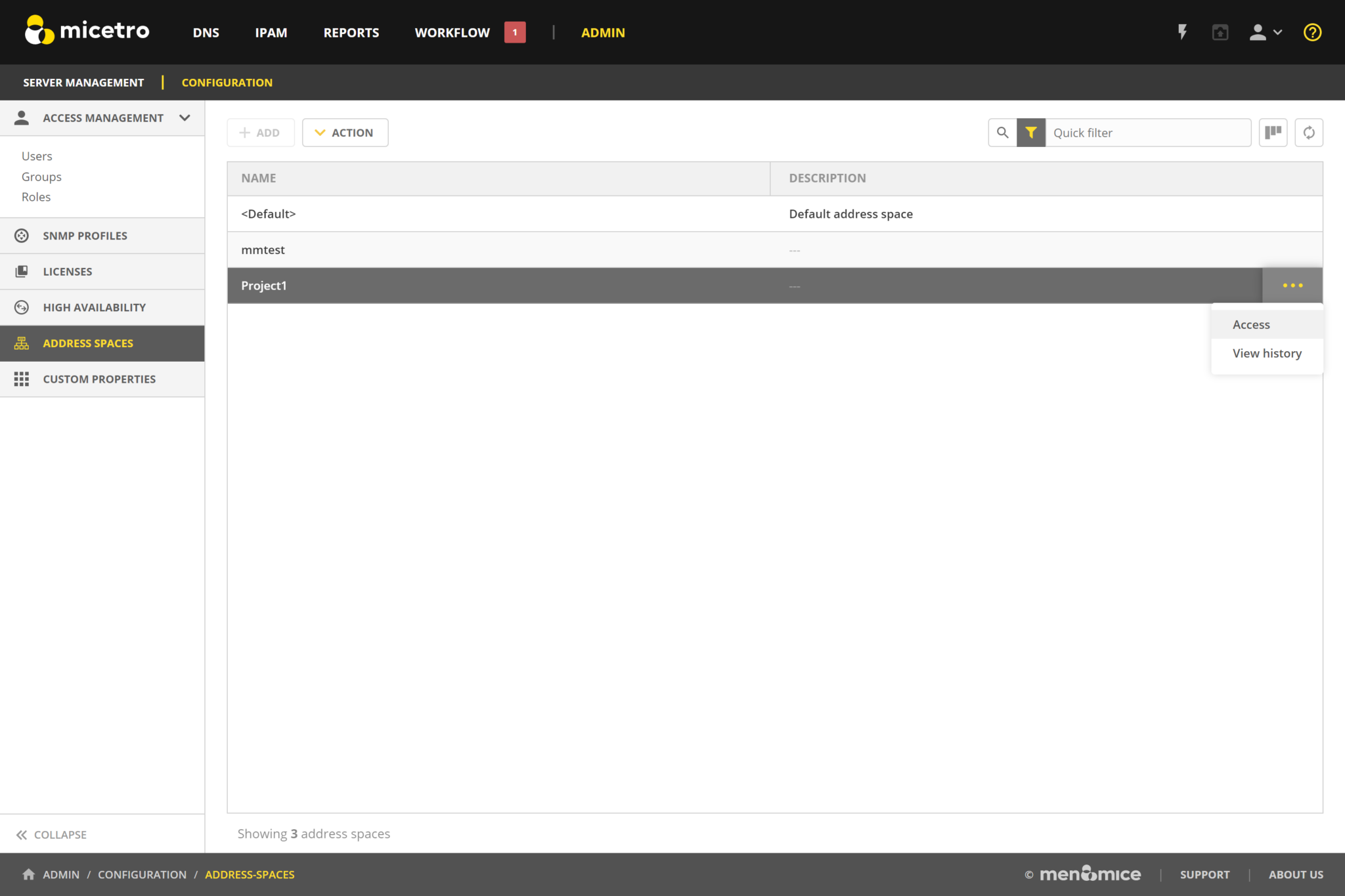
Address Spaces will allow you to create an Address Space for your customers, manage access permissions by address space, and of course get audit trail information. Once you’ve created an Address Space for your customer or BU, you can work in the appropriate address space for each customer to get a view of their entire DNS, DHCP, and IP environment. You may even choose to give their internal IT admins access to some or all of this address space.
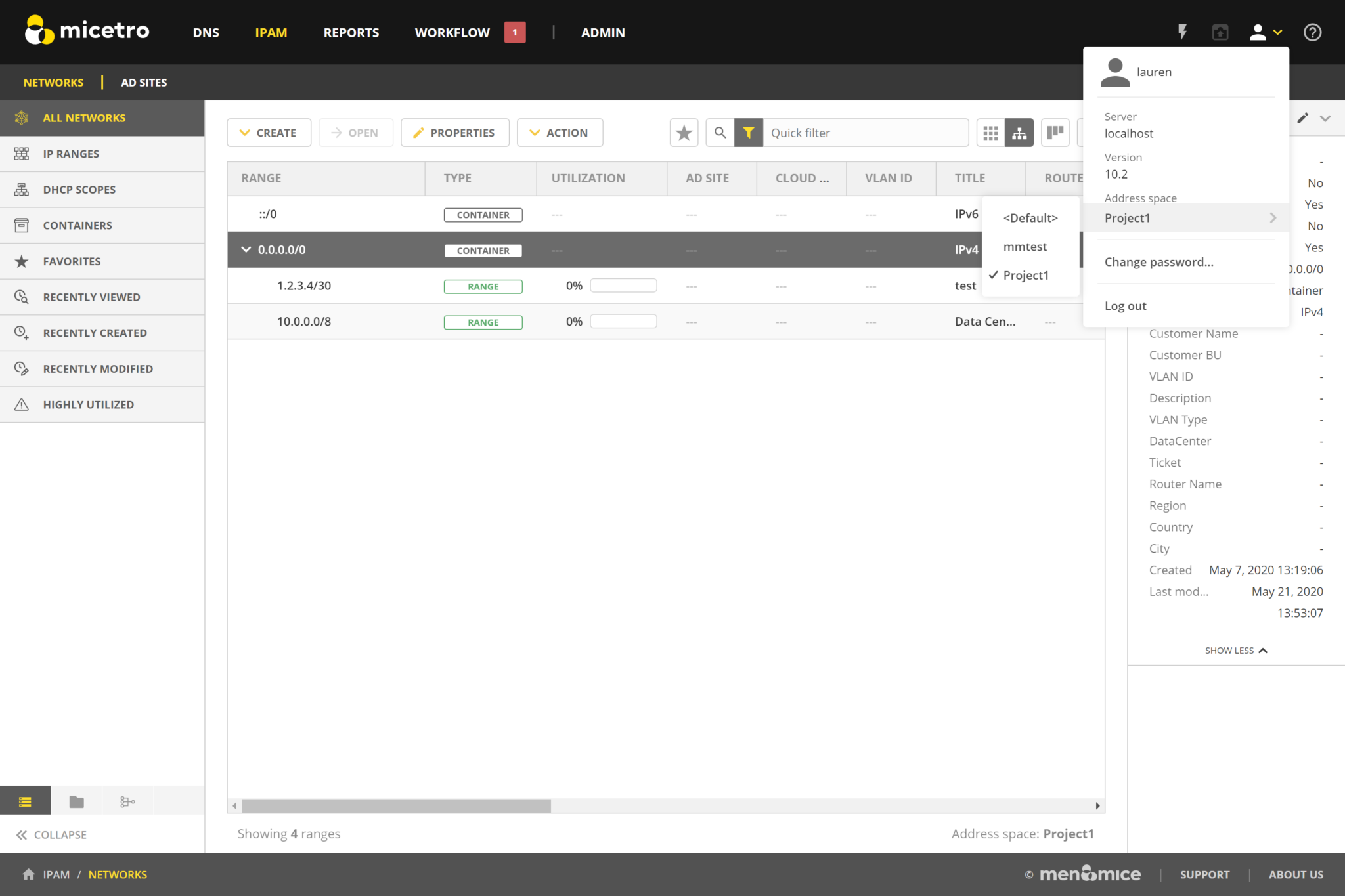
Visibility and Consistency Matter
No matter how you decide to design you multi-tenant architecture, simplicity is key to avoiding human error and reducing mean-time-to-resolution (MTTR). Using a DDI (DNS, DHCP, and IPAM) overlay solution will give you context and a big picture view of your entire environment. Using an overlay solution like Micetro goes beyond giving you visibility to giving you a centralized and consistent UI and APIs to make managing multiple tenants, multiple sites, and multiple platforms possible.
Have some other use cases or want to find out how Micetro can help you? Reach out any time for a personalized demo.
Related content

Get answers from the LiveNX data you already have with LiveAssist
Learn how LiveAssist, the AI-powered add-on for LiveNX, turns your network data into fast, guided answers, with value you can see in days.

Get total control of your DDI infrastructure with Micetro’s unified API
Stop juggling between network tools and use Micetro’s RESTful API for complete control over your DDI infrastructure and cloud environment.

BlueCat MCP servers bring network intelligence to your AI assistant
Our MCP servers provide a standard integration layer that makes it easy to connect the AI tools you already use to BlueCat products.

We bet on Intelligent NetOps two years ago. Infoblox now has too.
With Infoblox acquiring Kentik, BlueCat’s CEO confirms its vision for a single platform unifying DDI, network monitoring, and observability.