
Network discovery: Four ways to manage networks you can’t see
Network discovery automates the network-finding process and keeps your IPAM honest. Learn four ways to uncover hidden subnets with Micetro.



 Key takeawaysKey takeaways are generated with AI assistance. Because automated summaries can occasionally contain errors or miss important context, always refer to the full blog post for complete information.
Network discovery is the automated process of identifying networks, devices, and IP addresses in use across your infrastructure by querying routers via SNMP and pinging hosts. Many organizations suffer from incomplete IPAM records that don't match actual network topology, leaving blind spots that cause IP conflicts, failed deployments, and outages. BlueCat Micetro centralizes DNS, DHCP, and IPAM management while offering advanced discovery features—including SNMP profiles, subnet filtering rules, adjustable timeouts, and agent selection—that eliminate ghost subnets, reduce noise from /32 floods, and ensure discovery runs where devices actually exist.
What is network discovery and how does it improve IPAM accuracy?
Network discovery is the automated process of finding networks, devices, and IP addresses in use by querying routers and switches via Simple Network Management Protocol (SNMP) and checking which hosts respond to ping requests. It enables you to compare what your IPAM tool records against what your routers actually report, closing gaps between documented and actual infrastructure. By automating this process, network discovery helps ensure your IPAM tool becomes a source of truth rather than a guess, allowing you to tune discovery to your specific network instead of scripting workarounds. This addresses the operational impact of unknown subnets appearing as IP conflicts and outages.
What are the four network discovery ideas described in the article?
The article presents four key ideas: (1) The ghost subnet—keeping SNMP libraries current with newer OIDs like ipNetToPhysicalPhysAddress to discover networks not in existing records; (2) The /32 flood—filtering out host routes and point-to-point links smaller than a chosen threshold to reduce noise; (3) The blunt instrument—using per-profile SNMP controls and adjustable timeouts instead of uniform scan settings across all routers; (4) Eyes where the devices are—placing discovery agents strategically to ensure they can reach all routers, particularly on branch links where connectivity challenges exist.
How does BlueCat Micetro implement these network discovery best practices?
Micetro provides four primary features supporting network discovery best practices: SNMP profiles that enable per-profile neighbor-discovery method selection; network discovery settings consolidating subnet handling rules and timeouts in one place; agent selection allowing administrators to choose which agent runs discovery or start with the central host; and an IPAM grid that discovers CIDRs, VLAN IDs, virtual routing and forwarding names, and other router details. These capabilities eliminate the need for custom scripts while overlaying existing DDI infrastructure to provide unified visibility and control without requiring infrastructure replacement.
How many subnets are on your network right now?
Not how many are recorded in your IP address management (IPAM) tool, but how many are truly there. If you hesitated, you’re in good company. Unknown subnets don’t send calendar invites. They show up at 2 a.m. as an IP conflict, a failed deployment, or an outage you own.
If your IPAM tool only knows about half your subnets, it isn’t a source of truth. It’s a guess.
Network discovery automates the network-finding process, but there are lots of hidden tricks to getting the most out of it. BlueCat Micetro, which centralizes your DNS, DHCP, and IPAM (together known as DDI) across on-premises, cloud, and branch environments, can help.
In this post, we first define network discovery and why it matters for IPAM. Next, we detail four of the best network discovery ideas you can steal from us, along with providing a real-world example. Finally, we highlight how Micetro can make network discovery a breeze.
What is network discovery, and why does it matter for IPAM?
Network discovery is the automated process of finding the networks, devices, and IP addresses in use. Usually, it asks routers and switches what they know over the Simple Network Management Protocol (SNMP) and checks which hosts respond to a ping.
Your IPAM tool is only as trustworthy as what it knows, and discovery is how it finds out what’s there. With network discovery, you can:
- Compare what your IPAM tool says with what your routers say, then close the gap.
- Tune discovery to your network instead of scripting around it.
- Run discovery close to the devices it needs to reach.
Four network discovery ideas worth stealing
No matter what IPAM tool you run, these ideas are worth borrowing. And, yes, the first one involves ghosts.
1. The ghost subnet
Some networks and subnets can behave like ghosts. They’re on your wires but not in your records. Network discovery built on outdated identifiers—the object identifiers (OIDs) and management information bases your tools use to ask a router for data—misses devices, leaves topology incomplete, and undercounts IP usage.
A Dimensional Research survey sponsored by Broadcom found that 80% of enterprise NetOps organizations report limited visibility and blind spots across their networks. You can’t manage what you can’t see.
Idea: Keep your SNMP library current and query the newer ipNetToPhysicalPhysAddress OID, so more of what’s out there makes it into your grid.
Benefit: Your IPAM matches today’s network, not last quarter’s.
2. The /32 flood
Routers report everything, including host routes and tiny point-to-point links. Without rules, your grid fills with /32 and /31 entries that aren’t really networks, and the real ones get buried.
Idea: Decide up front. Ignore subnets at or below a size you pick (/30, /31, or /32) or treat /32 discoveries as single IP addresses instead of ranges. Check whether the rule applies only to future discoveries or also cleans up what’s already synced.
Benefit: Signal over noise, with no cleanup scripts.
3. The blunt instrument
One scan setting for every router is how you end up with timeouts on the slow branch link and missed neighbors on the new gear. Many network teams patch these gaps with custom scripts.
Idea: Look for per-profile control over how neighbors are discovered, using ipNetToPhysicalPhysAddress (IPv4 and IPv6) or ipNetToMediaPhysAddress (IPv4 only). An adjustable SNMP timeout also helps on slower or busier networks.
Benefit: Control without code.
4. Eyes where the devices are
Discovery only works if it can reach your routers. Reach matters because inventories drift. In a 2023 Armis survey of UK IT professionals, 96% believed they had 35,000 devices or fewer, yet 53% had more.
Idea: Choose which agent runs discovery and ping, and make sure a sensible default lets you start without extra setup.
Benefit: Discovery runs where the network lives.
A real-world example of network discovery in action
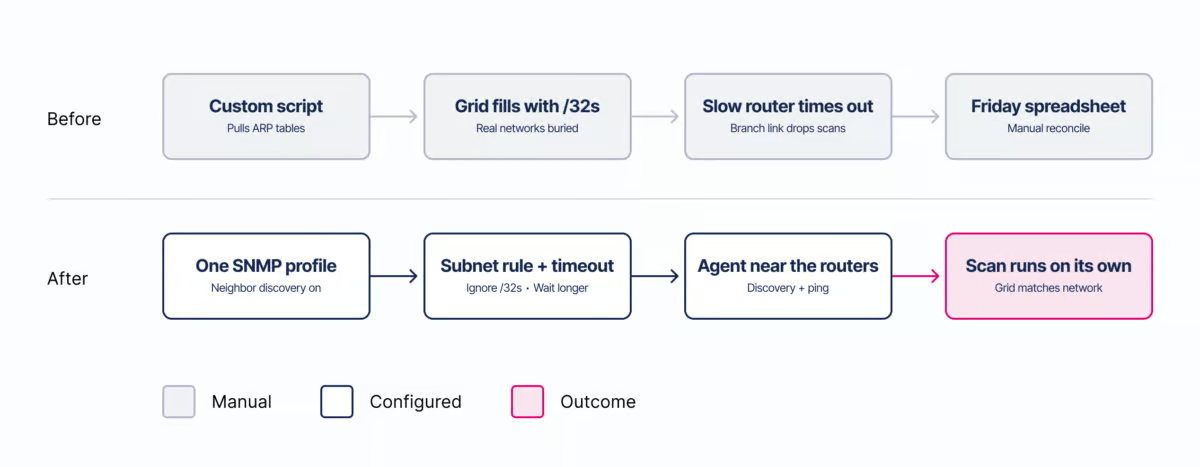
Think of a map app that’s missing one road. You trust it right up until the day it sends you somewhere that doesn’t exist. Now picture an IT manager with a team of five and no DNS specialist.
Before: A custom script that nobody wants to touch pulls ARP tables, the grid fills with /32 entries, scans die on the slow branch router, and Friday afternoon goes to reconciling a spreadsheet.
After: With network discovery, you have one SNMP profile, a subnet rule, a longer timeout for the branch router, and discovery pointed at the right agent. The scan runs on its own, and Friday afternoon goes to something more impactful.
Honest trade-offs and how Micetro can help
There’s no one-size-fits-all network discovery setup. Ask yourself:
- Do you want small subnets in IPAM, or only the networks you plan around?
- How much SNMP traffic can your slowest devices handle?
- Which agent can reach every router you care about?
Micetro overlays existing DDI infrastructure to provide unified visibility, control, and automation without replacement. It offers several features that make it easy to implement our best network discovery ideas.
- SNMP profiles: Choose the neighbor-discovery method per profile (ideas 1 and 3).
- Network discovery settings: Subnet handling and timeouts in one place (ideas 2 and 3).
- Agent selection: Pick the agent for discovery and ping or start with the central host (idea 4).
- IPAM grid: Discover CIDRs, VLAN IDs, virtual routing and forwarding names, and other router details that land in IP ranges you already manage.
If you’re ready to see network discovery in action, learn more about Micetro today.
P.S. Run one SNMP profile against your busiest router this week. Count what shows up that your IPAM didn’t know about.
Published in:

Mark is a Principal Product Marketing Manager at BlueCat Networks.
Related content

Get answers from the LiveNX data you already have with LiveAssist
Learn how LiveAssist, the AI-powered add-on for LiveNX, turns your network data into fast, guided answers, with value you can see in days.

Get total control of your DDI infrastructure with Micetro’s unified API
Stop juggling between network tools and use Micetro’s RESTful API for complete control over your DDI infrastructure and cloud environment.

BlueCat MCP servers bring network intelligence to your AI assistant
Our MCP servers provide a standard integration layer that makes it easy to connect the AI tools you already use to BlueCat products.

We bet on Intelligent NetOps two years ago. Infoblox now has too.
With Infoblox acquiring Kentik, BlueCat’s CEO confirms its vision for a single platform unifying DDI, network monitoring, and observability.