
One To One NAT On Palo Alto Firewall For Access To Internal Untrusted Network



Notice: This blog post was originally published on Indeni before its acquisition by BlueCat.
The content reflects the expertise and perspectives of the Indeni team at the time of writing. While some references may be outdated, the insights remain valuable. For the latest updates and solutions, explore the rest of our blog

Many implementations use NAT to provide public internet access (untrust) from an internal private network (trust) considering address preservation and security on the private network space. One of the less popular use case but is effective in every way is on providing connectivity to internal networks that have a less robust security posture such as development and laboratory networks.
In both cases, NAT still boils down to the traversal of packets from a trusted domain to an untrusted network. This guide will show the step by step procedure on how you can accomplish one to one static NAT on a Palo Alto firewall for an internal untrusted network.
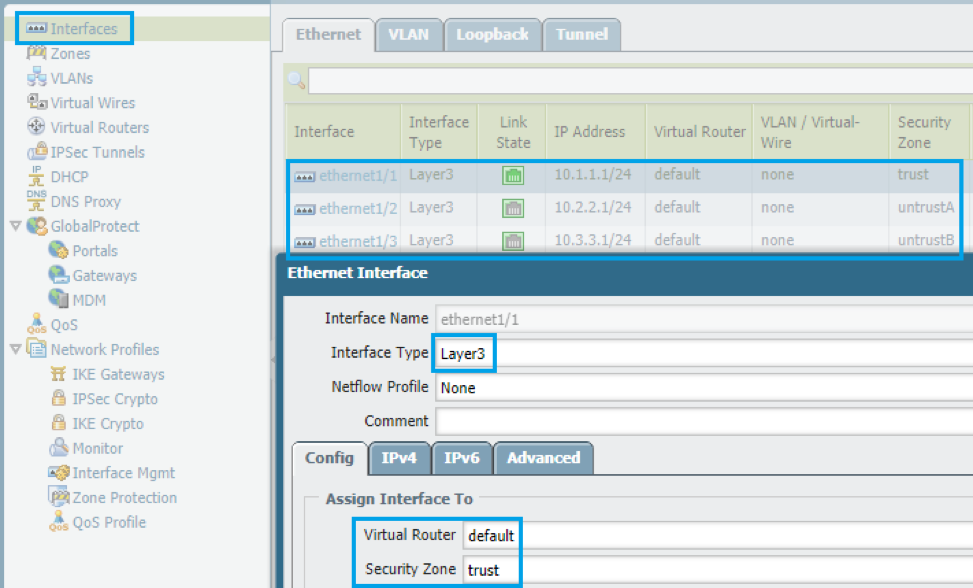
Let the diagram below be our working diagram. Note that the user subnet is 10.1.1.0/24 (zone: trust), the routable private IP space is 10.2.2.0/24 (zone: untrustA) and the laboratory/test subnet is 10.3.3.0/24 (zone: untrustB).
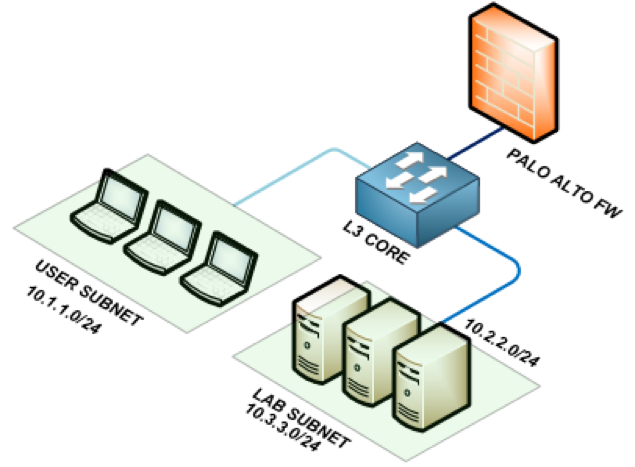
Scenario: The server 10.3.3.5 needs to be reachable on the user side over port 80. The Palo Alto firewall serves as the main layer 3 gateway so the switch is just passing all traffic to the firewall. The LAB subnet is obscured and is not propagated within the network.
STEP 1: Understand how NAT is being handled by the firewall
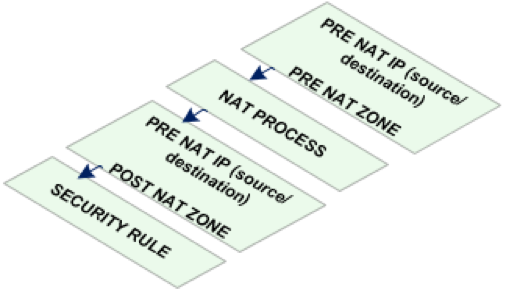
One to one NAT is termed in Palo Alto as static NAT. For all NAT processes, the firewall reads the pre-NAT parameters such as pre-NAT IP address and pre-NAT zone. On the corresponding security rule however, the pre-NAT IP is preserved while post NAT zone parameter is changed to the corresponding destination zone after NAT. Below is a diagram to visualize this.
STEP 2: Create the zones and interfaces
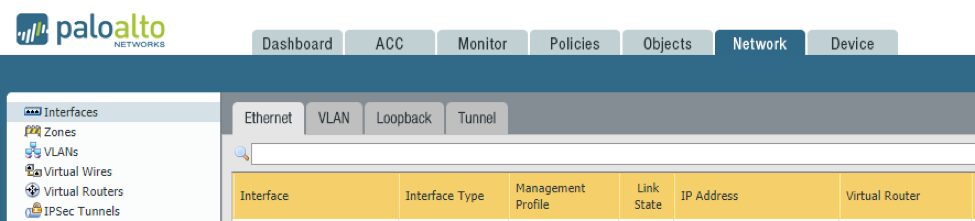
- Login to the Palo Alto firewall and navigate to the network tab. Here you will find the workspaces to create zones and interfaces.
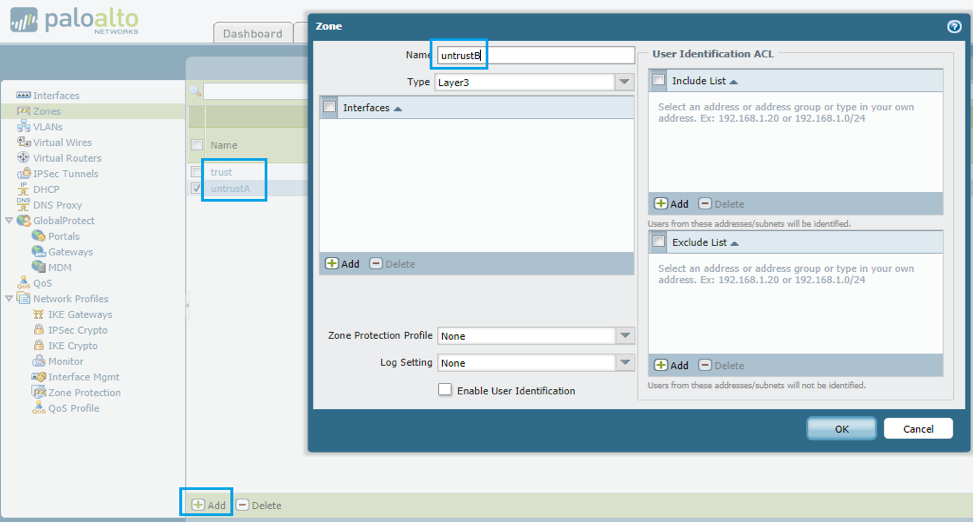
- Create the three zones, trust, untrustA, untrustB, in the zone creation workspace as pictured below.
- Create the layer 3 interfaces and tie them to the corresponding zones along with the IP addresses. The firewall can use the first usable address for simplicity.
STEP 3: Configure layer 3 routing
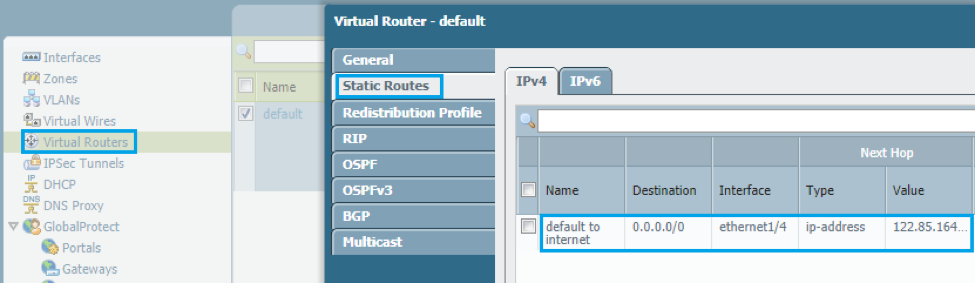
- Navigate to the virtual router workspace and configure any layer 3 requirement of your network. In this case, we will just have a default route going out to the internet although this is not a requirement for the set-up.
STEP 4: Create the NAT statements
- You can now proceed to defining the NAT statements on the firewall. Navigate to the policies tab and select the NAT workspace.
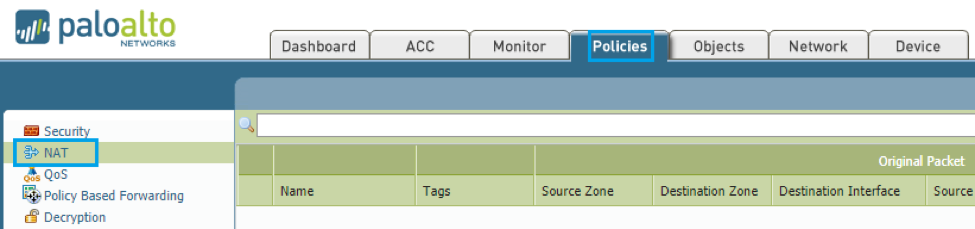
- Our purpose is to allow traversal of traffic from the internal user subnet going into the lab devices on untrustB using the routable private IP space. In this case, the pre NAT parameters will be as follows.

STEP 5: Create the matching security rule
- Every NAT rule should be paired with a corresponding security rule. Navigate to the security workspace on the policies tab.
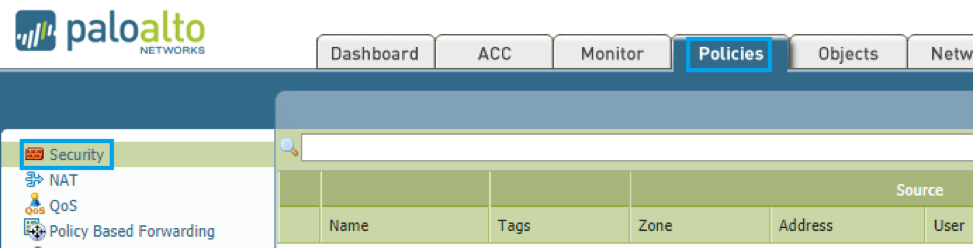
- As established earlier, the pre-NAT IP is preserved at least on how the firewall processes the packet so the security rule will still utilize the pre-NAT IP addresses but the post NAT zone will be used this time.

At this point, internal users on 10.1.1.0/24 should be able to reach 10.3.3.5 over port 80 considering all routes are working going between 10.1.1.0/24 and 10.2.2.0/24.
We hope this was informative to you! Check out what Indeni can do for Palo Alto Networks firewalls and our customers’ favorite automation elements. Thank you to Ralph Masajo for contributing this article.
 Key takeawaysKey takeaways are generated with AI assistance. Because automated summaries can occasionally contain errors or miss important context, always refer to the full blog post for complete information.
This article explains how to configure one-to-one static NAT on a Palo Alto firewall to provide controlled connectivity from an internal user network (trust) to an obscured laboratory/test network (untrustB) using a routable private IP space (untrustA). It outlines the real-world problem of exposing less secure development or lab subnets to users while preserving address spaces and security posture, and describes the required technical environment: zones, layer 3 interfaces, virtual routing, NAT statements, and matching security rules. The outcome is that users on 10.1.1.0/24 can reach the lab server 10.3.3.5 on port 80 through the firewall after creating zones/interfaces, routing, static NAT, and a paired security rule, assuming routes between 10.1.1.0/24 and 10.2.2.0/24 are functioning.
What is the purpose of using one-to-one static NAT for a lab or development subnet in this guide?
The guide uses one-to-one static NAT (termed static NAT on Palo Alto) to make an obscured laboratory/test subnet reachable from an internal user network while preserving the private lab address space and isolating it from propagation in the broader network. This approach enables controlled access to less secure or experimental networks by translating lab device IPs into addresses in a routable private space, allowing trusted users to reach specific services (for example, a server on port 80) without exposing the lab subnet directly. It balances address preservation, reachability, and containment of the lab environment.
What are the essential Palo Alto configuration steps required to enable this static NAT setup?
The essential steps are: (1) Create three zones (trust, untrustA, untrustB) and assign layer 3 interfaces with appropriate IP addresses to those zones; the firewall can use the first usable IP on interfaces for simplicity. (2) Configure layer 3 routing in the virtual router workspace—at minimum a default route if required by your network. (3) Define the static NAT statement in the NAT workspace under Policies, specifying the pre-NAT parameters (pre-NAT IP and pre-NAT zone) and the translated routable private address. (4) Create a corresponding security rule that uses the pre-NAT IPs for source/destination but sets the post-NAT zone as the destination zone so the firewall allows the translated traffic.
How should the security rule be constructed relative to the NAT rule so traffic is permitted correctly?
Every NAT rule must be paired with a corresponding security rule. On Palo Alto, the firewall processes packets using pre-NAT parameters, so the security rule should reference pre-NAT IP addresses for source and destination while using the post-NAT destination zone. In practice, you create a policy in the Security workspace that permits traffic from the user subnet (10.1.1.0/24) to the pre-NAT destination (the lab IP) and set the destination zone to the NAT-translated zone (untrustA/untrustB as applicable). This ensures the firewall matches on pre-NAT addresses but applies the correct post-NAT zone context so users can reach 10.3.3.5 on port 80 assuming routing between 10.1.1.0/24 and 10.2.2.0/24 is in place.
Related content

Get answers from the LiveNX data you already have with LiveAssist
Learn how LiveAssist, the AI-powered add-on for LiveNX, turns your network data into fast, guided answers, with value you can see in days.


LiveWire GEN3 device offerings
BlueCat LiveWire is a packet capture and network forensics platform that provides deep packet-level visibility across hybrid enterprise environments to help…

Get total control of your DDI infrastructure with Micetro’s unified API
Stop juggling between network tools and use Micetro’s RESTful API for complete control over your DDI infrastructure and cloud environment.

BlueCat MCP servers bring network intelligence to your AI assistant
Our MCP servers provide a standard integration layer that makes it easy to connect the AI tools you already use to BlueCat products.