
Planning IPv6 Address Assignment
Understanding how IPv6 addresses are assigned to hosts manually and dynamically on your enterprise network.


Notice: This blog post was originally published on Men&Mice before its acquisition by BlueCat.
The content reflects the expertise and perspectives of the Men&Mice team at the time of writing. While some references may be outdated, the insights remain valuable. For the latest updates and solutions, explore the rest of our blog
 Key takeawaysKey takeaways are generated with AI assistance. Because automated summaries can occasionally contain errors or miss important context, always refer to the full blog post for complete information.
The article explains methods for assigning IPv6 addresses—manual, SLAAC, and DHCPv6—so network teams can plan IPv6 migration and choose the best approach for their environments. It contrasts manual static configuration (similar to IPv4) with SLAAC, where routers advertise prefixes and hosts self-assign interface identifiers, and highlights how SLAAC differs between Windows (random identifier) and Unix/Linux/Mac (Modified EUI based on MAC). It then outlines DHCPv6 in stateless mode (SLAAC for addresses plus DHCP for options) and stateful mode (DHCPv6 controls address assignment and options), noting operational trade-offs around centralized visibility, management, and mixed IPv4/IPv6 complexity.
When should I use manual IPv6 assignment instead of automated methods?
Manual IPv6 assignment is appropriate when you need permanent, predictable IP addresses—typically for servers or infrastructure where DHCP reservations are not being used. The process is similar to IPv4: on Windows you select Use the following IPv6 address and enter the address, prefix length (commonly /64), and default gateway; on Mac or Linux you can do the same via GUI or command line specifying the prefix length. Use manual configuration when centralized DHCP control is unnecessary or unavailable, but be aware it lacks the centralized visibility and management that DHCP-based solutions provide.
How does SLAAC create a host’s IPv6 address on different operating systems?
With SLAAC, a router or Layer 3 device sends Router Advertisements (NDP) advertising the IPv6 network prefix, and hosts form the full address by appending an interface identifier. On Windows, the host typically picks a random interface identifier. On Unix/Linux/Mac systems, the host often uses the Modified EUI method: the 48-bit MAC is split, FF:FE is inserted in the middle to form 64 bits, and the seventh bit of the first byte is inverted to produce the final interface identifier (for example, 70:CF:49:B3:F2:0D becomes 02:CF:49:FF:FE:B3:F2:0D after modification).
What are the differences and operational benefits between stateless and stateful DHCPv6?
Stateless DHCPv6 complements SLAAC: Router Advertisements indicate SLAAC should be used for addresses while instructing clients to query a DHCP server for configuration options such as DNS, domain name, and lease times. The DHCP server does not manage addresses, so centralized address control is not provided. Stateful DHCPv6, by contrast, disables SLAAC for address assignment via Router Advertisement and directs clients to a DHCP server for both IP addresses and other options—mirroring IPv4 DHCP behavior and offering full centralized control. Operationally, stateful DHCPv6 gives enterprises complete address management and consistency, while stateless preserves SLAAC simplicity but still allows centralized distribution of configuration options; both modes allow DDI systems to gather contextual data and manage DHCP across the environment.
Dynamic allocation of an IPv6 address is a bit different than in IPv4. We’ll go over some of the available methods of address assignment via manual, SLAAC, and DHCPv6 to help you plan your IPv6 migration and the best method for your networks.
Manual
Let’s start off with what’s most familiar to server admins, which is the manual assignment of an IP address, in this case an IPv6 address. You’ll use this method if you’re not using DHCP reservations to assign permanent IP addresses likely to servers on your network.
This is very similar to IPv4. On a Windows machine we just need to go into our network card properties, check the Use the following IPv6 address radio button, and type in the address, subnet prefix length, and default gateway. Typically, with IPv6 addressing you’ll have a 64-bit subnet prefix length.
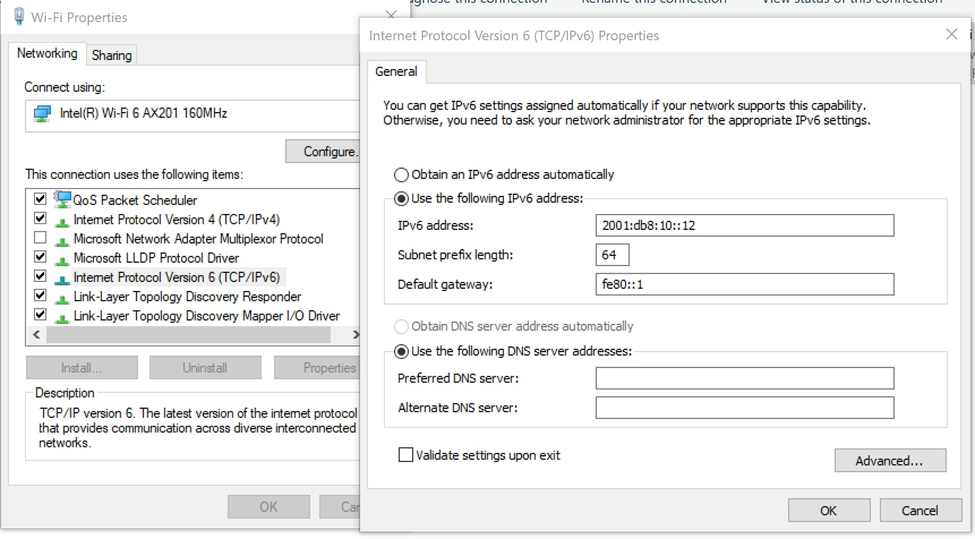
Notice that the major difference here is that with IPv4 we would generally put in the entire 32-bit IP address as well as the entire 32-bit default gateway IP address. This will be done in a similar way on a Mac GUI, or it may be done on the Mac terminal or Linux/Unix command line always specifying the prefix length.
Stateless Address Auto Configuration (SLAAC)
In the case of SLAAC, which is new with IPv6, a device will be connected to a router (or Layer 3 switch more likely) and that layer 3 device will send out a Router Advertisement with its IPv6 network. This is called Neighbor Discovery Protocol (NDP). In the case of a Windows machine, it will pick its own random interface identifier (or host part of the address). Then add that on to the network address learned from the Router Advertisement.
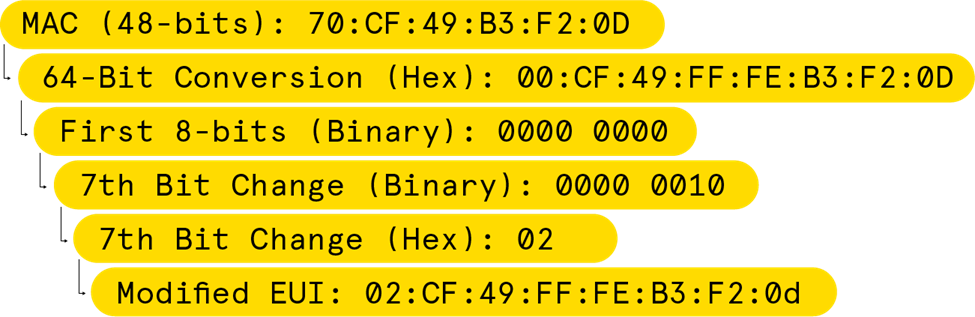
Regarding a Unix/Linux/Mac machine it’s a similar process, except the host will use its MAC address in the creation of the Modified EUI (Extended Unique Identifier, or host part of the address) to create a unique IPv6 address. So, it will receive the network address from the router and then take the 48-bit MAC and modify it so that it becomes 64-bits. The way this is done is by breaking the MAC address in half and then adding an FF:FE in the middle. So if the MAC were 70:CF:49:B3:F2:0D it would become 00:CF:49:FF:FE:B3:F2:0D.
Then it will take the first 8 bits, in the case 00, and convert the seventh bit into the opposite of what it is currently. For 0000 0000, the seventh bit would change to a 1. Now we have 0000 0010, which becomes 02:CF:49:FF:FE:B3:F2:0d ultimately in hex.
A quick recap of the math for creating a Modified EUI:
SLAAC is probably the simplest way to configure automatic IP addressing, but doesn’t give us all the benefits of DHCP, the biggest being centralized visibility and management. Also since many companies are still using IPv4 along with IPv6 it adds yet another layer of management complexity.
DHCPv6
DHCP gives centralized control for enterprise network management. There are two ways to use DHCP with IPv6 address allocation: Stateless and Stateful.
Stateless:
DHCPv6 (Stateless) still uses SLAAC in the same way described above. However, it will change a flag when sending the Router Advertisement for the client to check with the DHCP server for configuration options. So, you can specify things like which DNS server to go to, the domain name, and lease time. This is referred to as stateless because the DHCP server is not in charge of IP configuration, it’s only giving the extra options which are so often used in an enterprise environment for more automated and consistent configuration.
Stateful:
In the case of DHCPv6 (Stateful) the client will still try to get information from a Router Advertisement, but in this case the Router Advertisement will tell it not to use SLAAC at all and will be sent to a DHCP server for both IP configuration as well as the other options discussed above. This is very similar to how DHCP works in IPv4 environments and gives complete control to the DHCP servers.
In both Stateless and Stateful use cases, a DDI solution will be able to gather more information for a contextual view as well as control of DHCP for the entire environment.
For More Information
If you’d like to learn more about IPv6 and DCHPv6 check out our Fundamentals on-demand webinar.
Related content

We bet on Intelligent NetOps two years ago. Infoblox now has too.
With Infoblox acquiring Kentik, BlueCat’s CEO confirms its vision for a single platform unifying DDI, network monitoring, and observability.

BlueCat DDI data boosts Cisco Cloud Control AI-driven operations
BlueCat’s integration with Cisco Cloud Control provides AI agents with access to trusted DDI data for network investigation and remediation.

Automate your DDI modernization path by migrating with Micetro
Automate cross-platform DNS and DHCP migration with Micetro to reduce risk, eliminate manual effort, and modernize infrastructure faster.

How to map your network with user-defined links in Integrity X
Map your network with user-defined links in Integrity X to define and manage custom relationships, such as dual-stack and NAT environments.