
Step into the Customer Portal: Getting the Most Out of BlueCat
Are you a BlueCat customer looking to get more out of your enterprise software?



 Key takeawaysKey takeaways are generated with AI assistance. Because automated summaries can occasionally contain errors or miss important context, always refer to the full blog post for complete information.
The article describes BlueCat’s Customer Care Portal as a centralized resource for customers to access product documentation, troubleshooting tools, and community-driven solutions that improve operational efficiency and reduce time-to-resolution. It explains real-world problems—like upgrade planning, API questions, and high-severity incidents—can be addressed via searchable documentation, the Upgrade Wizard, multi-channel 24/7 support, and crowdsourced knowledge from peers and BlueCat experts. Key outcomes include faster issue resolution through vetted solution articles, enhanced collaboration via user groups and the Knowledge Leaderboard, and recognition/rewards for active contributors.
What types of resources and tools are available on the BlueCat Customer Care Portal to help with upgrades and troubleshooting?
The Care Portal provides easy-to-find product documentation, software and patch downloads, and product release notes along with administration and installation guides. The Upgrade Wizard helps you search for relevant documentation by product, current version, and target version to streamline upgrade planning. Additionally, the portal offers tools, troubleshooting tips, FAQs, and topic-filterable discussions and solution articles (for areas such as API, security, hardware troubleshooting, upgrades, tools, and appliances) to support problem diagnosis and remediation.
How does the Care Portal support fast response times and case management for critical issues?
BlueCat’s Care Portal supplements multi-channel 24/7 support from the Customer Care team with efficient case submission and status updates for all open and closed cases. The support model emphasizes prompt responses to high-severity issues that consistently exceed SLA expectations. Customers can search the knowledge base for solution articles or engage the community to crowdsource answers before opening a case, helping prioritize support resources and accelerate resolution for critical incidents.
What community and recognition features encourage customer participation on the Care Portal?
The portal encourages engagement through community features like topic-filterable discussions, User Groups, and Connect, Educate and Learn (CEL) sessions where customers can meet BlueCat experts and learn about upcoming functionality. The Knowledge Leaderboard highlights top contributors, showing accumulated points and areas of expertise; users earn points by posting questions, answers, and voting for the best responses. Active participants may be named BlueCat Ambassador of the Month and receive BlueCat swag as appreciation, fostering ongoing contributions and peer support.
Are you a BlueCat customer looking to get more out of your enterprise software? Whether you’re interested in our API, or you want to contribute to the BlueCat customer community, step into BlueCat’s Customer Care Portal and take advantage of the wealth of informative articles and exclusive webinars.
If you’re a BlueCat customer and you’re not using the Care Portal yet, here’s a few reasons why you should be.
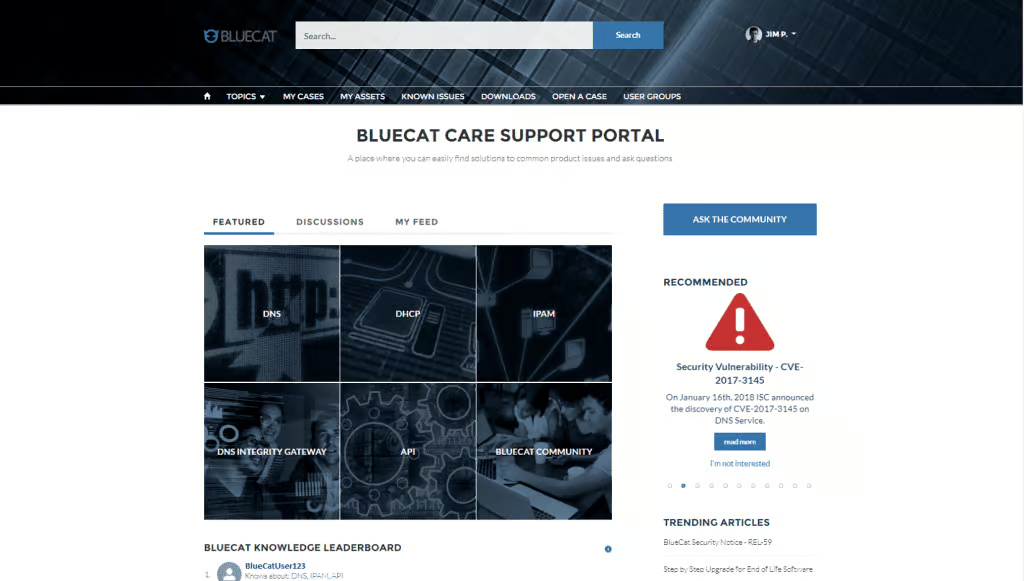
The Care Portal features:
Easy Access to Information
- Solutions to common issues and FAQs as well as product documentation, tools, and troubleshooting tips Regular feature highlights, answers and suggested best practices
- Easy-to-find product documentation, software and patch downloads The Upgrade Wizard helps you search for relevant documentation by product, current version, and target version
- Product release notes, administration and installation guides
- Have a great idea for an upcoming release? Want to submit a feature request? Have a question or concern? Filter discussions and solution articles by topic (e.g., API, security, hardware troubleshooting, upgrades, tools, appliances…)
- Check out the User Groups page and connect with other BlueCat users and learn about upcoming features and functionality
Fast Response Time
- Multi-channel 24/7 support from our team of experts
- Efficient case submission and status updates for all open and closed cases
- Prompt responses to high severity issues that consistently exceed SLA expectations
- Search our knowledge base for a relevant Solution article, or ask the community for their advice. BlueCat customers and employees alike browse the boards and offer advice
- Crowdsourced answers and vetted solution articles help you solve your problem quickly without creating a case/engaging the Care team

Customer Appreciation
- The Knowledge Leaderboard features the community’s top contributors
- Connect, Educate and Learn (CEL) user groups offer customers a chance to meet with BlueCat experts to hear firsthand about upcoming product features and functionality
- Customers who regularly contribute their ideas, insights, and experience to the community may be featured on the Knowledge Leaderboard on the portal’s homepage which shows the community’s top contributors, their accumulated points, and their areas of expertise
- You can vote for the best answers and receive points by posting questions and answers.
- If you accumulate enough points and actively participate in the community, you could become BlueCat Ambassador of the Month! For all your contributions to the community, we’ll send you some BlueCat swag to show our appreciation.
To log in to the portal, visit https://care.bluecatnetworks.com/s/ and enter your BlueCat credentials. If you have not yet received any login credentials, contact Customer Care ([email protected]) to register for a Care Portal account.
Published in:

Anna is a passionate content writer who’s always eager to learn something new about cyber security.
Related content

Get answers from the LiveNX data you already have with LiveAssist
Learn how LiveAssist, the AI-powered add-on for LiveNX, turns your network data into fast, guided answers, with value you can see in days.


LiveWire GEN3 device offerings
BlueCat LiveWire is a packet capture and network forensics platform that provides deep packet-level visibility across hybrid enterprise environments to help…

Get total control of your DDI infrastructure with Micetro’s unified API
Stop juggling between network tools and use Micetro’s RESTful API for complete control over your DDI infrastructure and cloud environment.

BlueCat MCP servers bring network intelligence to your AI assistant
Our MCP servers provide a standard integration layer that makes it easy to connect the AI tools you already use to BlueCat products.