Notice: This blog post was originally published on Indeni before its acquisition by BlueCat.
The content reflects the expertise and perspectives of the Indeni team at the time of writing. While some references may be outdated, the insights remain valuable. For the latest updates and solutions, explore the rest of our blog
Key takeawaysKey takeaways are generated with AI assistance. Because automated summaries can occasionally contain errors or miss important context, always refer to the full blog post for complete information.
This article explains network automation as the process of completing network device tasks without human intervention, addressing the real-world problem that technology has outpaced many organizations' ability to manage complex networks. It outlines practical, low-to-high risk task categories to automate—creating device scripts and APIs, prioritizing issues discovered from device data, and implementing automated changes—highlighting the operational impact of reduced errors, faster remediation, and the need for seasoned professionals to triage and prepare for IaaS and containerized infrastructure. Key outcomes include starting with validation and runbooks, using best-practice checks (redundancy, clustering, compliance, security), and leveraging platforms like Indeni to automate validation tasks for maintenance and visibility.
What is network automation and why is it necessary according to the article?
Network automation is defined as completing tasks or activities on network devices (firewalls, routers, switches) without human intervention—examples include validating configurations, checking cluster availability, toggling features, and deploying services. The article argues automation is necessary because networks are increasingly complex and human mistakes are inevitable; survey results show technology has outpaced many teams’ ability to manage networks manually. Automation reduces manual error, scales repetitive validation and remediation work, and helps teams focus expert human effort on higher-risk, complex issues and future-proofing for virtualization and cloud transitions.
What practical steps does the article recommend for getting started with network automation?
The article recommends starting small and practical: first validate that network and security devices are configured and operating as intended by checking best practices, redundancy/cluster availability, compliance, and security settings. Begin by creating scripts to extract and parse device data—understanding whether devices provide APIs is crucial because many networking devices lack well-documented programmable interfaces. Collect knowledge from your team and document runbooks describing how humans make changes; once a change is well understood it can be automated. The author also suggests using a crowd-sourced validation platform like Indeni to automate checks for maintenance, visibility, and best practices.
How should organizations prioritize which network tasks to automate and who should be involved?
Organizations should view automation along a risk/complexity spectrum and prioritize lower-risk, lower-complexity tasks first (data extraction, parsing, basic validations) before moving to higher-risk automated changes. The article emphasizes that prioritization of issues uncovered by automation requires seasoned IT professionals who can interpret interdependencies across on-premises, cloud, and hybrid environments—deciding when a configuration change is safe or when trends indicate emerging problems. Invest in experienced staff to handle urgent and complex issues and to gain IaaS/container expertise so that automation efforts are informed by deep operational knowledge and safe runbook-driven procedures.
It is very hard to keep up with technology trends, especially if you are a network or security professional. Networks are complex, and mistakes are an inherent fact of human life. In our recent automation survey individual contributors and managers agree technology has outpaced our ability to manage the network – we need automation. Unfortunately our industry has done an impeccable job confusing everyone with acronyms and “new” technologies. Let’s use the next 5 minutes to clarify what network automation is, and how you can use it.
Network Automation Definition
Automation is the process of completing a task or activity without human intervention. When applied to network devices, such as firewalls, routers or switches, automation refers to the completion of tasks such as validating configuration settings, cluster availability, enabling or disabling features to deploying new services without human intervention.
Task automation scale
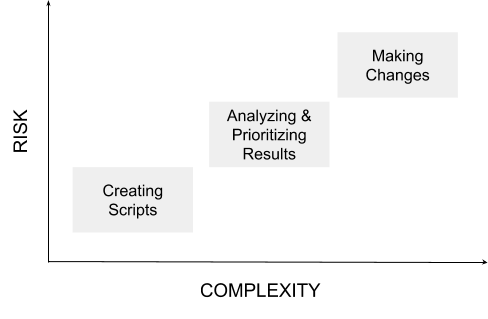
Every organization has different risk tolerances. Here is a simple graph to help guide a discussion around task automation in your internal team. It is possible to automate a range of activities from very low risk and lower complexity, to high risk and high complexity.
Network tasks to automate in 2018
1. Creating scripts
Commands to use when extracting data
Parsing data returned from scripts
Processing and analyzing device data
2. Prioritizing issues uncovered by data
3. Implementing changes to fix issues
Let’s break these down further:
1. Create scripts for networking devices
In order to extract data from a network device you have to understand the protocols it uses or if it has one, the application programming interface (API). Unlike applications and servers, networking gear very rarely has a programmable interface. What is an API? Here is a great description from ProgrammableWeb:
“An API is very much the same thing as a UI, except that it is geared for consumption by software instead of humans. This is why APIs are often explained in the mainstream media as a technology that allows applications (software programs) to talk to one another. In this context, the terms “software,” “applications,” “machines” and “computers” are virtually interchangeable. For example, APIs are often discussed as being machine-readable interfaces (versus human-readable).” From this article: APIs Are Like User Interfaces–Just With Different Users in Mind.
Without a well documented programming interface, it is very difficult to know how to extract data, parse or process data from networking devices, regardless if the commands are run proactively or reactively.
2. Prioritizing issues uncovered by data
Regardless if your environment is on-premises, cloud based, or a hybrid of the two, single vendor solutions are complex and interdependencies exist between them. For example if network performance is degrading, the culprit could be a single configuration, combination of the configurations, and/or connectivity dropping between devices. It takes a subject matter expert with years of experience to understand the implications of situations such as:
What happens when I enable or disable this feature?
If there is a spike in memory usage, is this a cause for concern?
When comparing two data trend lines, should they be correlated? Is there a potential problem on the horizon?
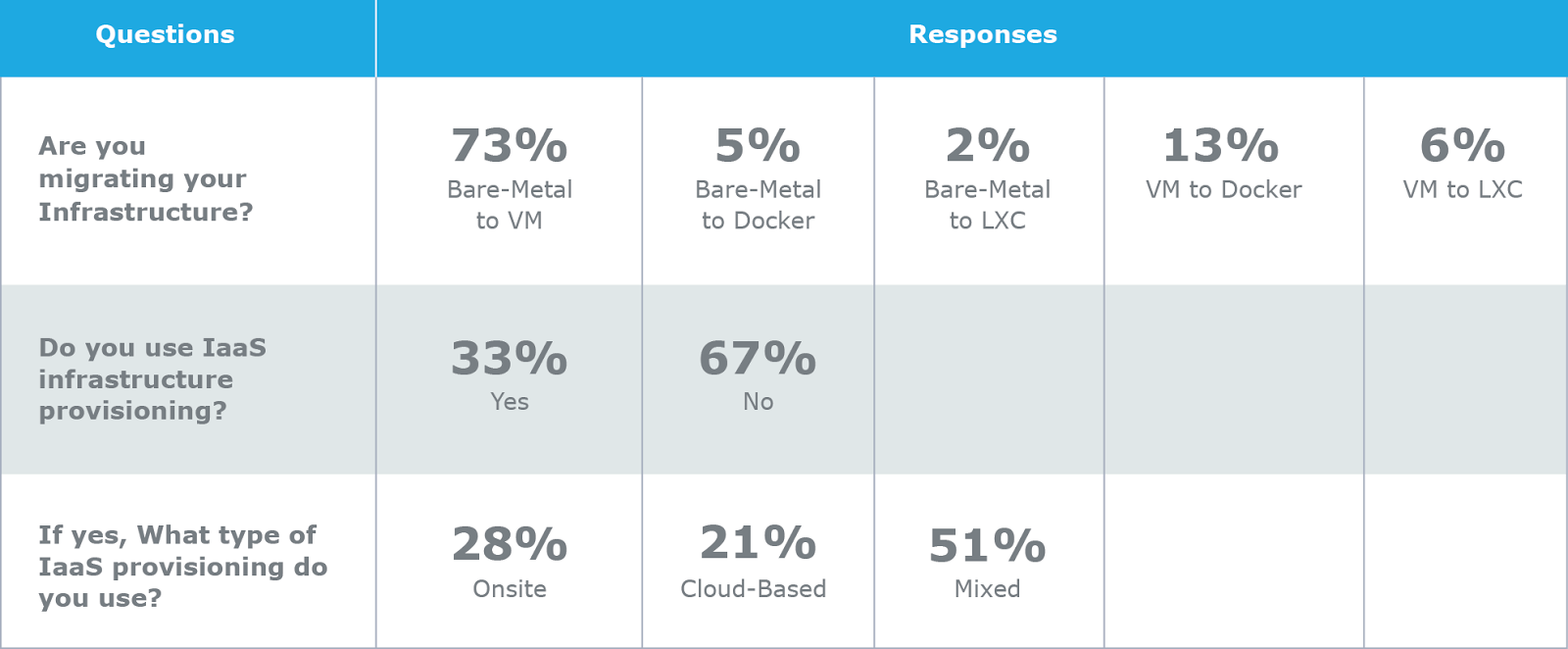
As more companies migrate bare-metal infrastructure services to virtual machines and containers, it will be even more difficult to avoid and resolve issues. In order to effectively prioritize the issues uncovered, you must have seasoned IT professionals to tackle urgent issues (present day) and invest in those same experts to give them experience working with IaaS solutions (so your company can prepare for future).
3. Implement changes to fix issues
Knowing how to fix a problem is an art, as much as it is a science. It would be more of a science if documentation was always up to date. To get to a state where the network is self-operating humans need to know how to make changes first. Once we know how to make a change, only then can we teach a machine to perform the task without intervention. Machines unlike humans are very good at following directions! In a recent survey by GNS3 and Indeni, it was interesting to see that fewer professionals are implementing automation here than you would guess.
For those of us who haven’t programmed our systems to be self operating yet, you can start collecting this information from your team and document runbooks. From the same Network Security Automation survey mentioned above, of those using runbooks, 87% of respondents found them effective to lower cost and increase productivity.
How to get started
If you are just getting started with network automation, start by validating that your network and security devices are set up and working as intended:
Are [Palo Alto Networks, Cisco, Juniper, etc.] best practices are in place?
Do I have redundancy / cluster availability?
Have I followed compliance best practices?
Have I followed security best practices?
Indeni provides a crowd-sourced automation platform. With Indeni customers automate validation tasks for maintenance, network visibility, best practices and more. Contact us if you are ready to automate network tasks.
If you found this article helpful please share on social media by clicking the share links at the top of this page. Thanks!
BlueCat LiveWire is a packet capture and network forensics platform that provides deep packet-level visibility across hybrid enterprise environments to help…
Our MCP servers provide a standard integration layer that makes it easy to connect the AI tools you already use to BlueCat products.
Read more
We’re using cookies on this website to improve your experience. Cookies help us learn how you interact with our website and remember you when you come back so we can tailor it to your interests.
To learn more about cookies and how we use them, read our cookie notice.
Some cookies are essential, while others help us to improve your experience by giving us insight into how you are using our website. You may adjust your preferences for non-essential cookies below.
To learn more about cookies and how we use them, read our cookie notice. You can also review our privacy policy for more details on the personal data we collect, use, hold, and disclose when you visit our website or use our products and services.
Functional cookies
Functional cookies are essential cookies that allow us to remember choices or changes you have made (such as to language settings or your choices regarding the use of cookies). These cookies cannot be turned off since they are essential for the operation of our Websites.
Analytics cookies
Analytics cookies are non-essential cookies that collect information on how visitors use our Websites. We use this information with your consent to measure the number of visitors to our Websites, determine whether specific content or communication has been viewed, and to help us improve our Websites and communication. These cookies can be turned off.
Personalisation Storage
Personalisation cookies are non-essential cookies that collect information when you fill out a form on this website. We only use this information with your consent to pre-fill other forms on the site. These cookies can be turned off.
Marketing cookies
Marketing cookies are cookies that are placed by third parties to collect information about your visits and actions on our Websites so that they or we can deliver ads to you later, such as when you are on certain third-party sites or platforms. These cookies may be used by those third parties to build a profile of your interests and show you relevant ads on other websites. These cookies also enable visitors to our Websites to share content on social networks and to enable and evaluate interactions with our communication and social media tools. These cookies can be turned off.




 Key takeawaysKey takeaways are generated with AI assistance. Because automated summaries can occasionally contain errors or miss important context, always refer to the full blog post for complete information.