
Top 5 Automation for FortiGate Firewalls


Notice: This blog post was originally published on Indeni before its acquisition by BlueCat.
The content reflects the expertise and perspectives of the Indeni team at the time of writing. While some references may be outdated, the insights remain valuable. For the latest updates and solutions, explore the rest of our blog
 Key takeawaysKey takeaways are generated with AI assistance. Because automated summaries can occasionally contain errors or miss important context, always refer to the full blog post for complete information.
This article describes Indeni’s most popular automation elements for managing FortiGate firewalls to reduce operational risk, prevent zero-day attacks, and automate routine tasks. It highlights real-world problems such as HA cluster sync failures, missed FortiGuard updates, memory leaks leading to conserve mode, session and ephemeral session overloads, and missing DoS policies — explaining how Indeni monitors, alerts, and provides step-by-step remediations in each area. The outcomes include proactive detection of configuration and health issues, faster troubleshooting with expert remediation guidance, and improved resilience and uptime for FortiGate deployments.
How does Indeni help maintain FortiGate High Availability (HA) readiness and what common HA issues does it detect?
Indeni monitors FortiGate HA clusters to detect and alert on a range of HA readiness problems so administrators can act before outages occur. It checks cluster synchronization (including debug zone and configuration checksum) to identify out-of-sync configurations — the most common HA issue — and tracks heartbeat interface status, link status, bandwidth utilization, and the number of operational heartbeat links (alerting if fewer than the recommended two). Indeni also verifies HA monitor link health, uptime of the HA cluster, and whether HA features such as session-pickup and session-override are enabled, providing recommended remediation steps built by certified Network Security Experts.
What capabilities does Indeni provide to detect and remediate memory-related conserve mode on FortiGate devices?
Indeni proactively identifies when a FortiGate enters conserve mode — a self-protection state triggered by high memory usage (default red threshold 88%, extreme 95%) — and reports the threshold level and duration to avoid disruptive reloads. It analyzes key metrics that can indicate memory leaks or high utilization, including the top five processes by total memory, socket memory, and active file descriptors, and offers detailed remediation steps to isolate and resolve root causes. By continuously monitoring these metrics and alerting administrators with prescriptive guidance, Indeni helps prevent session drops and service impact related to memory exhaustion.
What session and DoS-related alerts does Indeni generate to help detect attacks or resource exhaustion on FortiGate firewalls?
Indeni collects in-depth session statistics and alerts on conditions that indicate attacks or resource strain, such as session clashes (where a new session replaces an existing identical tuple causing retransmissions), kernel sessions deleted due to lack of memory, sessions dropped from interface down status or hitting maximum limits, and high numbers of ephemeral sessions that can trigger memory shortages. It captures totals like current sessions, sessions created per second, sessions in removable state, and TCP session state distributions (NONE, ESTABLISHED, CLOSE, CLOSE_WAIT) — high CLOSE or CLOSE_WAIT counts may suggest attacks. Separately, Indeni alerts if IPv4 DoS policy is not enabled so administrators have the first layer of protection against DDoS traffic.
Authors: Vasilis Bouloukos & Ulrica de Fort-Menares
Keep your FortiGate firewalls running smoothly and free from zero day attacks, here’s our list of the most popular automation elements among our customers. Indeni can take a few things off your plate with our Auto-Detect elements (ADE). We have approximately 70 automation elements to help you proactively manage your firewalls, automate mundane tasks and keep you out of trouble. When issues occur, you can count on the recommended step-by-step remediations built by certified Network Security Experts to help you address issues quickly.
#1 High Availability Readiness
Our support for high availability (HA) readiness has always been popular among our customers. HA provides resilience not only in the event of a cluster member failing, but also allows for firmware updates without any downtime. FortiGate Clustering Protocol is the most commonly used HA solution. It allows two or more FortiGates of the same type and model to be put into a cluster in Active-Passive (A-P) or Active-Active (A-A) mode. A-P mode provides redundancy by having one or more FortiGates in hot standby in case the primary device experiences a detectable failure. A-A mode allows traffic to be balanced across the units in the cluster for scanning purposes, and also performs failover.
High Availability Capabilities:
- Alert if one or more firewalls in a firewall cluster experiences problems
- Cluster configuration out of synchronization issues. This is the most common issue with HA. Indeni can identify proactively these issues including checks for sync status, debug zone and configuration file checksum
- Identify cluster heartbeat interface problems by tracking link status and bandwidth utilization
- Identify the status of critical HA monitor links
- Alert if the number of operational heartbeat links are less than the recommended two HA links (no redundancy)
- Identify HA heartbeat interfaces do not have different priorities
- Monitor the uptime of the HA cluster. Any unexpected low uptime should be troubleshot and investigated
- Analyze if HA features configuration settings are activated as per below:
- Session-pickup: The new primary unit uses its synchronized session table to resume all TCP sessions that were being processed by the former primary unit with only minimal interruption.
- Session-override: Always renegotiate when an event occurs that affects primary unit selection
#2 Critical Services
Firewalls depend on many external security services to get dynamic content updates for the latest threat intelligence. Services include AV engine, Virus definition,malware prevention, security rating, intrusion prevention attack engine, URL filtering, etc.
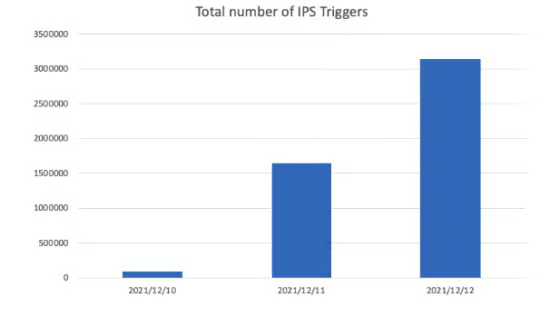
To get the most protection from your firewall, you need to verify the FortiGuard services last update status and versions. A timely update of IPS signatures is the best protection mechanism from zero day attacks. The recent Log4j vulnerability (Log4Shell) is a great example where we saw the exponential growth of IPS triggered attacks shortly after the announcement of the vulnerability. Indeni continuously monitors the last update status of all the UTM features to ensure timely updates.
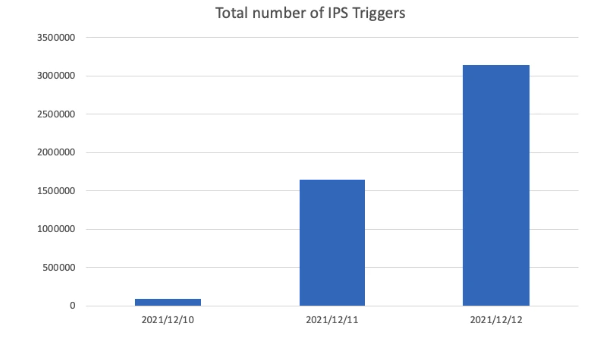
Source: https://www.fortinet.com/blog/psirt-blogs/apache-log4j-vulnerability
#3 Tackling Conserve mode
A FortiGate goes into the “conserve mode” as a self protection measure when a memory shortage appears on the system. When entering conserve mode the FortiGate activates protection measures in order to recover memory space. Memory shortages are the most commonly found problems with FortiGate. The FortiGate enters conserve mode when memory usage reaches the red threshold (default 88% memory used). If memory usage reaches the extreme threshold (95% memory used), additional new sessions will be dropped. When used memory goes below the green threshold, the kernel releases the conserve mode state.
Several FortiOS releases have encountered issues with memory leaks. After a certain period of time, the memory utilization increases at a level where it has severe service impact. Fortinet TAC many times proposed to proceed with a reload. Indeni can proactively inform the administrator if the Fortigate enters a conserve mode state and the threshold level, thereby preventing a reload. Indeni monitors and analyzes key metrics which could be the root cause of a memory leak and high memory utilization. This includes the top 5 processes:
- consuming the highest memory
- with the most socket memory
- with the most active file descriptors
Detailed Remediation steps are provided for each alert to isolate and resolve this critical issue.
#4 Session Status & Statistics
Getting in-depth session statistics information provides an important picture of what is happening on your system. This is particularly useful if you are experiencing memory issues or if you are close to the hardware session limits of the FortiGate. For instance, if the number of ephemeral sessions is high, not only do you have a very busy device, you may also run into memory issues. A high number of ephemeral sessions may indicate a DoS attack is underway.
Indeni alerts if following conditions are detected:
- Sessions clash causing service degradation
Session clash appears when a new session is created but a conflicting similar session (same tuple) already exists. When that happens, the old session will be deleted and replaced by the new one. The consequence is that it may cause re-transmissions.
- Kernel sessions are deleted due to lack of memory or resources
- Sessions have been dropped due to interface down status or maximum limit reached
- High number of ephemeral sessions resulting in memory shortages
In addition to these alerts, we collect in-depth session information about the system’s state. This includes useful information such as total number of current sessions and the current number of created sessions per second.
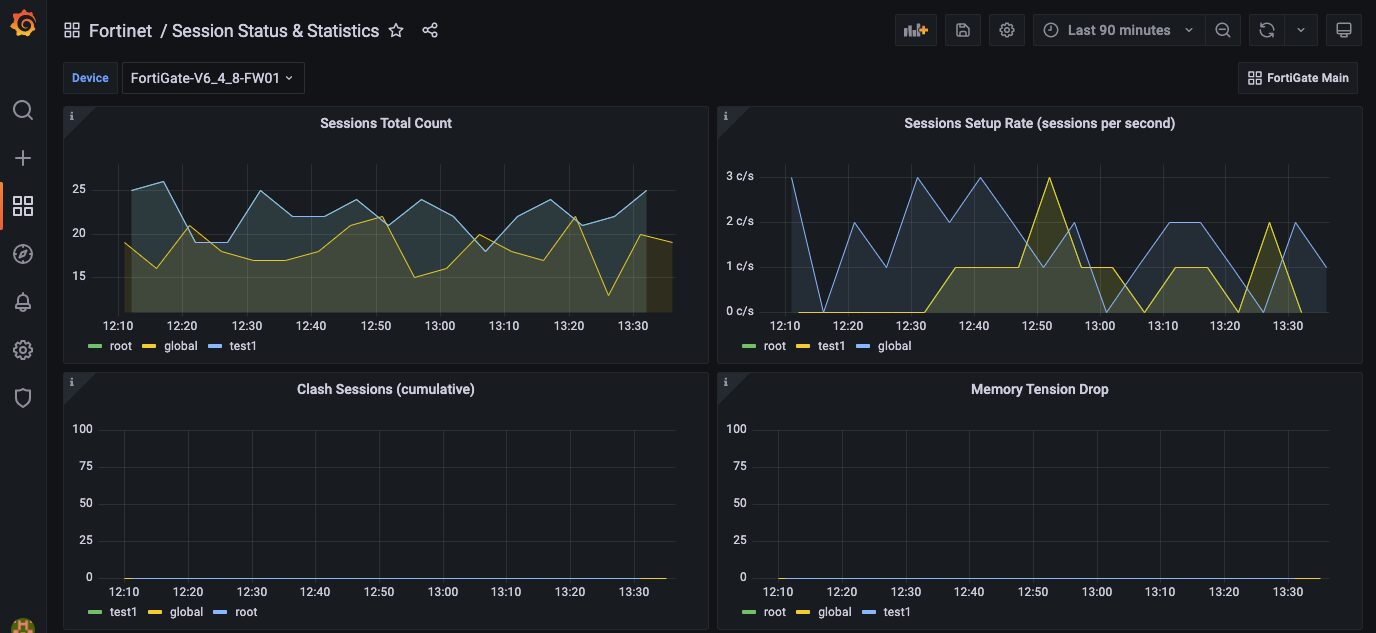
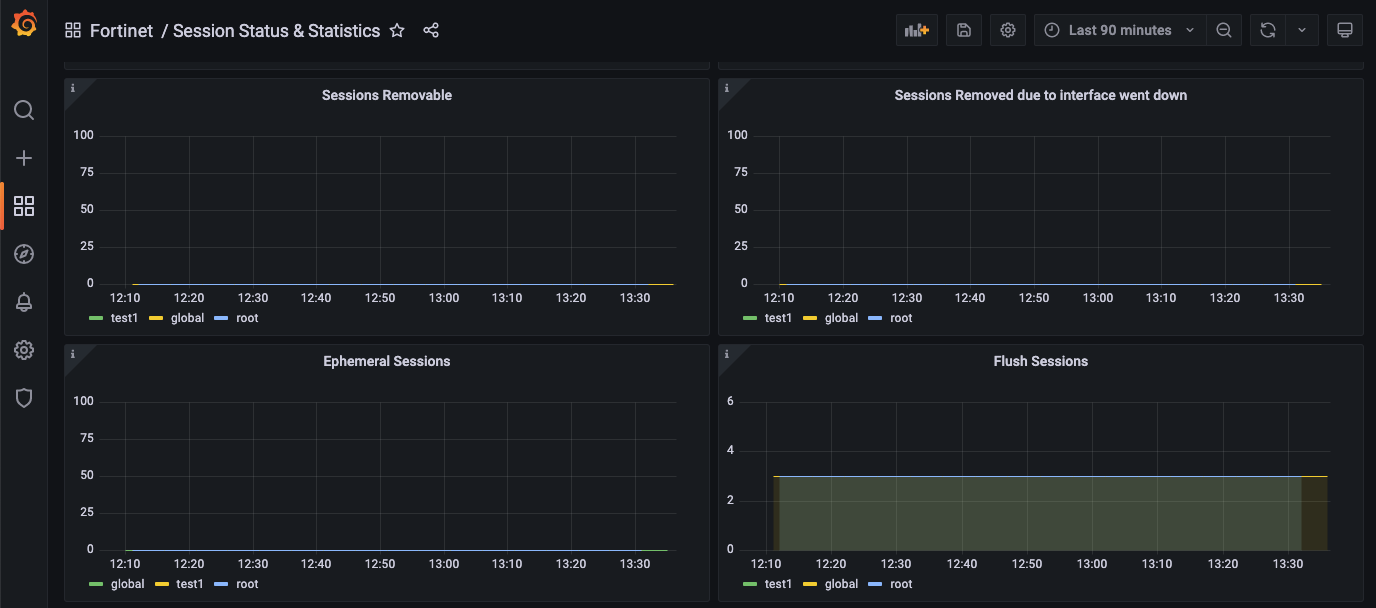
We also collect the current number of sessions in removable state. A session is in removable state when the total number of sessions reaches a certain limit. You can also see the number of times a request was made to flush firewall sessions matching a specific criteria. It is useful to know how many times the more expensive flush was done.
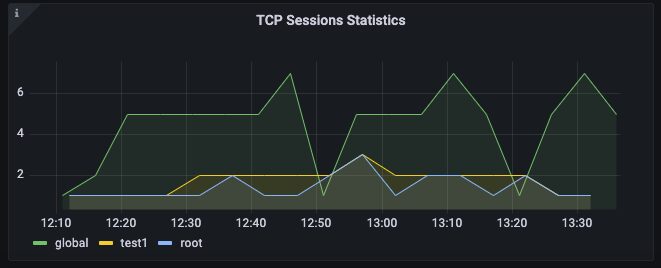
We capture statistics about the current number of TCP sessions in various states such as NONE, ESTABLISHED, CLOSE, CLOSE_WAIT. A high number of sessions in CLOSE or CLOSE_WAIT state could be an indication of attacks.
#5 DoS Policy Status
Separate recent reports by Cloudflare and Kaspersky Lab found that DDoS attacks have increased dramatically since the beginning of Russia’s invasion of Ukraine. Not only did the number of attacks grow significantly, the duration of these attacks grew notably. With DDoS attacks a growing threat, you want to enable IPv4 DoS policy as the first layer of protection against DDoS attacks.
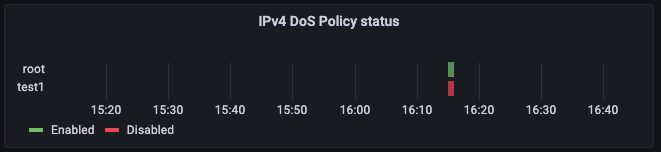
A Denial of Service (DoS) policy examines network traffic arriving at a FortiGate interface for anomalous patterns, which usually indicates an attack. A DoS policy prevents attackers from flooding your network. Indeni generates an alert if the DoS policy is not enabled.
Try Indeni
There, you have our top picks for FortiGate firewalls. You have made a big investment in security with your firewall and all the features it has enabled. Let us help you make the most out of your security infrastructure. With Indeni, you can quickly get conclusions, not conjecture from your monitoring tool. For a complete list of Auto-Detect Elements, click download.
If you are new to Indeni, we encourage you to take Indeni for a spin and try out our automation capabilities.
Published in:

Ulrica de Fort-Menares is the Vice President of Product Management for Infrastructure Assurance.
Related content

Get answers from the LiveNX data you already have with LiveAssist
Learn how LiveAssist, the AI-powered add-on for LiveNX, turns your network data into fast, guided answers, with value you can see in days.

Get total control of your DDI infrastructure with Micetro’s unified API
Stop juggling between network tools and use Micetro’s RESTful API for complete control over your DDI infrastructure and cloud environment.

BlueCat MCP servers bring network intelligence to your AI assistant
Our MCP servers provide a standard integration layer that makes it easy to connect the AI tools you already use to BlueCat products.

We bet on Intelligent NetOps two years ago. Infoblox now has too.
With Infoblox acquiring Kentik, BlueCat’s CEO confirms its vision for a single platform unifying DDI, network monitoring, and observability.