Pulling Data via SNMP, SSH or API – PAN Firewall Best Practices
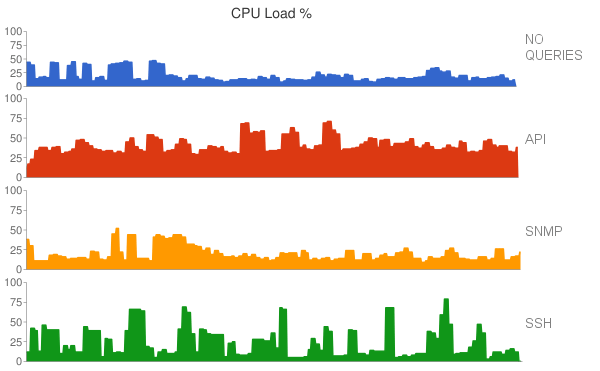
If you're want to integrate Palo Alto firewalls as part of some automated system – scripts, central NOC, SDN. What protocol is best? SNMP,…
Read moreSimple Network Management Protocol (SNMP) is a standard network management protocol that enables monitoring and configuration of enterprise devices such as routers, switches, servers, and firewalls through a manager-agent model operating over UDP ports 161 and 162. SNMP exposes device data as objects in a Management Information Base (MIB) organized by Object Identifiers (OIDs), which the manager accesses through polling requests or receives via unsolicited trap notifications when events occur. Organizations must deploy SNMPv3 with authentication and encryption, maintain accurate MIB files, carefully manage polling intervals, and restrict access by source address to avoid security vulnerabilities, blind spots from misconfiguration, and performance degradation from excessive device CPU load.

SNMP uses a manager and agent model. The agent runs on a managed device and exposes its data as objects identified by object identifiers (OIDs) and organized in a Management Information Base (MIB).
An SNMP walk is a repeated series of GetNext or GetBulk requests that retrieves every object under a chosen point in the OID tree. It is commonly used to discover what a device exposes. Traps cover events between polling cycles, but UDP delivery of a plain trap is not guaranteed.
Devices left with community strings such as public or private allow anyone who can reach UDP port 161 to read data, and sometimes to write it. Security scans commonly flag this on printers and switches that were never hardened after installation.
A trap receiver sees nothing because the device has no trap destination configured, a firewall blocks UDP port 162, or the community or SNMPv3 user does not match. Because traps are unsolicited and SNMPv1 and SNMPv2c traps are not acknowledged, the sender gives no sign of failure.
Polls time out or return authentication errors when the manager and agent disagree on the security level, authentication protocol, or privacy protocol. A mismatch in the engine ID used for traps and informs is another frequent cause.
Aggressive polling intervals or large GetBulk walks over big tables, such as routing or ARP tables, can raise CPU use on older devices and produce gaps in graphs. Staggering polls and limiting the OIDs requested usually resolves it.
Without the correct vendor MIB loaded, tools show raw numeric OIDs or misread values. Counter wrap on 32-bit interface counters can also produce false spikes on fast links, where 64-bit counters are the better choice.