
Expert Review of Runbook Templates



Notice: This blog post was originally published on Indeni before its acquisition by BlueCat.
The content reflects the expertise and perspectives of the Indeni team at the time of writing. While some references may be outdated, the insights remain valuable. For the latest updates and solutions, explore the rest of our blog

Runbook templates are used by operations teams to automate routine maintenance and respond to system alerts and outages. Infrastructure is changing so rapidly, that it is difficult to keep documentation up to date. To improve incident response times and reduce errors in the troubleshooting process it is critical to have operating steps documented. Before you can gather the information, it is important to have a solid template as a starting point. What background information is important to include in a runbook? What is a must have vs. nice to have? We asked our community of certified IT professionals for their review of free runbook templates. Check out what they said:
Templates
- THWACK member
- Skeleton Thatcher
- Indeni
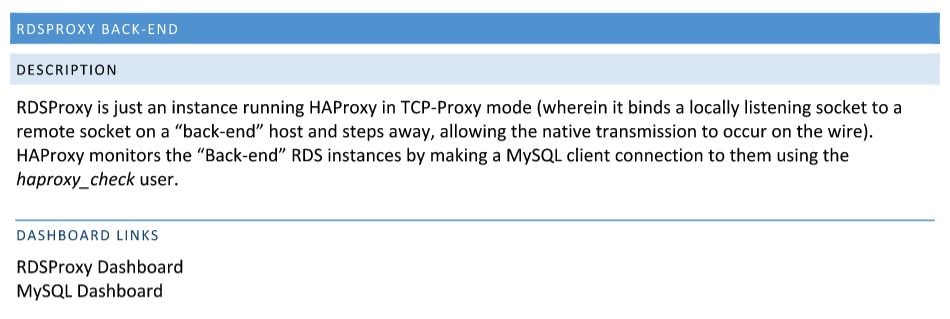
Runbook Template #1 by THWACK
What I like about it:
Tells you in plain english what the issue is
- Description of the problem
- What the symptoms are
- What the recovery process is
- Provides links to review it in the related operation tool dashboard
What’s missing
- How was the issue uncovered, what commands did the tool use?
- How major of an issue is this?
- What could the issue be related to?

Runbook Template #2 by Skelton Thatcher Consulting

What I like about it
Provides background and contextual information about the system or service affected
- Background
- What is the system or service
- What part of the business is impacted
- What are the expectations for availability, performance and our SLAs
- Expected traffic and load
- Required resources
- Security and access control
- How security validation on ongoing basis
- How system configuration is managed
- Which parts of the system are backed up
- Tools
- What tools are available to help operate the system?
- What significant metrics will be generated?
- How does the system report its own health?
- Does it perform routine and sanity checks?
- Contextual
- What are the contributing applications, daemons, services, middleware
- Infrastructure and network design – What servers, containers, schedulers, devices, vLANs, firewalls, etc. are needed?
- Differences between Production/Live and other environments
Tells you how to resolve the issue
- Restore procedures
- Operational instructions – Deployment, Batch processing
- How to perform maintenance tasks such as patching, daylight-saving time changes, Data clear down, Log rotation
- Failover and Recovery procedures – What needs to happen when parts of the system are failed over to standby systems? What needs to during recovery?
What’s missing
- When there is an issue, what commands we’re using by those tools to identify it?
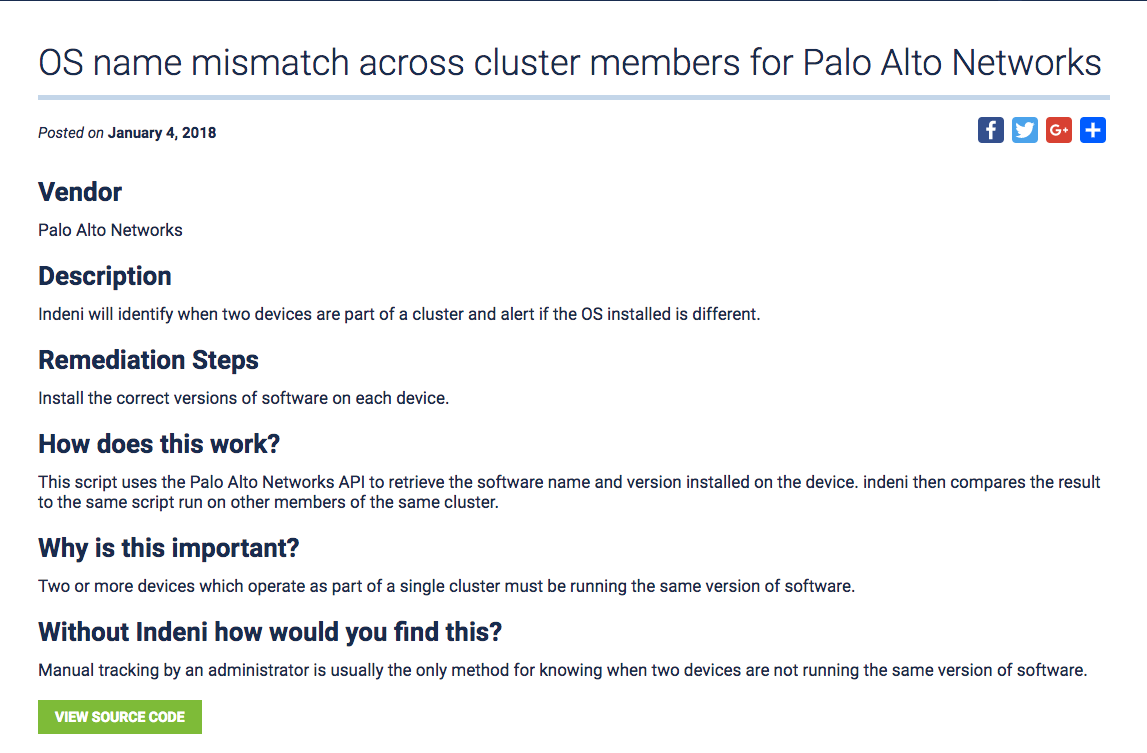
Runbook Template #3 by Indeni
What our community likes about it:
- Tells you in plain english what the issue is
- Description of the problem
- What the symptoms are
- What the recovery or remediation process is
- Provides visibility into the commands that are used
- What metrics does it inspect
- What are the rules, or thresholds that caused the notification to be generated
- Tells you how else you could of found the problem
- Are written in collaboration between engineering, IT operations and a subject matter expert from the Indeni Crowd Community.
- Scripts are continuously updated
In Summary
Great runbook templates must include three things
- Written in collaboration between the subject matter expert and IT operations
- Are written for humans, and machines
- Provide readable summaries of the issue that has occurred, or about to occur.
- Simple instructions to resolve the problem
- Give visibility into the commands used so that it can be:
- Edited by an individual
- automated by a machine
- Are continuously kept up to date
Interested in automating runbook tasks?
Download Indeni and connect to up to 5 devices for free when you engage in the Indeni Crowd.
If you found this article to be helpful, please share with your social networks using the buttons above. If you have feedback or other best practices you use please comment below. Thanks!
 Key takeawaysKey takeaways are generated with AI assistance. Because automated summaries can occasionally contain errors or miss important context, always refer to the full blog post for complete information.
This article reviews three free runbook templates from a certified IT community to help operations teams document routine maintenance and incident response in rapidly changing infrastructures. It explains the real-world problem of keeping runbooks current to improve incident response times and reduce troubleshooting errors, outlines essential background and operational details to include, and compares what each template provides and lacks. Key outcomes include a recommended set of must-haves for runbooks—collaboration between SMEs and operations, human- and machine-readable instructions, clear summaries, visible commands and metrics, and ongoing updates—and a pointer to try Indeni for automating runbook tasks on up to five devices for free.
What are the essential background details a runbook must include according to the reviewed templates?
The reviewed templates emphasize including clear background and contextual information about the affected system or service: what the system is, which part of the business it impacts, and expectations for availability, performance, and SLAs. They recommend documenting expected traffic and load, required resources, security and access control (including how security is validated ongoing), and how system configuration is managed. Operators should also note which parts of the system are backed up, contributing applications and services, infrastructure components (servers, containers, VLANs, firewalls, etc.), and differences between production and other environments.
What do the templates say about operational steps and troubleshooting commands?
All three templates prioritize plain-English descriptions of the problem, symptoms, and recovery or remediation steps, but differ on command visibility. Indeni and one THWACK template provide visibility into the specific commands used and the metrics and thresholds that triggered alerts, which helps both manual troubleshooting and automation. The Skelton Thatcher template lists operational instructions such as deployments, patching, log rotation, failover and recovery procedures, but community feedback noted that some templates lack explicit commands or the exact tool queries used to uncover an issue—information considered critical for fast, accurate response.
What practices make a runbook effective and maintainable over time?
The community summary identifies three core practices: write runbooks collaboratively between subject matter experts and IT operations so content is accurate and actionable; make runbooks usable by humans and machines by including readable summaries plus visible commands and machine-checkable steps; and keep runbooks continuously updated so they remain reliable as infrastructure changes. Effective runbooks should provide simple, editable instructions that can be automated, include the rules or thresholds that generate notifications, and be updated regularly—Indeni highlights continuous script updates from community collaboration as an example.
Related content

Get total control of your DDI infrastructure with Micetro’s unified API
Stop juggling between network tools and use Micetro’s RESTful API for complete control over your DDI infrastructure and cloud environment.

The Reality of Observability Unification in Modern IT Operations
Independent EMA research with 356 enterprise IT leaders shows that 97% now view observability unification as strategic, yet only 17% have completed it, with…

BlueCat MCP servers bring network intelligence to your AI assistant
Our MCP servers provide a standard integration layer that makes it easy to connect the AI tools you already use to BlueCat products.

We bet on Intelligent NetOps two years ago. Infoblox now has too.
With Infoblox acquiring Kentik, BlueCat’s CEO confirms its vision for a single platform unifying DDI, network monitoring, and observability.