
ISC DHCP is EOL
What do you do when your services reach EOL? Overlay services can make migration much easier.


Notice: This blog post was originally published on Men&Mice before its acquisition by BlueCat.
The content reflects the expertise and perspectives of the Men&Mice team at the time of writing. While some references may be outdated, the insights remain valuable. For the latest updates and solutions, explore the rest of our blog
 Key takeawaysKey takeaways are generated with AI assistance. Because automated summaries can occasionally contain errors or miss important context, always refer to the full blog post for complete information.
The article discusses the End of Life (EOL) announcement for ISC DHCP and recommends planning migrations to modern DHCP solutions such as ISC Kea, highlighting that ISC DHCP is embedded in many Linux-based devices and that Kea was created as a modern replacement. It frames migrations as an opportunity to discover unknowns about your network, simplify legacy configurations (like removing BOOTP options), and build documentation and ownership using tools such as Micetro to manage DHCP scopes and track progress. The piece outlines a practical workflow using Micetro custom properties, smart folders, GUI bulk actions and API calls to organize, filter, and execute migration tasks, and points readers to an upcoming KEA session and a free Micetro trial for hands-on help.
Why is ISC DHCP reaching End of Life and what does ISC recommend as the modern alternative?
According to the article, ISC declared the 4.4.3-P1 and 4.1-ESV-R16-P2 releases as the last maintenance versions of ISC DHCP, intending to cease active maintenance of the legacy codebase. ISC determined the original DHCP solution had become fully mature and difficult to modernize, so in 2015 they built a new DHCP service called Kea as a modern replacement. The article therefore frames Kea as the recommended path forward when ISC DHCP is no longer being actively maintained.
How can Micetro help manage and track a migration from ISC DHCP to Kea or another DHCP service?
The article explains that Micetro can help by adding documentation and operational controls via Custom Properties and Smart Folders. You can create a Custom Property (for example, Migration with values ISC and KEA) and attach it to Networks/DHCP scopes. Smart Folders can filter scopes by that Custom Property so you can see which scopes still require migration; when a Smart Folder for ISC scopes is empty, migration is complete. Micetro also supports bulk actions in the GUI (Shift+Click and the menu) and automation via the API to run workflows or migrations against the filtered set of scopes.
What practical steps and API example does the article provide for organizing DHCP scopes during migration?
Practically, the article recommends going to Admin > Configuration > Custom Properties in Micetro, adding a Custom Property on Networks (DHCP scopes share those properties) called Migration, and defining values such as ISC and KEA. Then create a Smart Folder with a filter for scopes marked ISC to list remaining work. For automation, the article shows that a smart folder has parentRef and filter fields and gives an example API call structure: { method: ‘GetDHCPScopes’, params: { filter: To ISC.filter, folder: ISC.parentRef, … } } — noting that if the smart folder is at root level, parentRef can be omitted. This allows you to retrieve and act on the filtered scopes via API-driven workflows.
Whether or not you’re using ISC DHCP in your environment, you probably are… Meaning, ISC DHCP is kind of everywhere, built-in to devices like access points, routers, and switches. So what do you do now that it’s reached End of Life?
The End of an Era
According to ISC’s (Internet Systems Consortium) site:
The 4.4.3-P1 and 4.1-ESV-R16-P2 versions of ISC DHCP, released on October 5, 2022, are the last maintenance versions of this software that ISC plans to publish. If we become aware of a significant security vulnerability, we might make an exception to this, but it is our intention to cease actively maintaining this codebase.
ISC DHCP is a commonly used flavor of DHCP service due to it being a Linux-based solution which can be installed on a Linux server or built-in to any sort of Linux-based device such as access points, routers, switches, etc.
In 2015 ISC created a new DHCP service called Kea, which is a more modern DHCP solution. ISC has said that the original DHCP solution had become fully “mature” and at this point it would have been difficult to change the codebase to modernize it and therefore starting fresh with Kea was the best option.
Migrations are Hard
Entire service-driven consultancies are kept alive because they help companies perform migrations and that’s all they do. The crazy thing is that unless you’re just maintaining status quo on your network, everything is a migration! Need new switches? That’s a migration. Access points need to be refreshed, that’s a migration. Server refresh, service EOL, IP schema change – migration, migration, migration.
So, let’s concentrate on the benefits of migration. First, a migration means you’re probably going to find something out about your network that you didn’t know about. While this may not be good at the time, in the long run it’s always better to know because ignorance is only bliss for so long.
As you’re learning more about your network configuration, or specifically your DHCP configuration, you now have the change to improve and maybe even make simpler! If you’ve been using ISC DHCP for the last decade or two, there are likely some older and unnecessary configurations. Now is your perfect opportunity to get rid of those BOOTP options to make troubleshooting and management easier in the future.
Now is also the perfect time to start fresh with documentation. Of course, Micetro will help you build all of that in, but we’ll talk more about that later. Documenting owners of scopes or sites, site locations, integrations with 3rd party systems and making that all searchable is only going to simplify your DHCP operations.
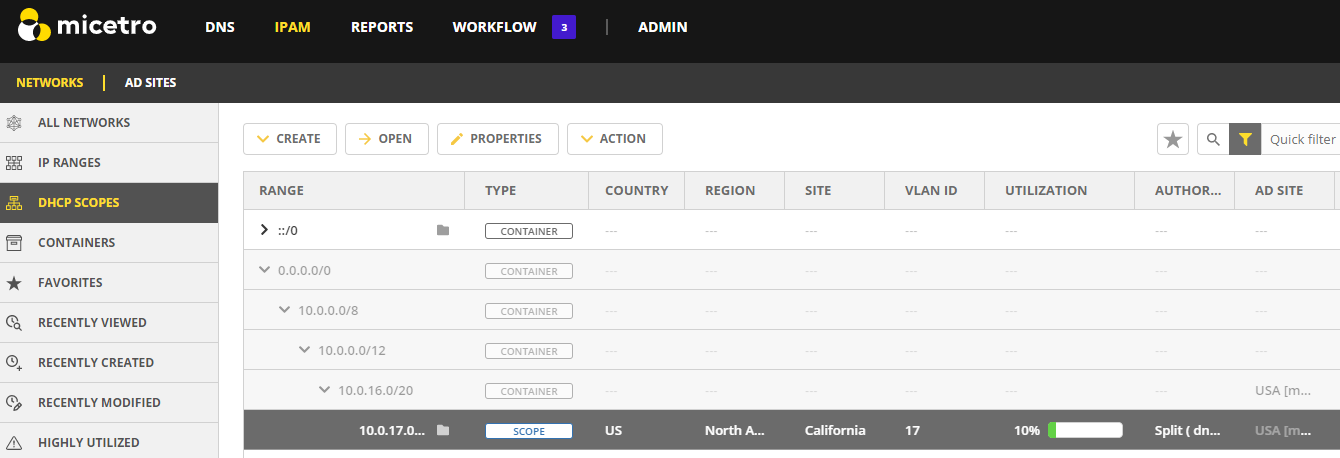
Next Steps – Using Custom Properties to Track Migration
Not only can you use Custom Properties to help build-in documentation processes and make searching and organizing easier, you can also use it to keep track of your migration efforts.
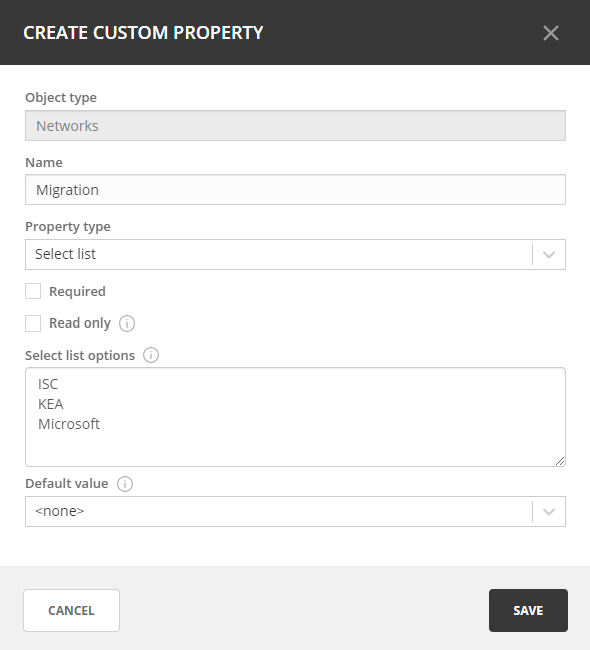
For example, you can create a new Custom Property called Migration and give it the two values ISC and KEA (or another DHCP service if you’re going in a completely different direction like Microsoft).
Steps to follow:
- Go to Admin >> Configuration >> Custom Properties
- Click on Networks (DHCP Scopes have the same Custom Properties as Networks in Micetro)
- Click on Add Custom Property
- Enter the information as shown in the image below
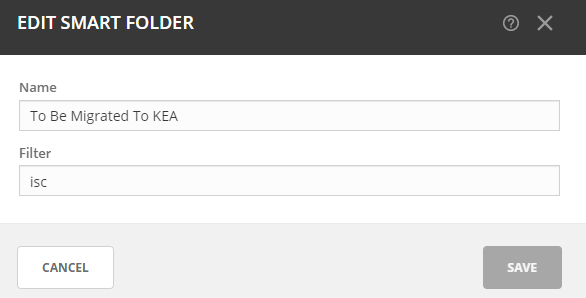
Now, that we’ve created custom properties we can easily go through and organize based on these attributes. We can do this automatically through the use of Smart Folders in Micetro.
The smart folder could simply look like this:
Then when we click on it we see the following:
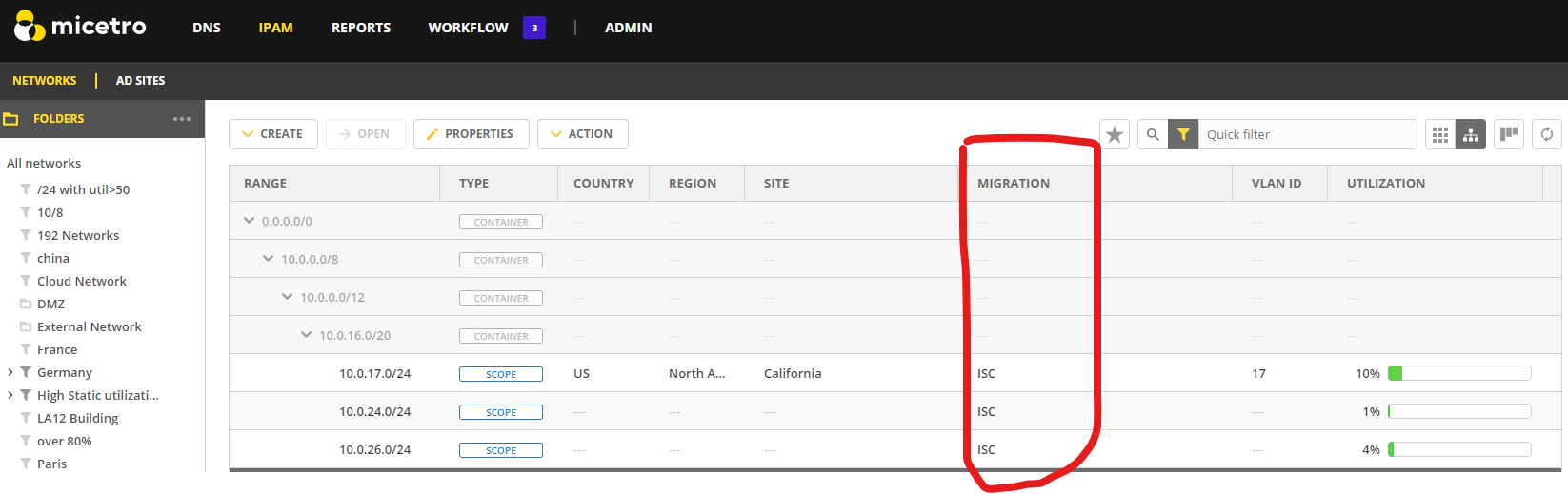
When this Smart Folder is empty we’ll know that all the scopes have been migrated to a modern DHCP service. Now of course there are a few ways, as always to organize this.
Taking this a step further, you can also run actions in bulk against these scopes very easily now, either through the GUI or the API. In the GUI, we can simply use Shift + Click to select multiple scopes and then click on the meatball menu to select which action we’d like to perform. Through the API we can run any automation workflow, including a migration workflow, against this filter.
A smart folder is simply a folder with a filter applied to it. So if you have the smart folder, it has fields called parentRef and filter and if you are looking for scopes in the smart folder ISC you could call { method: 'GetDHCPScopes, params: { filter: and that should give you what you need (and if the smart folder is at the root level, you can ignore the parentRef).To ISC.filter, folder: ISC.parentRef, ... } }
For more information:
We’ll have a live session on KEA coming up on January 26th.
We’ll be joined by a special guest, our resident expert developer on KEA, Sesar Hersisson. As always, you can also download our free trial and get started using Micetro today to help you with your future migration, management, and visibility needs. https://www.menandmice.com/free-trial
Related content

Get answers from the LiveNX data you already have with LiveAssist
Learn how LiveAssist, the AI-powered add-on for LiveNX, turns your network data into fast, guided answers, with value you can see in days.

Get total control of your DDI infrastructure with Micetro’s unified API
Stop juggling between network tools and use Micetro’s RESTful API for complete control over your DDI infrastructure and cloud environment.

BlueCat MCP servers bring network intelligence to your AI assistant
Our MCP servers provide a standard integration layer that makes it easy to connect the AI tools you already use to BlueCat products.

We bet on Intelligent NetOps two years ago. Infoblox now has too.
With Infoblox acquiring Kentik, BlueCat’s CEO confirms its vision for a single platform unifying DDI, network monitoring, and observability.