
Migrating DNS zones from DynDNS (or other DNS services)
Let’s see how you can migrate all your DNS data from one service to another in literal minutes.


Notice: This blog post was originally published on Men&Mice before its acquisition by BlueCat.
The content reflects the expertise and perspectives of the Men&Mice team at the time of writing. While some references may be outdated, the insights remain valuable. For the latest updates and solutions, explore the rest of our blog
 Key takeawaysKey takeaways are generated with AI assistance. Because automated summaries can occasionally contain errors or miss important context, always refer to the full blog post for complete information.
The article explains how Men&Mice Suite simplifies migrating DNS zones from Dyn (which is retiring some services) to other providers like AWS, addressing the practical problem of transferring zone data before Dyn's EOL. It describes a lightweight technical environment where Men&Mice acts as a DDI management overlay that connects to existing cloud DNS services, creates matching zones on the target, and copies DNS records plus metadata such as access controls, object history, and custom fields. The operational impact is minimal downtime and flexible workflow—operators can duplicate zones to verify functionality on the new service before deleting the original—and the process takes only a few minutes using the Suite's migration feature and cloud account connectors.
What exactly does the Men&Mice Suite copy when migrating a DNS zone from Dyn to a target service like AWS?
When migrating a DNS zone the Men&Mice Suite creates a new zone on the target service and copies all DNS records from the source zone. In addition to record data, it also copies metadata that Men&Mice stores for the zone such as access controls configured, the complete object history, and custom field values. Users also have the option to leave a copy on the source server so the migration can function as a duplication for validation before deleting the original.
Do I need special hardware or network integration to use Men&Mice Suite for DNS migration?
No special hardware or network integration is required. The Men&Mice Suite is described as a DDI management overlay, meaning it does not come on hardware appliances or require integrating into your network; instead you connect the existing network services you already have. You simply install the Suite (installation instructions are in the documentation) and connect cloud accounts such as Dyn and AWS using the Knowledge Base guidance to perform migrations.
How long does the migration take and can I verify the new zone before removing the original?
The article emphasizes that the zone migration feature is fast and can take just a few minutes to move DNS zone data. Men&Mice also provides an option to leave a copy of the zone on the source server rather than remove it, effectively duplicating the zone on the target. This allows operators to verify that everything is working correctly on the new service before deleting the original, supporting a low-risk migration workflow.
In 2019, Oracle (parent corporation to DynDNS) has announced that they’re retiring select services, including access to zone transfer from Dyn to external nameservers.
While the End-of-Life (EOL) date has been moved from 2020 to 2022, it’s worth looking at the easiest option to migrate DNS zone data from Dyn to other providers. Men&Mice has been supporting Dyn as an external cloud DNS platform. As such, the zone migration feature makes the process easy.
In fact, it takes just a few minutes. (And you can apply the steps here to almost anywhere you may be hosting your DNS.)
What you need
The list is relatively short:
- some DNS zones in Dyn (or other platforms)
- a target platform (we’ll use AWS)
- a functioning copy of the Men&Mice Suite
To make this last one simple, you can get a fully functioning, no-restrictions 30-day free trial of the Men&Mice Suite. Run it yourself or deploy on Microsoft Azure, it’ll give you everything to migrate DNS zones.
(Of course, once that’s done, you’re free to experiment with it further. We’re confident you’ll find it impressive.)
Now let’s dive into how you actually move the zone data.
DNS migration made easy — and complete
The zone migration feature in the Men&Mice Suite is robust but easy to use to migrate any DNS zone to a different service.
How it works: the Men&Mice Suite creates a new zone on the target service, including all the DNS records from the zone on the source service. It also copies the data it stores for the zone (like access controls configured, as well as the complete object history and custom field values).
Users also have the option of leaving a copy on the source server. This essentially duplicates the zone onto the target service. (Instead of migrating it completely.) This can come in handy and allows operators to verify that everything’s working correctly on the new service before deleting the original.
Smooth sailing. In fact, you can migrate all your DNS data from one service to another before this song ends:

Movin’ movin’ movin’, cruisin’ cruisin’ cruisin’
All that’s left now is to do the deed.
1. Install the Men&Mice Suite
Installation instructions are available in our documentation.
2. Connect your services
The Men&Mice Suite is a DDI management overlay. Meaning that it doesn’t come on hardware appliances or require integrating it into your network. Instead, you plug in the network services you already have.
Instructions on how to connect cloud accounts such as Dyn and AWS (that we will use as our target in this example) can be found in our Knowledge Base.
Make sure you have the right zone in Dyn:
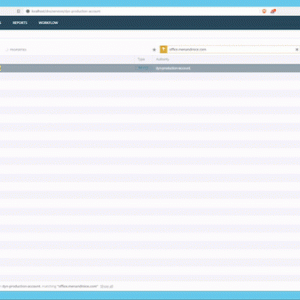
And verify that the target service is empty.
3. Migrate the zones
Here’s where the magic happens. Select the zone, and click “Migrate zone“:
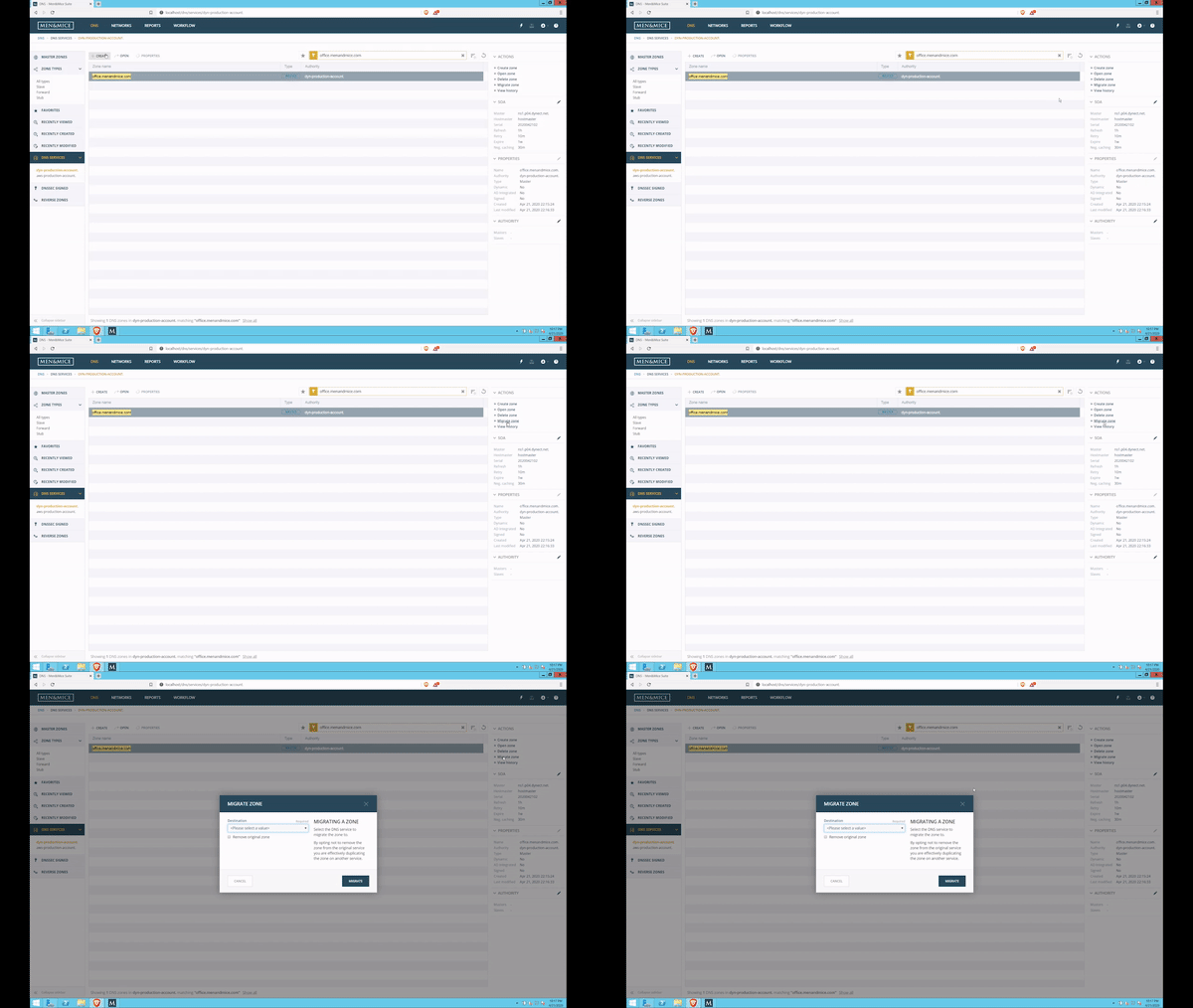
And verify that it worked:
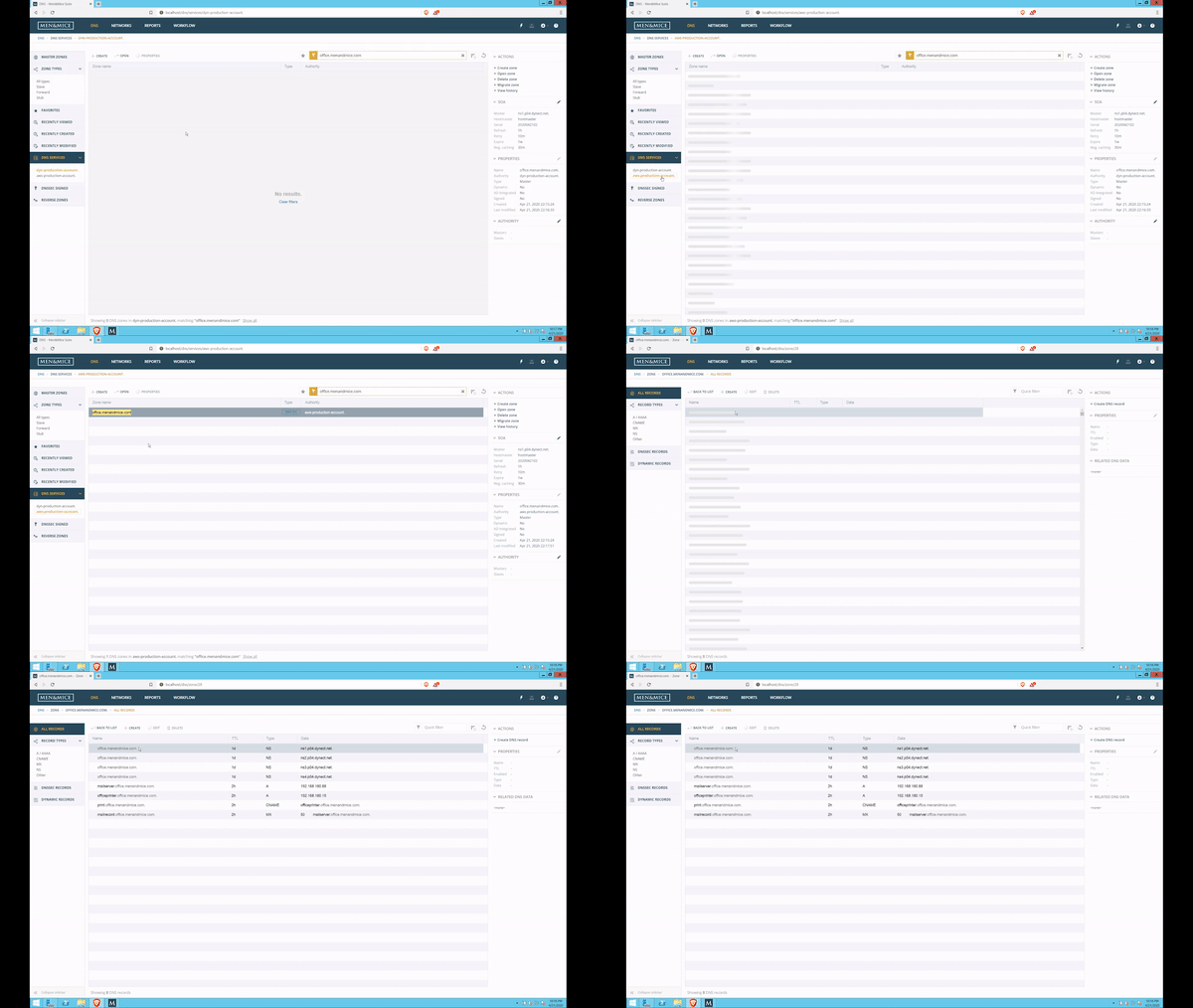
That’s it, your zone is migrated. Expected more? Sorry to disappoint. 🙂
Explore the Men&Mice Suite further
As the song above says: “I’ve got the feeling/I’ve got the real thing.” Now you do, too.
Feel free to experiment with the Men&Mice Suite, and see how it can transform the way you see your networks. And of course, reach out to us at any time if you have questions.
Related content

We bet on Intelligent NetOps two years ago. Infoblox now has too.
With Infoblox acquiring Kentik, BlueCat’s CEO confirms its vision for a single platform unifying DDI, network monitoring, and observability.
BlueCat DDI data boosts Cisco Cloud Control AI-driven operations
BlueCat’s integration with Cisco Cloud Control provides AI agents with access to trusted DDI data for network investigation and remediation.

Automate your DDI modernization path by migrating with Micetro
Automate cross-platform DNS and DHCP migration with Micetro to reduce risk, eliminate manual effort, and modernize infrastructure faster.

How to map your network with user-defined links in Integrity X
Map your network with user-defined links in Integrity X to define and manage custom relationships, such as dual-stack and NAT environments.