
DNS automation: Adding host records with ServiceNow
With the certified BlueCat DDI Service Catalog, you can automate adding host records in ServiceNow and streamline your IP address management.



 Key takeawaysKey takeaways are generated with AI assistance. Because automated summaries can occasionally contain errors or miss important context, always refer to the full blog post for complete information.
The article announces the ServiceNow-certified BlueCat DDI Service Catalog now available in the ServiceNow store, which automates DNS record and IP address management by integrating ServiceNow with BlueCat Address Manager. It addresses the common operational pain of manually adding host records and the time-consuming review/validation steps within ServiceNow workflows by providing a REST API intermediary and a Service Portal workflow that validates entries and reduces errors. The integration simplifies administrative tasks, supports existing approval processes, and positions BlueCat to expand with additional use cases and configurable features.
What problem does the BlueCat DDI Service Catalog integration with ServiceNow solve for network and IT administrators?
The integration targets the repetitive and error-prone task of adding host records and managing DNS/IPAM data via ServiceNow workflows. Instead of an administrator manually reviewing a request, validating inputs, performing the change in BlueCat Address Manager, and reporting back, the Service Catalog automates validation and submission through a REST API intermediary. This reduces back-and-forth communication, prevents common mistakes such as typos or selecting IPs from non-existent networks, enforces validation before submission, and allows organizations to retain their approval processes while streamlining operational effort and turnaround time.
How is the BlueCat-ServiceNow integration deployed and used by end users in ServiceNow?
Deployment requires installing the BlueCat DDI Service Catalog app from the ServiceNow store and configuring the REST API intermediary image available from quay.io. Once installed and configured, end users access the Service Portal, choose BlueCat Gateway from the Service Catalog, then select the target configuration, view, and DNS zone. They enter the intended IP address and hostname and submit the request; the integration performs requisite validation automatically, preventing invalid inputs or conflicts. Administrators can also bring in their existing approval workflows to control who approves requests and when.
What capabilities and future plans does BlueCat indicate for this ServiceNow integration?
Currently the integration automates DNS record and IP address creation with validation to eliminate common errors and supports existing approval processes. BlueCat describes a roadmap and plans to extend the integration with additional use cases, features, and configurability to address broader operational needs. The article also invites customers to suggest specific ServiceNow use cases they would like BlueCat to address and points readers to explore additional BlueCat Adaptive Plug-ins for further capabilities.
Handling one of the simplest IP management requests—adding a host record—still takes time and effort for a network admin to complete. That time and effort can be compounded in a ServiceNow workflow environment, where an IT admin might have to review a work request, validate it, execute the work themselves, and then respond to close it out.
Enter the ServiceNow-certified BlueCat DDI Service Catalog, which is now available in the ServiceNow store. It facilitates an easy connection to BlueCat Address Manager, automating the process for the management of DNS records and IP addresses. With this new integration with ServiceNow, DNS management gets a whole lot easier.
BlueCat has a roadmap and plan for additional use cases, features, and configurability. Is there a ServiceNow use case you’d like BlueCat to address? We’re all ears.
How it works
Download the app from the ServiceNow store and the REST API image from quay.io. After installing the app and configuring the REST API intermediary, log into the ServiceNow Service Portal and select BlueCat Gateway from the Service Catalog.
Search for and select your configuration, your view, and your zone. Then, enter an IP address and hostname click Submit.
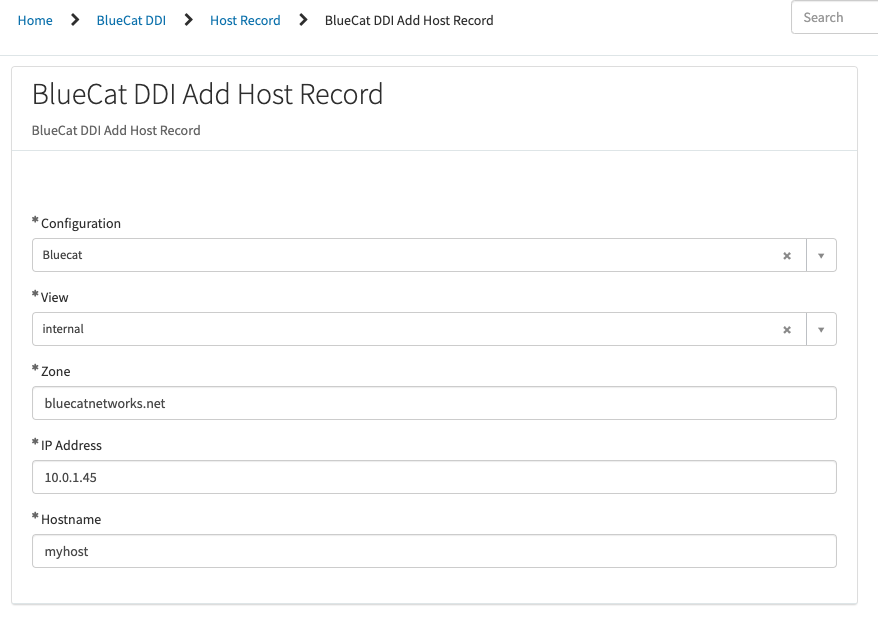
That’s it! You’ll notice it does all the requisite validation for you. No back and forth with your network team over typos, IPs in networks that don’t exist, or host records already in the system.
You can bring your own approval process to the table, deciding who should approve what and when.
Want to see what else BlueCat can do? Explore additional BlueCat Adaptive Plug-ins.
Related content

Get answers from the LiveNX data you already have with LiveAssist
Learn how LiveAssist, the AI-powered add-on for LiveNX, turns your network data into fast, guided answers, with value you can see in days.

Get total control of your DDI infrastructure with Micetro’s unified API
Stop juggling between network tools and use Micetro’s RESTful API for complete control over your DDI infrastructure and cloud environment.

BlueCat MCP servers bring network intelligence to your AI assistant
Our MCP servers provide a standard integration layer that makes it easy to connect the AI tools you already use to BlueCat products.

We bet on Intelligent NetOps two years ago. Infoblox now has too.
With Infoblox acquiring Kentik, BlueCat’s CEO confirms its vision for a single platform unifying DDI, network monitoring, and observability.