DNS glossary

What is RPZ (Response Policy Zone)?

Abstract isometric UI showing network ranges, usage bars, region names (EMEA/APAC), and a purple "Deploy" button
Key takeawaysKey takeaways are generated with AI assistance. Because automated summaries can occasionally contain errors or miss important context, always refer to the full blog post for complete information.

Response Policy Zone (RPZ) is a DNS security mechanism that enables recursive resolvers to apply policy rules to DNS responses by storing enforcement rules as records in standard DNS zones, allowing administrators to block, redirect, or permit queries for specific domains and distribute those rules via zone transfer. RPZ provides organizations with centralized, policy-based DNS filtering that reaches thousands of devices without requiring endpoint software, delivering security value through early interruption of connections to known malware, phishing, or command-and-control domains while generating logs to identify infected hosts. However, RPZ operates only at the DNS layer, requires careful management to avoid blocking legitimate services, and does not protect against direct IP connections or clients using external resolvers, making it most effective as one layer within a broader network security strategy.

  • RPZ rules are distributed to resolvers through standard DNS zone transfers, enabling continuous updates of threat intelligence feeds and custom allow/block lists without requiring resolver restarts or manual configuration changes.
  • Overbroad policy rules or stale zone transfers can cause significant operational disruption by blocking legitimate services organization-wide or leaving resolvers with outdated protection against emerging threats.
  • RPZ cannot prevent connections made directly to IP addresses or block queries from clients using external resolvers like public DNS services or DNS over HTTPS, requiring complementary network controls to address these bypass scenarios.

RPZ at a glance

AttributeValue
Full nameResponse Policy Zone
CategoryDNS security control
Primary useApplying domain-based policy to recursive resolver answers, such as blocking known malicious domains
Related termsRecursive resolver, DNS zone, Zone transfer, DNS firewall, NXDOMAIN, DNS sinkhole

How RPZ works

An RPZ is a normal DNS zone whose records describe policy instead of regular data. A resolver that is configured to use the zone checks its rules while it builds each response.

  1. Publish the policy zone: An administrator or a feed provider creates a zone whose owner names and record data encode rules, such as a trigger domain name and the action to take.
  2. Distribute to resolvers: Resolvers load the zone as a secondary through standard zone transfer, so rule updates reach them without a restart or manual edits.
  3. Match the query: When a client asks for a name, the resolver compares the query name, and optionally the returned addresses or name servers, against the policy rules.
  4. Apply the action: If a rule matches, the resolver rewrites the answer. Common actions are returning NXDOMAIN, returning an empty answer, returning a redirect target, or passing the answer through unchanged.
  5. Return the response: The client receives the modified or original answer and generally cannot tell that policy was applied, except through the resulting behavior.

Matching happens only on resolvers that support and enable RPZ, and rules can be ordered across several policy zones to set precedence. Many resolvers can also log matches, which gives security teams a record of which clients queried blocked names.

Why RPZ matters in enterprise networks

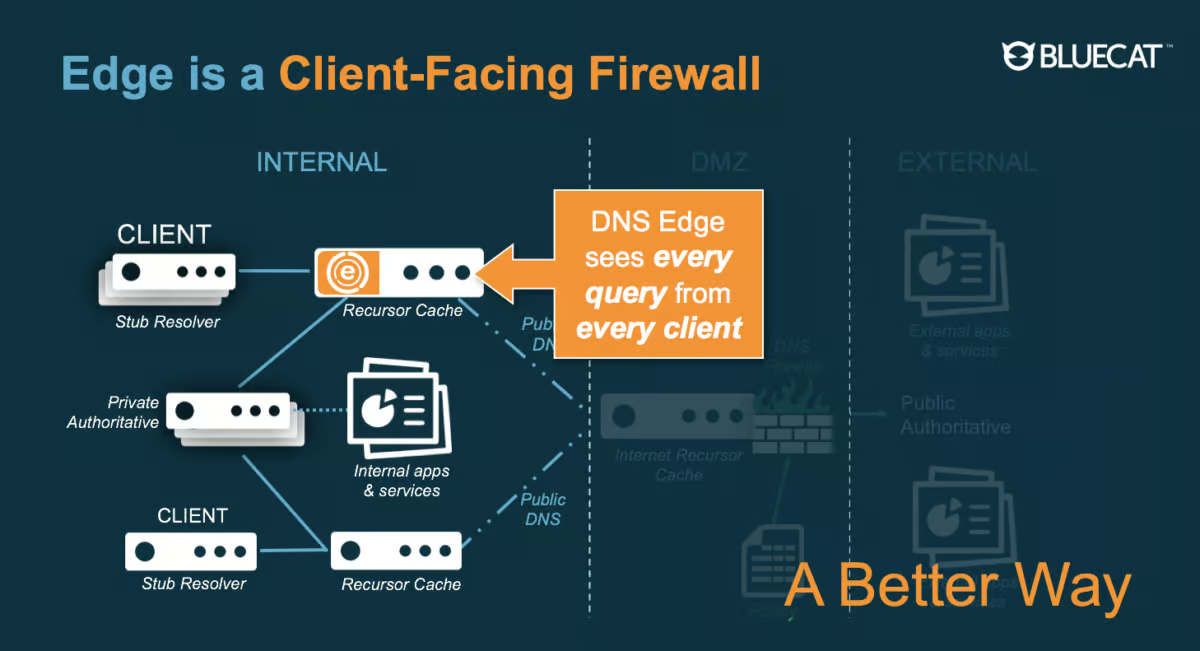
RPZ gives organizations a way to enforce domain-based policy at the resolver, where every client already sends its queries. One policy zone can cover thousands of devices, including ones that cannot run endpoint software. Because rules are distributed as ordinary DNS zones, teams can combine threat intelligence feeds with their own allow and block lists and update them continuously.

The security value is early interruption. Blocking or redirecting a lookup to a known malware, phishing, or command-and-control domain can stop a connection before it starts, and logged matches help identify infected hosts by their query patterns. RPZ works at the DNS layer only, so it does not inspect traffic and cannot stop clients that connect to IP addresses directly or use resolvers outside the organization's control.

Poor management causes real disruption. An overbroad rule or a bad feed entry can block legitimate services for the whole organization, and a stale or failing zone transfer can leave resolvers with outdated protection. Rewritten answers can also break DNSSEC validation for clients that validate on their own. Teams should test rules, keep allow lists, monitor transfers, and review match logs regularly.

RPZ vs DNS sinkhole

A DNS sinkhole is a technique that returns a controlled answer for unwanted names, while RPZ is a standardized way to publish and distribute the rules that can drive such answers. What is DNS sinkhole?

AttributeRPZDNS sinkhole
NaturePolicy format and distribution mechanismResponse technique
Rule storageRecords in a DNS zoneDepends on the implementation
DistributionZone transfer to secondary resolversConfigured per resolver or by the product used
Typical outcomeNXDOMAIN, NODATA, passthru, drop, or a local data answerAnswer pointing to a monitored or inert address

RPZ vs Protective DNS

Protective DNS is a security service or approach that filters malicious lookups, while RPZ is one resolver feature that can be used to implement that filtering. What is Protective DNS?

Common RPZ issues

A feed entry that is too broad, such as a shared hosting or content delivery domain, can block unrelated sites and trigger help desk tickets. Add a passthru rule for the affected name in a local policy zone placed ahead of the feed.

When several policy zones are configured, the resolver evaluates them in the order listed, so a feed placed before the local allow list can override it. Engineers see a name still blocked despite an allow entry until the zone order is corrected.

If zone transfers from a feed provider fail because of a TSIG key mismatch, a firewall rule, or a lapsed access list, the resolver keeps serving the old zone and new threats go unblocked. Monitor the zone serial number against the primary to catch it.

Very large policy zones increase memory use and load time, and a full reload after a transfer can briefly slow query handling. Symptoms are higher latency or memory growth after feed updates.

Clients that use a public resolver, DNS over HTTPS in a browser, or a hardcoded server never consult the policy zone. Blocks appear to work on some devices and not others until outbound DNS is restricted to approved resolvers.

See how unified DDI simplifies network operations

Manage DNS, DHCP and IP addresses from one platform with automation, visibility and control built in.

RPZ FAQ

Related terms

Article

DNS sinkhole

A DNS server that gives out a false result for a domain name.

Learn more
Article

Protective DNS

Protective DNS is an advanced cybersecurity technology that proactively blocks access to malicious domains by analyzing and filtering DNS queries in real-time.

Learn more
Article

Recursive DNS server

Responsible for providing the proper IP address of the intended domain name to the requesting host; the first servers contacted as the result of a request.

Learn more
Article

DNS zone

A distinct, contiguous portion of the domain name space for which administrative responsibility has been delegated to a single manager.

Learn more
Article

Transaction Signature (TSIG)

A protocol that enables DNS to authenticate updates to a DNS database; most commonly used to update dynamic DNS or a secondary DNS server.

Learn more
Article

DNS hijacking

IP addresses of your domain’s DNS servers are changed to IP addresses of attacker-controlled servers.

Learn more
Article

DNSSEC (Domain Name Service Security Extension)

A mechanism that uses cryptography to provide authentication and integrity for DNS queries.

Learn more
Article

DNS tunneling

Exploits the DNS protocol to tunnel malware and other data through a client-server model.

Learn more