Windows Server DNS, DHCP, and Active Directory carry enterprise core services reliably at first, then reach their design boundary as estates grow, losing centralized visibility, automation, and audit control. Because Active Directory is DNS-server agnostic, teams can consolidate without breaking replication. For organizations outgrowing native tooling, BlueCat Integrity delivers full DNS, DHCP, and IPAM consolidation across complex multi-platform estates.
Why is treating Microsoft DNS as “set it and forget it” risky for enterprise core services?
Treating Microsoft DNS as set-and-forget is risky because it works only about 90 percent of the time,
an unacceptable reliability level for high-availability services, and because Active Directory, authentication, and application-to-application traffic all fail when DNS fails.
Microsoft DNS auto-deploys with Active Directory, encouraging administrators to configure it once and move on. But “’90 percent of the time’ in a high-functioning IT organization is a horrible metric.” Call centers, global load balancing, and authentication cannot tolerate that gap.
DNS is the fundamental backplane of the network; every internal and external resource depends on it, and Active Directory does not function without it. Properly managed DNS also yields visibility: DNS firewalls disrupt malicious queries, and DHCP and IPAM reveal who requests addresses on the network.
When organizations don't leverage the power of DNS, they're missing out on network security, visibility, etc. How can we convince executives they need DNS?
3 min·Blog
Read more →
· 02 — The handoff nobody sees
How does DNS resolution actually work, from root servers to authoritative answers?
DNS resolves queries hierarchically: a recursive server with no cached answer queries a root server to learn the correct Top-Level Domain server,
follows referrals down to the authoritative name server, then caches the result according to its configured TTL.
Root DNS servers sit at the top of the hierarchy, serving the root zone that lists every Top-Level Domain and managed by IANA. “Root DNS servers are the servers that literally run DNS for the entire Internet,” and “without the root DNS servers, the Internet would no longer function.”
There appear to be only 13 root servers, but that reflects an original IPv4 limitation; each of the 13 logical hostnames now sits behind highly available, globally distributed clusters. Understanding this chain and its caching behavior is the baseline for diagnosing any resolution failure.
DNS root servers are authoritative servers that direct top level domain queries and list the 13 root hostnames, operators, and IP addresses.
1 min·Page
Read more →
· 03 — Guilty until proven otherwise
Why is the network team blamed first when DNS problems surface across teams?
Network teams are blamed first because network changes have a disproportionately large blast radius and DNS is foundational to nearly every service.
As a result, DNS misunderstandings drive misdiagnosis, blame, and slower incident resolution across IT.
“There’s this concept of Mean Time to Innocence, which is a joke, but it’s true. It’s always the network until you prove that it’s not.” Because a single change can disrupt everyone, network engineers become cautious and defensive, reinforcing organizational silos.
DNS is described as the oxygen of the environment: problems surface as application or authentication failures, such as Active Directory trust issues. Modern dynamic infrastructure makes naming indispensable, raising the need for baseline networking literacy and a shared language across roles.
In the spirit of breaking down barriers, IT professionals discuss guilty networks, speaking up the stack, and essential career skills.
96 min·Blog
Read more →
· 04 — Received wisdom, tested
Does Active Directory actually require AD-integrated Microsoft DNS?
No. Active Directory does not require AD-integrated DNS; it is DNS-server agnostic and works correctly on any platform that properly supports its DNS update mechanism,
SRV records, and secure dynamic updates.
A persistent myth holds that Active Directory only works with AD-integrated DNS. Expert guidance “denounces the myth that Active Directory will only work with AD-integrated DNS” and “shows what Active Directory really needs from a DNS system.”
What AD truly needs is correct support for its DNS update mechanism, not a hard coupling to a particular vendor’s integration model. Hosting AD DNS on an alternative platform, following established best practices, delivers operational and architectural benefits without breaking AD functionality.
How do DNSSEC, DNS over HTTPS, and DNS Flag Day affect enterprise DNS management?
DNSSEC and DNS over HTTPS solve different problems: DNSSEC authenticates DNS data integrity through a chain of trust, while DoH encrypts DNS transport for privacy.
Both introduce operational tradeoffs around complexity, key management, and enterprise visibility.
DNSSEC signs record sets rather than individual records. A zone-signing key produces the signatures in RRSIG records, a key-signing key validates the public key published in DNSKEY, and a DS record in the parent zone links the levels into a chain of trust. When any link fails validation, the resolver returns SERVFAIL rather than passing a forged answer to the client. The security case is strong; the operational case is where teams stall. “DNSSEC provides origin authentication via a chain-of-trust but is hard to configure and maintain.” Every zone change means resigning, keys need scheduled and emergency rollover, and one mistake takes the zone dark.
DoH runs the other way. It encrypts DNS in transit for privacy, but it “hampers traditional enterprise monitoring that relies on plaintext DNS,” concentrating resolution in a handful of public resolvers outside enterprise control. DNS Flag Day sits alongside both as a compliance forcing function: it “was essentially a wake-up call to DNS providers to remove older, or broken, non-compliant systems.”
DNSSEC authenticates DNS queries and responses by using cryptographic digital signatures. Learn more and how BlueCat can help to make implementation easier.
8 min·Blog
Read more →
· 06 — Platform requirements
What should teams look for in a DNS, DHCP, and IPAM platform for reliable core services?
Teams should look for a platform that centralizes DNS, DHCP, and IPAM into a single source of truth with a single pane of glass,
supports self-service automation, and enforces compliance requirements like DNSSEC, failover, and network segmentation across the entire estate.
“Centralized DNS is necessary because shared services architectures have scale and complexity that make decentralized DNS unwieldy and error-prone.” As the shared-services analysis puts it, keeping multiple “points of truth” for DNS is “just asking for trouble in the form of error-driven network outages which can be time-consuming to solve.” This is the direct inverse of the fragmentation established above.
The platform must provide self-service provisioning for automation and DevOps, unify DNS across hybrid and multi-cloud environments rather than fragmenting into per-cloud instances, and “deliver a compliant network that adheres to standard requirements such as DNSSEC, failover capabilities, and network segmentation.”
DNS is not only a key foundation of shared IT services, but also delivers the functionality which makes those shared services thrive. 
3 min·Blog
Read more →
· 07 — Consolidating onto an enterprise DDI platform
How do teams that have outgrown native Microsoft DNS and DHCP move to an enterprise DDI platform?
Teams that have outgrown native Microsoft DNS and DHCP consolidate by replacing scattered Windows servers with an enterprise DDI platform, BlueCat Integrity, which brings DNS, DHCP, and IPAM management under enterprise governance.
Because Active Directory is DNS-server agnostic, AD zones migrate in phased steps without downtime.
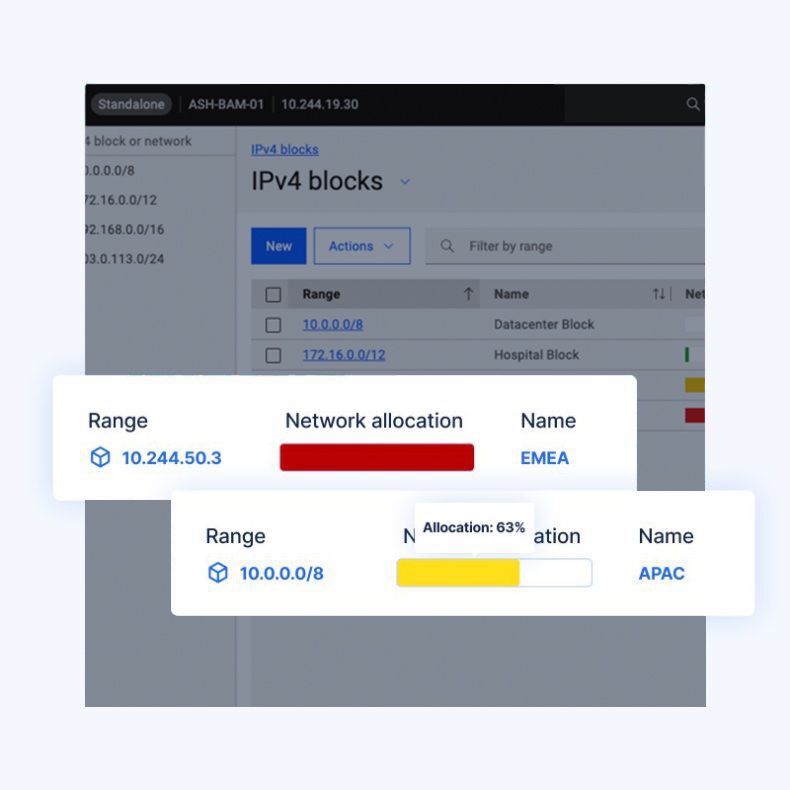
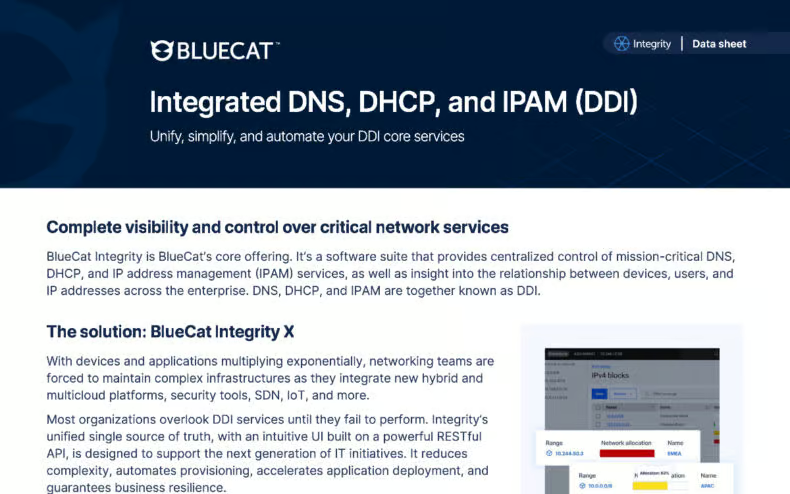
Integrity is BlueCat’s core DDI software suite, combining Address Manager with distributed BlueCat DNS/DHCP Servers to unify fragmented DNS, DHCP, and IPAM into a single source of truth, along with insight into the relationships between devices, users, and IP addresses across the enterprise. The hub-and-spoke architecture makes consolidation practical at scale: one enterprise-grade appliance manages thousands of DNS/DHCP servers without additional infrastructure cost, over 1,000 servers connect to a single Address Manager under N-2 release support, and the model supports phased upgrades rather than a single cutover.
Governance is built into the platform rather than layered on top. Role-based access controls define multiple administrative users at different privilege levels, network templates and IP modeling tools enforce consistency, and a vendor-agnostic RESTful OpenAPI exposes operations to automation so provisioning no longer depends on tickets. DNS and DHCP failover hold uptime across IPv4 and IPv6, backup and recovery options cover both on-premises and cloud deployments, and Prometheus-based real-time metrics surface problems before they become downtime.
15,000
15,000
A global manufacturer replaced Microsoft DHCP and brought roughly 15,000 IP addresses across 27 production sites under a single management console.
Tame network complexity with Integrity's full-stack DDI management platform and get visibility and control over your DNS, DHCP, and IPAM.
9 min·Page
View Integrity →
· 08 — Paths forward
Which modernization path is right for a Microsoft-centric team outgrowing native DNS and DHCP?
The right path depends on estate scale and governance requirements. It ranges from quantifying the reliability gap, to decoupling Active Directory from integrated DNS, to full enterprise consolidation onto a governed DDI platform.
PATH 01
When leadership still treats DNS as set-and-forget
Quantify the reliability gap first
Establish how much manual effort, outage risk, and blame friction native tooling is generating. Ground the case in how resolution actually works and why DNS failures cascade into authentication and application outages. This builds the internal mandate for change.
Confirm that Active Directory is DNS-server agnostic and needs only correct support for its update mechanism and SRV records. Weigh which security standards, like DNSSEC, the current tooling can realistically operate. This removes the last objection to moving AD zones off scattered Windows DNS.
When scattered Windows servers can no longer meet governance and scale needs
Consolidate onto an enterprise DDI platform
Replace fragmented DNS, DHCP, and IPAM with a single governed control plane offering visibility, automation, audit trails, and enforced compliance. For enterprise-scale, multi-platform estates, this is full consolidation onto BlueCat Integrity, migrated in phased steps.
Common questions from teams evaluating Windows Server networking fundamentals and enterprise DDI consolidation.
No. Active Directory is DNS-server agnostic and does not require AD-integrated Microsoft DNS. It works correctly on any DNS platform that properly supports its DNS update mechanism, SRV records, and secure dynamic updates.
There are 13 logical root-server hostnames, a limit that originated with IPv4 addressing. Each hostname now sits behind highly available, globally distributed server clusters, so hundreds of physical root servers operate worldwide.
Native Microsoft DNS and DHCP handle basic, standard tasks well but lack centralized visibility, automation, RBAC, and auditing. As estates grow into hybrid and multi-cloud environments, teams absorb mounting manual work, rigidity, and modernization delays that outweigh the tooling’s zero licensing cost. BlueCat Integrity absorbs that cost instead, bringing DNS, DHCP, and IPAM under one platform with the automation, role-based access control, and audit trails native tooling leaves to manual effort.
They solve different problems. DNSSEC authenticates DNS data integrity through a chain of trust so resolvers can verify responses are not tampered with. DNS over HTTPS encrypts DNS transport for privacy in transit but reduces enterprise visibility into DNS traffic.
Yes. Because Active Directory is DNS-server agnostic, AD DNS can be migrated in phased steps (pointing AD at new DNS servers, importing zones, and letting clients and domain controllers re-register records) as long as its DNS requirements are preserved. Teams consolidating onto BlueCat Integrity follow that phased pattern, importing zones and repointing domain controllers in stages so resolution continues throughout.
Decentralized DNS creates multiple points of truth that increase configuration errors and outage risk. Centralized DNS provides a single pane of glass, reduces operational risk, enables self-service automation, and enforces compliance requirements like DNSSEC, failover, and segmentation across the enterprise. BlueCat Integrity delivers that single pane of glass across the estate, so policy and compliance are enforced once rather than repeated server by server.
We’re using cookies on this website to improve your experience. Cookies help us learn how you interact with our website and remember you when you come back so we can tailor it to your interests.
To learn more about cookies and how we use them, read our cookie notice.
Some cookies are essential, while others help us to improve your experience by giving us insight into how you are using our website. You may adjust your preferences for non-essential cookies below.
To learn more about cookies and how we use them, read our cookie notice. You can also review our privacy policy for more details on the personal data we collect, use, hold, and disclose when you visit our website or use our products and services.
Functional cookies
Functional cookies are essential cookies that allow us to remember choices or changes you have made (such as to language settings or your choices regarding the use of cookies). These cookies cannot be turned off since they are essential for the operation of our Websites.
Analytics cookies
Analytics cookies are non-essential cookies that collect information on how visitors use our Websites. We use this information with your consent to measure the number of visitors to our Websites, determine whether specific content or communication has been viewed, and to help us improve our Websites and communication. These cookies can be turned off.
Personalisation Storage
Personalisation cookies are non-essential cookies that collect information when you fill out a form on this website. We only use this information with your consent to pre-fill other forms on the site. These cookies can be turned off.
Marketing cookies
Marketing cookies are cookies that are placed by third parties to collect information about your visits and actions on our Websites so that they or we can deliver ads to you later, such as when you are on certain third-party sites or platforms. These cookies may be used by those third parties to build a profile of your interests and show you relevant ads on other websites. These cookies also enable visitors to our Websites to share content on social networks and to enable and evaluate interactions with our communication and social media tools. These cookies can be turned off.