
Keep system issues at bay with health checks
Two levels of BlueCat support offer health checks to analyze customers’ system data for potential problems and fix them before they take networks down.



 Key takeawaysThis key takeaway was generated through LLMs crawling the page and coming up with an overview of the content.
The article describes BlueCat’s Customer Care health checks, a proactive service that analyzes raw data from BlueCat Address Manager and BlueCat DNS/DHCP Servers (BDDSes) to detect performance and stability issues before they become outages. Health checks review Address Manager metrics (user activity, database statistics, entity counts, role distribution, and deployment status) and BDDS/system hardware metrics (warranty, memory and disk use, network interfaces, patch levels, DNS logs, PNA files, RNDC status, and DHCP pool sizing) to identify actionable problems and create child cases for remediation. Premier (PRS) and Enterprise (ES) customers receive semi-annual or quarterly health checks respectively with different deliverables tailored to technical or management audiences, reducing high-severity incidents and improving overall support outcomes.
What specific Address Manager metrics are reviewed during a BlueCat health check and why do they matter?
BlueCat health checks review several Address Manager metrics: user activity to identify inactive or orphaned accounts that should be disabled for security; database statistics to determine database size and whether maintenance is needed; entity details (DNS servers, IP addresses, and counts) to understand inventory; DNS and DHCP role counts to detect overloaded servers that may need additional hosts; BlueCat and third-party DNS role counts to ensure interoperability; and deployment status to spot failed deployments. Collectively these metrics reveal risks to performance, capacity, security, and operational manageability so Customer Care can document issues and open child cases to remediate them before they escalate.
Which BDDS and hardware checks are performed and what operational issues can they uncover?
Health checks examine BDDS and hardware-level items including warranty status, system health (memory and disk usage, including swap usage and partition utilization), network interface errors or dropped packets, patch levels, DNS logs for repeated errors or anomalous connection attempts, PNA file accumulation, RNDC status for recursion or TCP client threshold hits, and DHCP pool sizing. These checks can uncover imminent failures (out-of-memory, full partitions), performance degradation (swap use, high interface errors), security indicators (repeated refused responses or database connection attempts), and configuration or capacity problems (stacked PNAs, exhausted DHCP pools) that, if addressed, reduce the risk of Sev-1/Sev-2 incidents.
How do health check deliverables differ between PRS and ES customers and what are the benefits of each?
Enterprise Support (ES) customers receive quarterly health checks with a brief list documenting identified issues; Customer Care opens child cases and works directly with ES teams, who are often highly technical and prefer raw data and direct remediation. Premier Support (PRS) customers receive semi-annual health checks with an in-depth, illustrated report that summarizes key issues and provides recommendations, tailored to management or less-specialized administrators to help justify changes or demonstrate system health. The ES approach prioritizes rapid technical remediation and ongoing support, while the PRS deliverable emphasizes visualization and actionable guidance to support decision-making and resource justification.
You may use BlueCat products to centrally manage your DNS, but do you know if your DNS server environment is performing optimally?
Or could it be a few steps away from a catastrophic outage?
BlueCat’s Customer Care team uses health checks to make sure you know the answer before it gets to that point.
Two levels of BlueCat support include health checks, which examine raw data from BlueCat products to identify potential problems. By finding issues and then helping customers fix them, health checks can reduce high-severity case submissions and avoid network failure.
“We asked ourselves, ‘What are the things that our customers are tripping over?’” says Kevin Moseley, BlueCat’s Customer Care Manager. “And then we said, ‘What can we do to prevent them from tripping?’”
This post explores the key metrics in a BlueCat health check. Next, it will detail the differences in health check services by customer level. Finally, it will highlight how BlueCat’s health checks contribute to our uncompromising and award-winning customer service.
What does a health check examine?
Health checks examine various aspects of raw customer data from BlueCat Address Manager and BlueCat DNS/DHCP Servers (BDDSes). DNS set-ups can either be internal and/or external. An in-depth analysis of these metrics can, collectively, provide an overall view of system health and performance. Importantly, health checks are for conducting system performance—not configuration—analysis.
After identifying and documenting any issues, Customer Care creates child cases for each of them and assists in resolving them.
Address Manager metrics
Customer health checks begin with an examination of Address Manager metrics. This includes looking at:
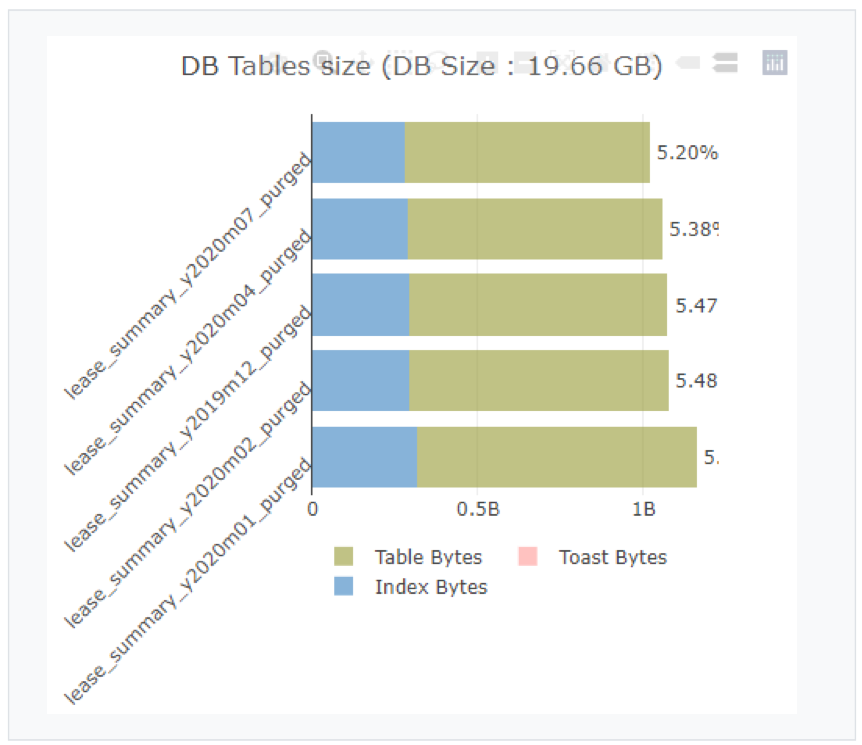
Above: Database table size, shown here in the normal range, is one of a variety of database statistics reviewed during BlueCat’s health check.
- User activity: There could be inactive users that the network team isn’t even aware of. Disabling those accounts bolsters security.
- Database statistics: How big is the database? Is it too big? Is database maintenance needed to bring it under control? Are transactions mostly dynamic, with few users?
- Entity details: From DNS servers to IP addresses, what entities are in Address Manager, and how many of them are there?
- DNS and DHCP role count: If the number of DNS and DHCP roles on a server or servers is high, purchasing additional servers can help to better balance the load.
- BlueCat and other DNS role counts: A review to ensure that BlueCat’s tools effectively interoperate with third-party systems. Dedicated primary and secondary servers are important and sometimes roles are not well-organized.
- Deployment status: Were there any deployment failures?
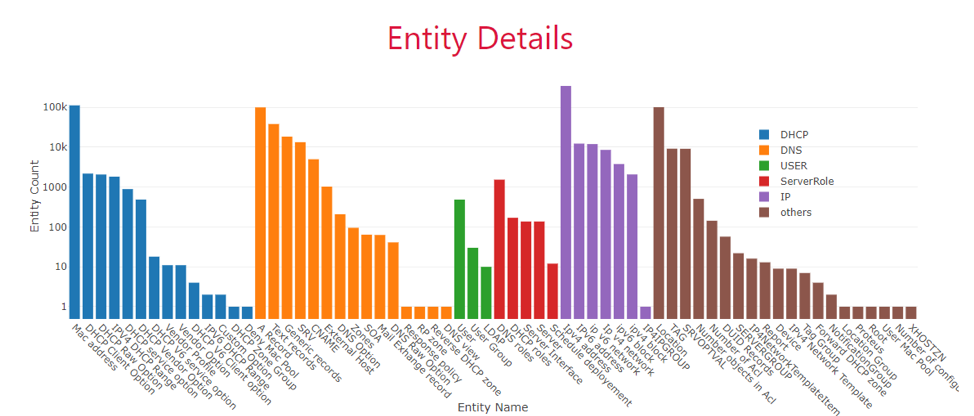 Above: Entity details in Address Manager are reviewed during BlueCat’s health check.
Address Manager and BDDS datarake review
Then, the health check moves into both Address Manager and BlueCat DNS/DHCP Servers (BDDSes) hardware. This includes examining:
- Hardware status: Is the hardware in or out of warranty? It can be difficult to obtain support for out-of-warranty hardware if something goes wrong.
- System health: Is the memory size sufficient? What about disk use space? For example, servers can run out of memory and have to revert to swap memory as a result.
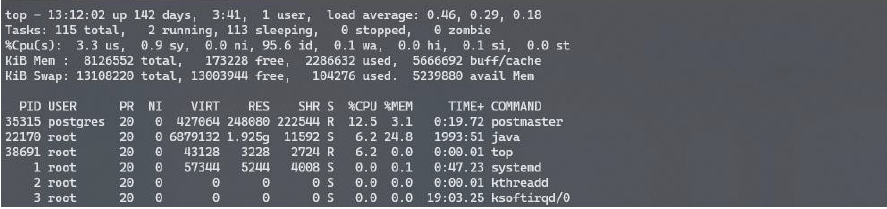 Above: A review of system health during BlueCat’s health check reveals that swap memory is in use. If a system is operating effectively, the use of swap memory should be zero.
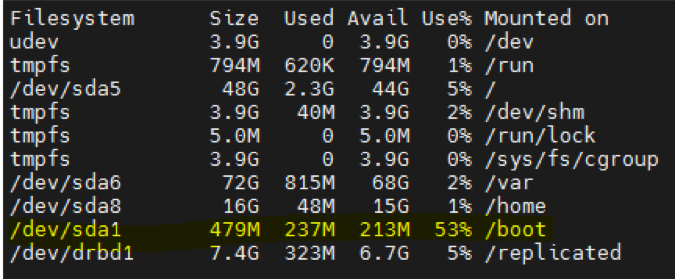
Above: A review of system health during BlueCat’s health check reveals that all partitions are within limit but the /boot partition is using above 50%, which warrants further investigation.
- Network interfaces: Dropped packets, errors, overruns, or frame issues are clues that something is amiss.
- Patch levels: Are systems patched to the latest version available?
- DNS logs: Error logs can reveal patterns to flag for security teams to investigate. For example, if an IP address repeatedly tries to connect to your database, it could be a sign of an anomaly on the network. Too many DNS queries that receive a REFUSED or similar error-indicating DNS response code can also mean that something is amiss. Logging and regularly monitoring DNS queries and response data can help protect your network from DNS tunneling and other DNS attacks.
- PNA file analysis: PNA files are notifications from BlueCat DNS/DHCP Servers (BDDSes). There should only be one; if they are stacking up, there could be an issue.
- Remote name daemon control (RNDC) status: The RNDC—the nameserver control utility—can show if recursive or TCP clients are exceeding thresholds, for example.
- DHCP pool analysis: A pool analysis might reveal, for example, if there are too few IP addresses in a range.
PRS vs. ES: What’s the difference?
BlueCat has three levels of customer support: TS, PRS, and ES:
-
-
- Technical Support (TS) provides basic support. This includes full access to BlueCat’s knowledgebase, downloads, documentation, and Customer Care Support Community. The TS tier also offers unlimited support requests via web and phone and update and security notifications.
- Premier Support (PRS) provides mid-level support, with all of the above plus shorter response times, priority in the queue, a designated team of support engineers familiar with your environment, monthly status calls, and assisted upgrades. This tier is ideal for small- and medium-sized businesses that want to lean on BlueCat’s engineering expertise and guidance.
- Enterprise Support (ES) provides top-of-the-line support, with all of the above plus even faster response times, a regular cadence of status calls, active support for change requests and maintenance, onsite support when needed, and custom documentation.
-
Quarterly health checks for ES and semi-annually for PRS
Health checks are included for both ES and PRS customers but vary in how they are delivered.
BlueCat’s ES customers receive quarterly health checks, with any issues documented in a brief list. Customer Care then opens child cases for each of the identified issues and works directly with ES customers to resolve them.
Meanwhile, BlueCat’s PRS customers undergo semi-annual health checks. After each, they receive an in-depth report with written and illustrated results. Furthermore, a conclusion for the health check summarizes the key issues and provides recommendations for how to rectify them.
Different deliverables for different customer types
ES customers tend to be quite technical, with dedicated DNS, DHCP, and IP address management (DDI) experts on their team. They’re very familiar with BlueCat products and are both used to seeing raw technical data and knowing what to do with it.
On the other hand, PRS customers might be less technical and more management-focused. Or they might be network admins with BlueCat’s tools among a slew of products they’re responsible for.
PRS health checks take the raw data and make it easier for management to visualize the health of their environment, Moseley says.
“This gives them either the ammunition to go to their management and say ‘Hey, we need to make some changes, and here’re the changes that BlueCat’s recommending.’ Or, ‘Hey, our system is operating well, there’re some minor things we’re going to change, but here’s what we’re working on together with BlueCat,” he explains. “It helps show the value of the relationship that they have with BlueCat and the PRS team.”
Health checks are not included as part of the TS support package. But according to Thomas D. Starkey Jr., BlueCat’s Director of Customer Care, some customers have upgraded from TS because they’ve realized the value that health checks provide.
An industry leader in health check offerings
About five years ago, members of BlueCat’s Customer Care team noticed repeat patterns in support cases at the Severity-1 and -2 levels. (Severity-1 cases are the most urgent, with production systems down, mission-critical failures, and no workarounds available.)
For instance, there were repeated submissions for systems running out of resources, databases filling up, and disk space filling up on Address Manager.
Customer Care developed the health check process to address those repeated urgent cases.
“It is a differentiator for us,” Starkey says. “No one else is proactively working with their customers to head off issues or problems. In theory, each of those child cases is a possible Sev-1 or Sev-2 that we can avoid by proactively finding it.”
Health checks are just one aspect of BlueCat’s comprehensive approach to support. Indeed, they help contribute to high customer retention levels and an average NPS score above 80.
“It’s just another example of the BlueCat touch and the extra level of support and service we provide,” Starkey says. “We’re doing this type of activity behind the scenes, proactively making sure things are working the way they should, making sure we’re staying in touch with our customers, making sure their environment is stable, pointing out any issues they may have.”
Interested in getting health checks for your BlueCat products? Learn more by contacting Customer Care.
Published in:

Rebekah Taylor is a former journalist turned freelance writer and editor who has been translating technical speak into prose for more than two decades. Her first job in the early 2000s was at a small start-up called VMware. She holds degrees from Cornell University and Columbia University’s Graduate School of Journalism.
Related content

How to map your network with user-defined links in Integrity X
Map your network with user-defined links in Integrity X to define and manage custom relationships, such as dual-stack and NAT environments.

Automate your DDI modernization path by migrating with Micetro
Automate cross-platform DNS and DHCP migration with Micetro to reduce risk, eliminate manual effort, and modernize infrastructure faster.

Your journey to intelligent NetOps begins at Cisco Live
Visit BlueCat’s booth or book a meeting now to learn more about how our solutions can help you build a network that supports constant change.

Replace BIND and ISC with Micetro DNS/DHCP Server (MDDS)
Tired of patching and manually configuring BIND DNS and ISC DHCP? Discover how Micetro MDDS appliances can replace them for modern DDI.