
What you can learn from an NXDOMAIN response
At a basic level, an NXDOMAIN response means “that site does not exist.” But it can also provide critical clues about your network’s security.



 Key takeawaysKey takeaways are generated with AI assistance. Because automated summaries can occasionally contain errors or miss important context, always refer to the full blog post for complete information.
This article explains NXDOMAIN — the DNS response meaning “non-existent domain” — and how network and security administrators can leverage NXDOMAIN patterns to detect operational issues and threats. It covers technical causes such as malware beaconing using DGAs, reconnaissance and lateral movement, zone sync inconsistencies, benign enterprise behaviors like WPAD and ISATAP that generate many NXDOMAINs, and administrative controls like NXDOMAINing Firefox’s DOH canary to disable DNS over HTTPS. The piece emphasizes the operational impact: with unified, searchable DNS logs and visibility across the enterprise, NXDOMAIN analytics can reveal infections, misconfigurations, and performance problems and help reduce costs and risk.
What kinds of security issues can persistent NXDOMAIN responses indicate?
Persistent NXDOMAIN responses can indicate several security problems. Regular, periodic NXDOMAINs from an endpoint may signal malware beaconing attempting to contact command-and-control domains generated by domain generation algorithms (DGAs). A cluster of NXDOMAIN queries from a single client can suggest reconnaissance or lateral movement as an advanced persistent threat maps the network using reverse PTR queries and other probes. Correlating NXDOMAIN patterns with timing, top-level domains, and known malicious indicators helps score the likelihood of DGA-generated names and prioritize investigative action.
Why do enterprise environments sometimes see millions of NXDOMAIN responses that are not security problems?
Large enterprises often generate many NXDOMAIN responses from benign processes that probe for configuration or protocol-specific records. For example, WPAD (Web Proxy Auto-Discovery) causes clients to search for proxy configuration records across every DNS search domain configured, producing large volumes of NXDOMAIN when those records don’t exist. ISATAP uses a special domain only resolvable when ISATAP is configured; when it isn’t, many NXDOMAINs result. These NXDOMAINs are expected and can represent successful checks rather than failures, so context and pattern analysis are necessary to avoid false alarms.
How does having a unified DNS service improve detection and troubleshooting of NXDOMAIN-related issues?
A unified DNS service centralizes DNS logs and makes response data readily searchable, which is critical for mining NXDOMAIN patterns across a decentralized environment. In infrastructures using Microsoft DNS or BIND, logs are scattered across individual servers and must be manually collected, slowing analysis. Centralized collection enables tracing queries through specific pathways between clients, networks, and authoritative servers, helping detect zone sync issues where different servers return NXDOMAIN for the same name, and allowing security teams to correlate NXDOMAIN patterns with malware indicators or operational misconfiguration for faster remediation.
If your web browser lands on the sad document or the cloud thought bubble, you’ve probably hit an NXDOMAIN error.
NXDOMAIN is the internet’s blunt way of saying “the answer to your question doesn’t exist”. Technically, it’s saying that the domain name referenced in the Domain Name System (DNS) query does not exist. NXDOMAIN, which stands for non-existent domain, is an answer that only an authoritative nameserver can return.
On the other hand, if the domain name exists, nameservers and DNS resolvers will work to return the positive NOERROR response. The specific IP address answer to the DNS query will be returned as well. (It is also possible to receive a NOERROR response without any specific answers. This happens if the domain exists, but not the DNS record type requested.)
This post will examine how admins can leverage NXDOMAIN responses. Further, it will delve into specific examples of what, exactly, an NXDOMAIN response might be indicating. Finally, it will touch on the importance of maintaining NXDOMAIN awareness for the health of your network.

Leveraging an NXDOMAIN response
For the average internet user, NXDOMAINs are usually the result of a typo in the web address. Or they might be an attempt to access a website that no longer exists. At most, they are an inconvenience. (Conversly, if your web address typo results in your query resolving to a site, you might be a victim of typosquatting.)
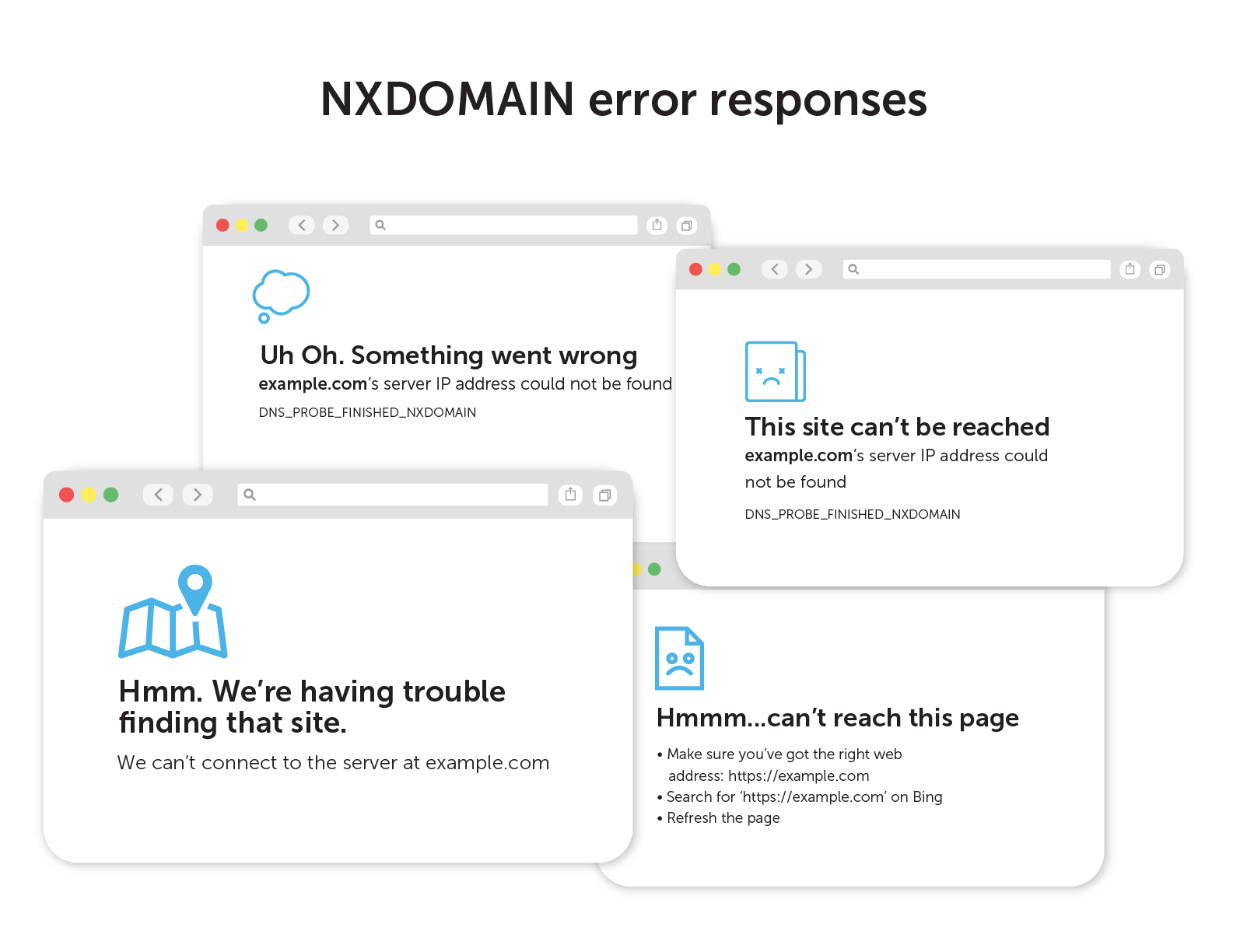
For network and security administrators, NXDOMAIN replies can be far more interesting. Persistent NXDOMAIN messages can actually be an early indicator of network issues or security gaps. With the right DNS security tools in place, these failed responses can become a goldmine of valuable data. (Some unscrupulous ISPs even use a form of DNS hijacking to turn NXDOMAIN into a business opportunity!)
To mine DNS error responses to uncover security and network performance issues, you need comprehensive data from DNS logs. And that data must be in a readily searchable format.
This is a tall order for enterprises operating with decentralized network infrastructures like Microsoft DNS and BIND. In these situations, DNS logs will need to be manually collected from individual DNS servers—a time-consuming process. It’s much easier when you have a unified DNS service operating across the enterprise. It is funneling all that data into a single location.
What is an NXDOMAIN telling you, exactly?
Once you have the right DNS response data at your fingertips, you can search for patterns. From those patterns, you can uncover more details about the root cause of failed DNS requests.
Here’s what some of those NXDOMAIN responses might be telling you:
Beaconing
Malware will try to get instructions from command-and-control systems. However, it doesn’t always know the latest domain to look for. There are many known cases of malware evading blocking by using domain generation algorithms (DGAs).
DGAs generate and register new domains on the internet. The malware, using a similar algorithm, will try a series of domains to find the one that provides an answer. Often times, the installed malware beacons on a somewhat consistent schedule.
Persistent and periodic NXDOMAIN responses can be a clue that a device is infected. Especially if they come from suspicious top-level domains and known malicious sites. There are several statistical methods to score the likelihood that the existent domain was generated via an algorithm.
Reconnaissance and lateral movement
Advanced persistent threats often sit in the background of a network. They bide their time as they search for valuable information and ways to exfiltrate data to the outside. That mapping process often involves a considerable amount of trial and error.
Persistent NXDOMAIN responses from your local DNS service that all originate from a single client could be an indicator. PTR queries can reverse engineer networks and mine for interesting hostnames.
Zone sync issues
DNS zones are often replicated across many servers to reduce latency and increase reliability. If these zones fall out of sync, some users will get the correct response. Others will receive an NXDOMAIN for the same destination, depending on which authority handles the DNS resolution path.
These cases are very difficult to debug without visibility into internal, east-west network traffic. Network admins need the ability to trace specific pathways between clients, networks, and servers.
NXDOMAIN can also be a signal
Certain normal processes utilize the existence of a DNS resource record as an indicator to do or not do something. The presence or lack of an answer indicates how the client will behave. It may include information, such as the address of the content cache, in the answer.
WPAD
Web proxy auto-discovery (WPAD) is a special domain that allows clients to discover addresses. The goal is to obtain the location of configuration files for web proxies. Usually, clients will attempt to find this record for every DNS search domain configured. In enterprise environments, this often results in millions of NXDOMAIN responses.
ISATAP
Microsoft’s Intra-Site Automatic Tunnel Addressing Protocol (ISATAP) generates a link-local IPv6 address from an IPv4 address. Additionally, it performs neighbor discovery on top of IPv4. It uses a special domain name that should only have an answer if ISATAP is configured. As a result, this process often generates piles of NXDOMAIN responses.
That can look like a problem at first. However, in this case, it’s a completed query that actually points to something interesting.
DNS over HTTPS
Mozilla has a canary domain (use-application-dns.net) that signals Firefox not to use DNS over HTTPS (DOH). Network administrators can configure their DNS to NXDOMAIN this record in order to turn DoH off.
Maintaining NXDOMAIN awareness
In general, the patterns of NXDOMAIN responses are the most interesting to threat hunters and security personnel. Often, the earliest indication that something is amiss is when a consistently queried domain name abruptly starts returning NXDOMAIN responses.
Absent an NXDOMAIN lookup, a unified DNS management system can mine the patterns of NXDOMAIN and other DNS response codes. Certainly, paying attention to your DNS data can pay almost immediate dividends. It can help uncover malware inside your network, lower bandwidth costs, and eliminate performance issues.
Learn more about DNS network security solutions and BlueCat’s unique way of collecting DNS data through service points.
Published in:

BlueCat provides core services and solutions that help our customers and their teams deliver change-ready networks. With BlueCat, organizations can build reliable, secure, and agile mission-critical networks that can support transformation initiatives such as cloud adoption and automation. BlueCat’s growing portfolio includes services and solutions for automated and unified DDI management, network security, multicloud management, and network observability and health.
Related content

We bet on Intelligent NetOps two years ago. Infoblox now has too.
With Infoblox acquiring Kentik, BlueCat’s CEO confirms its vision for a single platform unifying DDI, network monitoring, and observability.
BlueCat DDI data boosts Cisco Cloud Control AI-driven operations
BlueCat’s integration with Cisco Cloud Control provides AI agents with access to trusted DDI data for network investigation and remediation.

Automate your DDI modernization path by migrating with Micetro
Automate cross-platform DNS and DHCP migration with Micetro to reduce risk, eliminate manual effort, and modernize infrastructure faster.

How to map your network with user-defined links in Integrity X
Map your network with user-defined links in Integrity X to define and manage custom relationships, such as dual-stack and NAT environments.