
DNS sinkhole: A tool to help thwart cyberattacks
A DNS sinkhole supplies a false domain name in response to a DNS query, preventing connections to malicious or unwanted domains. Learn more with BlueCat.



 Key takeawaysThis key takeaway was generated through LLMs crawling the page and coming up with an overview of the content.
This article explains DNS sinkholing as a DNS-based defensive technique that stops devices from connecting to malicious or unwanted domains by returning controlled false IP addresses. It describes real-world problems such as malware and botnets that abuse DNS for command-and-control communications, and explains operational uses including blocking domains, identifying infected hosts via sinkhole logs, and presenting policy pages to end users. The post also outlines how sinkholing fits into a defense-in-depth DNS strategy, citing examples like the WannaCry incident and recommending complementary visibility and policy controls for effective protection.
What exactly is a DNS sinkhole and where can it be placed in the DNS lookup chain?
A DNS sinkhole is a DNS server or configuration that returns a false IP address in response to a DNS query, thereby redirecting the client and preventing connections to malicious or unwanted domains. The false IP points to a predetermined sinkhole server controlled by the administrator. A sinkhole can be placed anywhere in the DNS resolution chain—from a local recursive resolver to an authoritative nameserver—or even configured via local files on an individual client; however, the higher it is in the resolution chain, the more queries it will see and the greater its impact.
How can DNS sinkholing help identify infected hosts on a network?
Beyond blocking connections, sinkholing helps identify infected hosts by logging repeated redirected DNS queries. Devices that continually attempt to reach sinkholed domains are likely compromised, and those logs give security teams a signal to investigate. This is particularly valuable when firewalls or other devices only show the local DNS resolver as the source of queries, obscuring the originating client; sinkholing forces visibility into the problematic queries and buys time for teams to locate and remediate the infected devices.
What are practical uses and limits of DNS sinkholes within a broader security strategy?
Practically, sinkholes disrupt traffic to malicious domains (including C2 servers used by botnets), can be fed by open-source or commercial lists of bad domains, and can host custom pages to inform users of policy violations. Tools like Pi-hole can also block ad-serving sites enterprise-wide. However, sinkholing should be part of a defense-in-depth approach: it prevents connections but does not replace other controls such as enforcing device policies to block initial malware downloads and maintaining overall visibility and remediation processes. The WannaCry example illustrates sinkholing’s potential impact but also underscores the need for complementary DNS security best practices.
When it comes to thwarting malware attacks, a DNS sinkhole can be a very effective tool.
Every day, unwitting users click on a link to a malicious domain. Or a malware-infected computer attempts to spread to more devices. In any case, the Domain Name System (DNS) is crucial to any communication, good or bad, across a network. (DNS translates human-readable domain names to computer-friend IP addresses.)
DNS sinkholing prevents devices from connecting to those bad domains in the first place. Configuring the DNS server to supply a false IP address redirects the client elsewhere.
It’s a simple but surprisingly effective tool in your arsenal to proactively protect your network using DNS.
This post will first cover what a DNS sinkhole is, exactly. Then it will look at various ways to use sinkholes to prevent connections to malicious or unwanted domains. Finally, it will touch on how sinkholing can be part of an overall DNS-based defense strategy that includes BlueCat.
What is a DNS sinkhole?
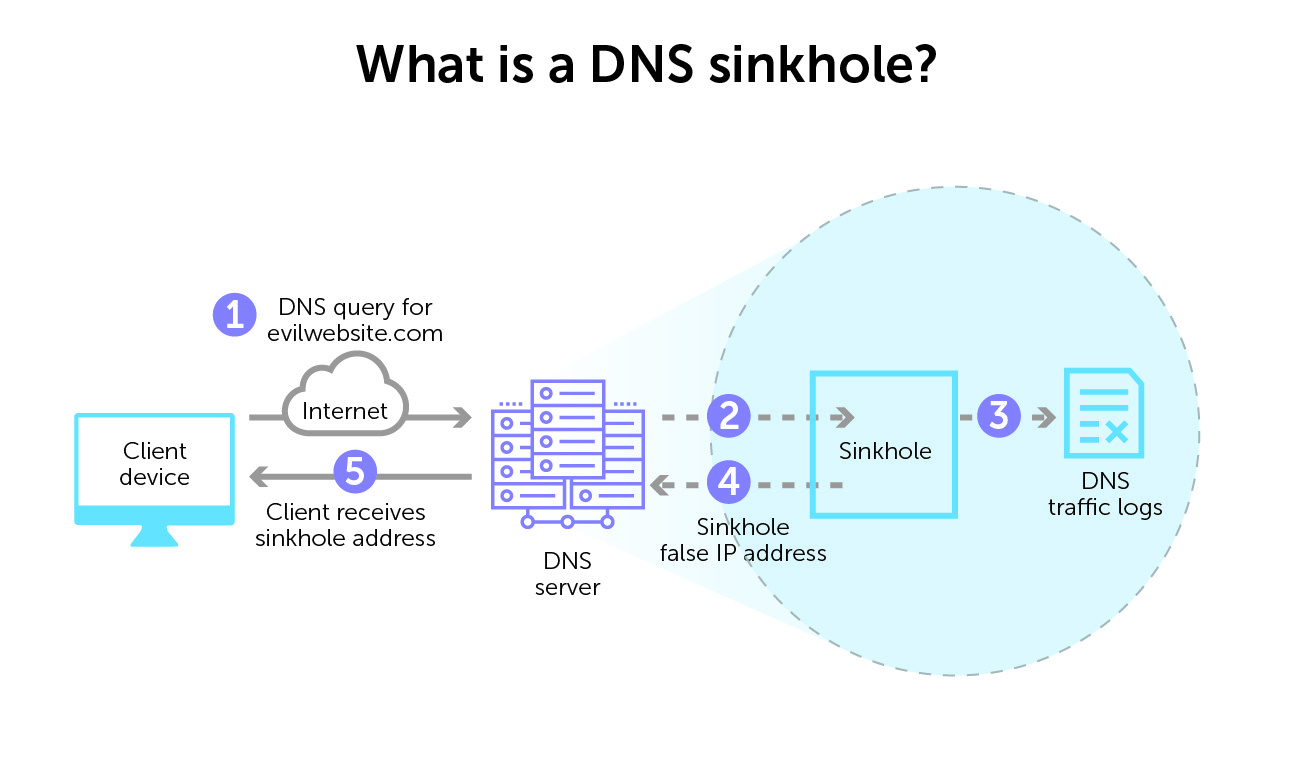
In short, a DNS sinkhole is a DNS server that supplies a false domain name in response to a DNS query. By doing so, it redirects the client device and prevents a connection to a bad domain. By configuring the DNS forwarder to return false IP addresses for specific URLs, it prevents connections to bad or unwanted domains. It is sometimes called blackhole DNS.
This false answer is, essentially, a controlled IP address. And that false IP address points to a sinkhole server predetermined by a network admin.
You can place a DNS sinkhole anywhere in the DNS lookup chain, from a local recursive resolver to an authoritative nameserver. You can even configure local files with a DNS sinkhole on an individual client device.
But the higher it is in the DNS resolution chain, the more DNS requests it will receive. And the more impact it will have.
Ways in which a DNS sinkhole is useful
A sinkhole IP address disrupts the flow of unwelcome traffic. By providing incorrect DNS resolution, DNS sinkholing redirects clients attempting to connect to malicious domains or otherwise unwanted content.
Sinkholes are very useful for thwarting botnets and their command-and-control (C2) originators. (A botnet is a collection of breached internet-connected devices. Subsequently, they are then under the command and control of a bad actor.) A sinkhole can interrupt the domain names that the botnet is using to communicate with the C2 servers directing its activities.
TLD sinkholes have, in some cases, disabled larger botnets across the internet.
There are numerous lists available of malicious URLs and known C2 servers to populate a DNS sinkhole. These come from both open source and commercial vendors.
More benefits: identifying infected hosts
However, DNS sinkholing can do more than just prevent or sever connections. Network security teams can use sinkholing server logs to help identify infected hosts. When a device repeatedly attempts to make a connection but gets redirected, there is a good chance that it is compromised.
This is especially helpful in situations where your firewall cannot see the original DNS query from the infected device. Many times, a log might only identify the local DNS resolver as the source of a query. It may miss the originating infected client device. By redirecting every device query, sinkholing buys security teams time to zero in on the infection source.
Restricting access to unwanted sites
DNS sinkholing can also restrict access or specific sites that violate organizational policies. When an end user tries to access a sinkholed URL, they can instead land on a custom webpage. Hosted on a local server, the page can inform them of their policy infraction.
Furthermore, DNS sinkholing tools like Linux-based Pi-hole can also block ad-serving sites for your entire enterprise network.
The surprise that brought down the 2017 WannaCry attack
A well-known example of the sometimes surprising benefits of sinkholing is the 2017 WannaCry ransomware attack. Alleged to have originated in North Korea, it was one of the most devastating of the decade. WannaCry crippled 200,000 computers in more than 150 countries.
Researcher Marcus Hutchins found an unregistered domain in the malware’s code. He registered it to create a DNS sinkhole so he could collect additional data. By doing so, he unintentionally activated a kill switch that significantly slowed the malware’s further spread, giving experts time to intervene.
DNS sinkholing as part of defense-in-depth
DNS has historically been seen as an attacker’s target. However, it can also be a proactive part of a good defense-in-depth strategy. The concept of protective DNS affirms that it’s critical to leverage DNS to protect your network from threats.
Certainly, DNS sinkholing is a viable and useful technique to thwart malware. But overall visibility and control are also crucial for your security posture and to prevent any number of DNS attacks. In the case of WannaCry, an enterprise could have employed key DNS security best practices to stop it.
These include enforcing policies on devices to block the initial malware download and identifying compromised devices on the network for remediation. Learn more about BlueCat’s security solution.
Published in:

Rebekah Taylor is a former journalist turned freelance writer and editor who has been translating technical speak into prose for more than two decades. Her first job in the early 2000s was at a small start-up called VMware. She holds degrees from Cornell University and Columbia University’s Graduate School of Journalism.
Related content

Modernizing Microsoft DNS and DHCP for Hybrid Active Directory Environments
Learn how to modernize Microsoft DNS and DHCP while preserving Active Directory stability. Reduce risk, improve visibility, and simplify management.

Your journey to intelligent NetOps begins at Cisco Live
Visit BlueCat’s booth or book a meeting now to learn more about how our solutions can help you build a network that supports constant change.

Replace BIND and ISC with Micetro DNS/DHCP Server (MDDS)
Tired of patching and manually configuring BIND DNS and ISC DHCP? Discover how Micetro MDDS appliances can replace them for modern DDI.

Automate it all in Integrity with REST v2 API-first DDI management
Discover API-first DDI with Integrity X by using REST v2 to automate DNS, DHCP, and IPAM for scalable, secure network operations.