



Scaling DNS and IPAM for IPv6 and Dual-Stack Enterprise Networks
Scale DNS and IPAM for dual-stack enterprise networks. Learn how Micetro helps teams manage IPv6 migrations with integrated DNS, DHCP, and IPAM systems.
Read moreDNS, DHCP, and IPAM

DNS, DHCP, and IPAM each handle one part of the same job: getting a device onto the network and making it reachable. IPAM is the plan, DHCP puts the plan into practice, and DNS makes the result findable by name. Each one depends on data the other two produce, which is why they are managed together.
IP address management defines subnets, ranges, and reservations, and records which device holds which address. It is the source of truth the other two services draw from, and the first place an engineer looks when an address is in question.
DHCP assigns addresses from defined scopes, along with the gateway, DNS servers, and domain a device needs, then renews or reclaims them over time. When a scope drifts from the IPAM plan, the result is conflicts or exhaustion.
DNS answers the first question every application asks: where is this name? Its A, AAAA, and PTR records point names to the addresses DHCP leases and IPAM tracks. When a lease changes and the record does not, connections fail.
A standalone IPAM tool only records addresses. DDI connects the address plan, the lease, and the DNS record, so one change updates all three at once and every change leaves a history behind it that teams can audit.
When a device joins a network, DHCP leases it an address from a range IPAM has defined, DNS registers a name for it, and IPAM records the result. DDI keeps those three records in agreement automatically.
IPAM holds 10.20.4.0/24 for VLAN 20, reserves .1 to .20 for the gateway and servers, and hands .21 to .250 to DHCP as a scope.
A laptop joins VLAN 20 and gets 10.20.4.57 with an eight-hour lease, the gateway, DNS servers, and the domain corp.example.com.
A dynamic update creates an A record for laptop-jsmith.corp.example.com and a PTR record pointing back. Dual-stack networks add an AAAA record.
IPAM marks 10.20.4.57 as leased with the laptop’s MAC address, hostname, and lease expiry, and updates subnet usage.
Servers resolve the laptop by name, security traces the IP to an owner, and capacity reports stay accurate. If any record is off, all three break.
When the three services live in separate tools, their records drift apart. Addresses get assigned twice, names point to the wrong place, scopes run out without warning, and nobody can show who changed what.
IPAM says an address is free, but a device already holds it. Hand-updated spreadsheets can’t keep up with live leases, so duplicate IPs and failed deployments follow.
Scopes are sized without the IPAM plan and DNS records aren’t cleaned up when leases change. The result is scope exhaustion, stale records, and outages hard to trace.
A record changed on one domain controller doesn’t appear on another. Native tools offer limited access control and change history, so audits stall and knowledge sits with one admin.
Cloud and on-premises DNS are managed in separate tools, and conditional forwarders are never revisited. Lookups between environments slow down or fail, and cloud migrations stall.
Two networks arrive with the same private ranges and duplicate zone names. Integration stalls for months while teams reconcile subnets, rename zones, and rebuild forwarding by hand.
A single /64 holds more addresses than a spreadsheet can track, and devices can self-assign outside DHCP. Dual-stack rollouts start with no reliable inventory of who owns what.
58%
had DDI-related outages in the past two years
40%
reported DDI-related security incidents
35%
call their DDI strategy completely successful
A full-stack DDI platform runs DNS, DHCP, and IPAM itself as one integrated system, with a single data model and a single API. It fits when you’re building greenfield, retiring aging servers, or want one platform to own the whole DDI lifecycle.
An orchestration overlay sits on top of the DNS and DHCP servers you already run, such as Microsoft DNS and DHCP, BIND, or Kea. It centralizes visibility, access control, change history, and automation without migrating services.
A SaaS control plane delivers DDI management as a cloud service. It connects to the DNS and DHCP services you already run, on premises and in the cloud, while those services keep running locally.
Manual or Microsoft-native DDI can work for a small, single-vendor network with few changes. Watch for the signs: a spreadsheet that has drifted, audits that need change history, or one admin holding all the knowledge.
| Full-stack platform | Orchestration overlay | SaaS control plane | Native tools | |
|---|---|---|---|---|
| Where DNS and DHCP run | The platform’s own DNS and DHCP services | Your existing servers, managed centrally | Your existing services, managed from the cloud | Your existing servers, managed one at a time |
| Migration effort | Higher, services move to the platform | Low, no service migration | Low to moderate, agents or connectors on existing infrastructure | None |
| Change history and access control | Central, across all services | Central, across existing servers | Central, across environments | Limited, per server |
| Automation | One API across the full stack | One API across existing servers | Cloud API across environments | Scripts per server |
| Best fit | Greenfield, server refresh, high scale | Microsoft-heavy or mixed vendors, lean teams | SaaS-first, hybrid and multicloud | Small, low-change, single vendor |
| Main trade-off | Cutover planning | Keeps the limits of existing servers | External service dependency | Hidden cost of manual error |
DDI is the foundation for both. Hybrid networks need one record of names and addresses across environments, and DNS security needs an accurate picture of what should exist before it can spot what shouldn’t.
Cloud DNS zones and on-premises records usually live in separate tools. DDI gives them one shared record of names and addresses, so both sides stay consistent as workloads move between environments.
Split-horizon views, conditional forwarders, and stub zones go stale when they’re managed by hand. Shared IPAM data keeps internal and external answers correct across every environment you run.
Every device and application depends on DNS, so an unmanaged zone or rogue record is an exposure. A unified record makes unexpected changes visible before they turn into incidents.
Role-based access and full change history answer audit requests on demand. Native tools offer limited versions of both, especially across many domain controllers and sites.
Still have questions?
Get real answers from a BlueCat representative.
Every network starts somewhere different. Pick the situation that sounds most like yours.
I want to keep my existing servers
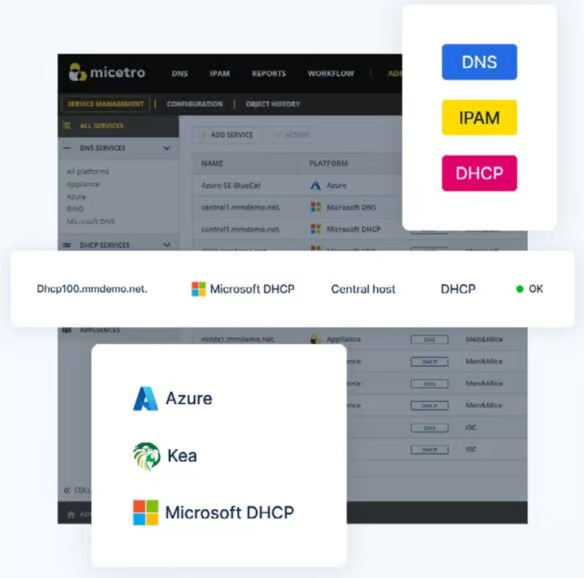
BlueCat Micetro is an orchestration overlay for Microsoft DNS and DHCP, BIND, Kea, and cloud DNS. It adds central control and change history without migrating services.
I’m ready to replace aging servers
BlueCat Integrity is a full-stack, API-first DDI platform that runs DNS, DHCP, and IPAM on one data model, built for large and high-availability networks.
I want DDI control from the cloud
BlueCat Horizon is a SaaS platform that orchestrates DDI across Active Directory, BIND, Kea, and cloud DNS, while services keep running locally.
I’m leaving another DDI vendor
See how BlueCat approaches unified DDI and what moving off an appliance-based platform involves, from data migration to cutover planning.
I need to automate DDI changes
Connect DNS, DHCP, and IPAM to ServiceNow, Ansible, and Terraform so requests stop waiting in a ticket queue and every change follows policy.
I need to make the business case
Break DDI modernization into the cost lines finance cares about: manual labor, outages, refresh cycles, and licensing.
Scale DNS and IPAM for dual-stack enterprise networks. Learn how Micetro helps teams manage IPv6 migrations with integrated DNS, DHCP, and IPAM systems.
Read more ›

Embedding DNS, DHCP, and IPAM into Ansible and Git-based IaC pipelines with Micetro turns address and record changes into versioned, reviewable steps
Read more ›
Manual DDI work costs surveyed teams 1,040 hours a year. Here's how to price a renewal, the refresh cycle, and the cutover, and why…
Read more ›
Stop juggling between network tools and use Micetro's RESTful API for complete control over your DDI infrastructure and cloud environment.
Read more ›
DDI modernization ROI starts with four key cost lines and automation gains. See how API depth in BlueCat Integrity delivers measurable returns.
Read more ›
SD-WAN DHCP management gets simpler with BlueCat Micetro, unifying Meraki branch DHCP, leases, scopes, and access control in one interface.
Read more ›
Automating DNS-based failover for enterprise services boosts resilience across cloud and hybrid environments with a unified control plane and orchestration.
Read more ›
Integrating enterprise DDI platforms with native cloud DNS services unifies control, automates discovery, and governs hybrid DNS centrally.
Read more ›
Micetro DDI automation centralizes multi-platform DNS, DHCP, and IPAM with one API, templates, and reporting to simplify and scale network operations.
Read more ›
API-first DDI management enables full-stack automation at enterprise scale. BlueCat Integrity X exposes DNS, DHCP, and IPAM directly to CI/CD and…
Read more ›
JAKARTA, INDONESIA [Aug. 3, 2026] — PT Mega Buana Teknologi (MBT), a leading IT value-added distributor (VAD) and subsidiary of CTI Group, has…
Read more ›
BlueCat Integrity and BlueCat Micetro help defense and intelligence agencies modernize mission-critical DDI by unifying DNS, DHCP, and IPAM across tactical,…
Read more ›We’re using cookies on this website to improve your experience. Cookies help us learn how you interact with our website and remember you when you come back so we can tailor it to your interests.
To learn more about cookies and how we use them, read our cookie notice.
Some cookies are essential, while others help us to improve your experience by giving us insight into how you are using our website. You may adjust your preferences for non-essential cookies below.
To learn more about cookies and how we use them, read our cookie notice. You can also review our privacy policy for more details on the personal data we collect, use, hold, and disclose when you visit our website or use our products and services.
Functional cookies are essential cookies that allow us to remember choices or changes you have made (such as to language settings or your choices regarding the use of cookies). These cookies cannot be turned off since they are essential for the operation of our Websites.
Analytics cookies are non-essential cookies that collect information on how visitors use our Websites. We use this information with your consent to measure the number of visitors to our Websites, determine whether specific content or communication has been viewed, and to help us improve our Websites and communication. These cookies can be turned off.
Personalisation cookies are non-essential cookies that collect information when you fill out a form on this website. We only use this information with your consent to pre-fill other forms on the site. These cookies can be turned off.
Marketing cookies are cookies that are placed by third parties to collect information about your visits and actions on our Websites so that they or we can deliver ads to you later, such as when you are on certain third-party sites or platforms. These cookies may be used by those third parties to build a profile of your interests and show you relevant ads on other websites. These cookies also enable visitors to our Websites to share content on social networks and to enable and evaluate interactions with our communication and social media tools. These cookies can be turned off.